
Difference between PABX and PBX

The difference between PBX and PABX is simple. A PBX is a Private Branch Exchange, while a PABX is a Private Automatic Branch Exchange. The only difference is the word “automatic.”

Since manual PBXs are no longer in use, the two terms are now used interchangeably. Still, it’s worth understanding the automatic features modern PBX systems offer.

What Is a PABX?

A PABX system automatically routes incoming and outgoing calls within a business. It connects internal users to each other and to external lines, using software to manage call routing without manual input.

PABX systems support multiple lines, extensions, voicemail, call forwarding, and conference calls—all from one unified platform.

PABX vs. PBX 

The original PBX relied on switchboard operators who manually connected calls by plugging lines into extensions.

That was already a step up from the plain old telephone system (POTS), which required a dedicated line per desk. Features like internal dialing, call transfer, and shared access numbers didn’t exist.

With electronic switching, the automatic PBX - or PABX—replaced manual operators. Staff could dial an internal extension directly. Today, nearly all PBX systems are automatic, so every PBX is effectively a PABX.

How a PABX System Works: IP communications
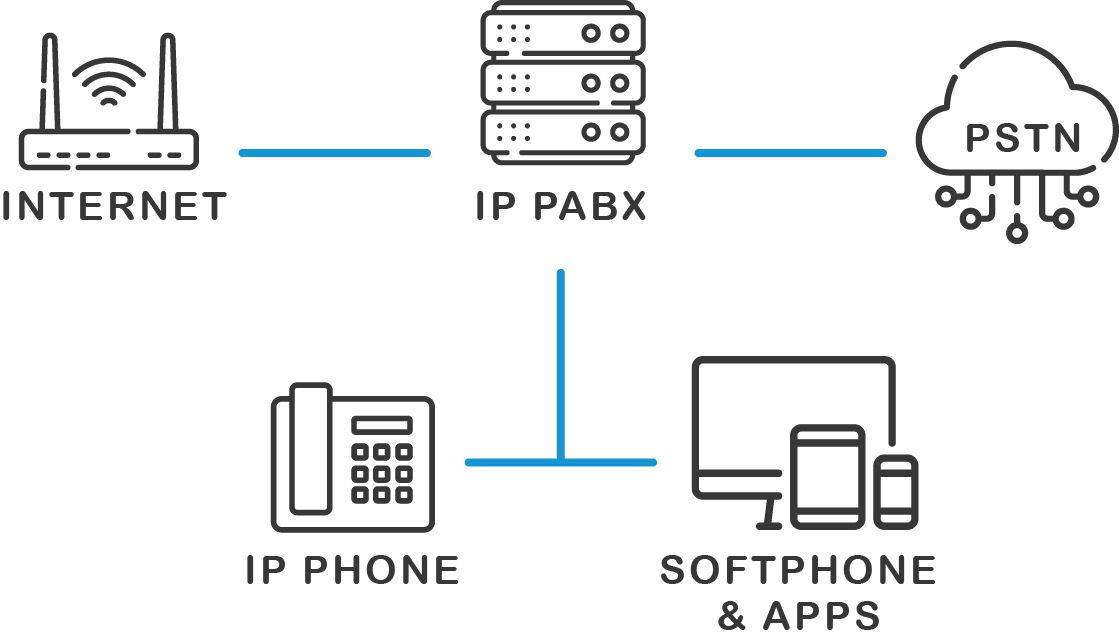
How does an IP PABX work?

Modern PABX systems have already evolved to use IP (internet protocol) communications. With internet service available in most places, a PABX now works over a LAN (local area network) or internet connection. This is often called an IP PBX.

These systems connect a business's SIP phones (session initiation protocol) and VoIP phones (voice over IP). It also connects the internal system to the public network, or public switched telephone network (PSTN), which basically means connecting to outside lines. Businesses can now use their office extension on a web browser or a personal cell phone.

The IP PABX has opened the door to further automation. For example, businesses can set up automatic call forwarding rules based on time of day or specific extensions. Callers can now tell an auto-attendant what extension they want or what they’re looking for verbally. Auto attendants recognize different languages.

The system alerts other users when the extension a caller wants is busy (BLF - “busy lamp field”). Phone systems can connect with calendars and automatically set a user's availability accordingly. Even caller ID, which is now a standard feature, is possible as a result of automation.

While the difference between a PABX and PBX system may no longer be relevant, automation has continued to grow, faster than ever.

PABX Systems Key Features

Business telephone systems will do well to continue paying attention to new automation features. A PABX phone system comes with the following features:

  • Automated Call Routing: Automatically directs calls without manual intervention.

  • Support for Multiple Lines and Extensions: Handles internal and external communication for businesses of all sizes.

  • Voicemail: Allows callers to leave messages when lines are busy or unattended.

  • Call Forwarding: Redirects calls to another number or extension.

  • Conference Calling: Enables multiple parties to join a single call for meetings.

  • Automated Attendant: Answers and directs calls.

  • Cut Costs - Many automated features will reduce staffing requirements. For example, an automated attendant reduces the time requirements for staff answering telephone calls and routing outside callers to the right line. IP based phone systems also make disaster recovery capability easier and far less costly.
  • Flexibility - A virtual PABX can be deployed on-site, or hosted in the cloud. This provides the opportunity to find the most cost effective solution.
  • Higher Efficiency - Voicemail, for example, can be sent as an audible file by emails. This means less time spent on checking emails, and reduces the possibility of getting messages late.
  • Provide Better Customer Service - Studies have found that customers are happiest when they can choose between self-serve automation and in-person service. Auto attendants with the option to call the operator provide a good example. Call forwarding rules can ensure that incoming calls reach the right place at any time of day.

What are the Benefits of PABX Systems?

Some advantages of using a PABX phone system include:

  • Cut Costs - Many automated features will reduce staffing requirements. For example, an automated attendant reduces the time requirements for staff answering telephone calls and routing outside callers to the right line. IP based phone systems also make disaster recovery capability easier and far less costly.

  • Flexibility - A virtual PABX can be deployed on-site, or hosted in the cloud. This provides the opportunity to find the most cost effective solution.

  • Higher Efficiency - Voicemail, for example, can be sent as an audible file by emails. This means less time spent on checking emails, and reduces the possibility of getting messages late.

  • Provide Better Customer Service - Studies have found that customers are happiest when they can choose between self-serve automation and in-person service. Auto attendants with the option to call the operator provide a good example. Call forwarding rules can ensure that incoming calls reach the right place at any time of day.

Why use 3CX as your PABX system?

3CX delivers a complete PABX solution with strong advantages:

  • Low Costs - Flat annual pricing by simultaneous calls, no per-user fees
  • Flexible Setup - Works with SIP trunks, existing servers, and IP phones
  • Remote Work Ready -  Mobile and browser apps keep users connected anywhere
  • Unified Communications -  Includes video calls, fax, and live chat
  • Advanced Call Center Tools - Wallboards, queues, and strategies via 3CX PRO
  • Low Costs - 3CX offers annual flat rate pricing based on simultaneous calls with no additional costs. This usually translates to much lower costs compared to a traditional telephone company or even VoIP service providers.
  • Hardware & Setup - 3CX integrates with existing telephone lines, server infrastructure and SIP phones. Easy setup means training costs for PABX technicians.
  • Facilitate Remote Work - Full-featured mobile apps and web phones allow users to connect to their office extension, receive phone calls or make outgoing calls from anywhere.
  • Unified Communications System - 3CX includes video conferencing, faxing and live website chat.
  • Advanced Features - 3CX PRO offers full call center features, such as wallboard and advanced queue strategies.

  • Build Voice Apps - Easily automate call flows with the 3CX call flow designer.

    Find out more

Your questions answered…

Here, you'll find answers to some of the most common questions about PABX systems.

Yes, PABX systems are still widely used, especially when combined with VoIP technology in systems like an IP PBX. This integration allows businesses to enjoy the benefits of a traditional PABX with the added flexibility and scalability that VoIP offers, making it a popular choice for modern communication setups.

A PABX is designed to manage and route calls within a business automatically. It simplifies communication by handling multiple lines and extensions, so there’s no need to manually direct calls.

The key difference is how calls are handled. A PABX uses traditional phone lines, while VoIP is a technology that allows the user to make calls over the internet. However, they can work together in an IP PBX system.

Further reading

Last Updated
This document was last updated on 4 July 2025
https://www.3cx.com/phone-system/pabx/