





Prevent accidental DND, remove hidden status triggers and add a safe recovery path.
A reception desk, security point, nurse station or emergency line cannot quietly disappear from call routing because somebody tapped Do Not Disturb (DND). This creates a straightforward admin challenge: how can selected extensions remain available without relying on every user to notice and correct an accidental status change?
There is no single PBX setting that disables DND across every IP Phone and 3CX app. Admins can instead reduce automatic status changes, limit accidental DND activation, strengthen call routing and add monitoring where required.
Read on to see how to configure this in 3CX and keep key extensions reachable across status changes.
What Can Change an Extension’s Availability?
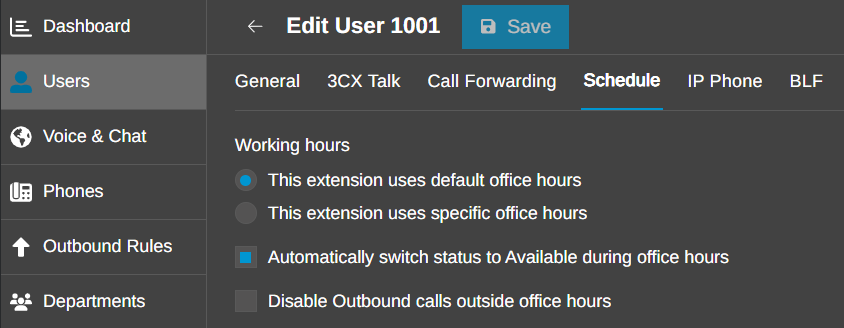
DND is only one route to an unavailable extension. A user can change status in a 3CX app or on a synchronized desk phone. The extension schedule can also switch it to DND outside office hours or to Away during breaks. Calendar and presence integrations may apply another status when a meeting, focus period or out-of-office event begins.
Status also affects downstream behavior. Call forwarding rules decide what happens under Available, Away and DND, while a queue can log an agent out when its profile changes. This is why an extension may remain registered but stop receiving calls.
Review Every Status Trigger
Start with Admin > Users > [user] > Schedule. For extensions that need to remain available, review automatic status switching and set the hours to match the operational requirement.
Then check any Microsoft 365 or Google Workspace calendar integration linked to the account. Where calendar events should not affect the extension status, review the presence mapping accordingly. Also check each endpoint using the extension. Status changes made in the Web Client, mobile app or a provisioned desk phone apply at extension level.
On supported IP phones, reassigning the physical DND key can help reduce accidental status changes. For additional device-specific control, a custom provisioning template can be used, but it should be tested with the relevant phone model and firmware before rollout.
Keep Calls Ringing Across Status Changes
The simplest PBX-native workaround is to place the protected extension in its own ring group. Although ring groups normally contain several users, a group with one member is valid. Calls sent to the ring group's virtual extension can be offered to that user even when the user's profile is Away or DND, provided that profile accepts ring group calls.
This method doesn’tprevent the user from changing status, and their presence indicator may still show DND. Instead, it makes the extension ring independently of that status. That is often the real business requirement for reception, security, gatehouse and other permanently staffed positions.
Create a One-Member Ring Group
In Admin > Call Handling, select Add Ring Group and configure it as follows:
- Give the Ring Group a clear name and note its virtual extension number
- Choose a ring strategy, with Ring All and Prioritized Hunt leading to the same destination when only one member is added
- Add only the extension that needs to remain reachable under the Users tab
- Set the required ring time and a tested destination for unanswered calls
- Assign the service DID to the Ring Group, or route the relevant upstream rule to its virtual extension instead of directly to the user
Routing is essential: a direct call to the user's extension still follows that user's active forwarding profile. Calls that must bypass DND need to arrive through the ring group.
Allow Ring Group Calls Across Profiles
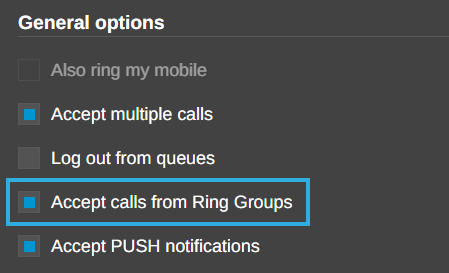
- Go to Admin > Users > [protected user] > Call Forwarding
- Open each relevant profile: Available, Away, DND, Custom 1 and Custom 2
- Enable Accept calls from Ring Groups for each profile that may become active
- Set the user to each status in turn and call the Ring Group or assigned DID from another phone
- Confirm that the endpoint rings and that the Ring Group's unanswered destination works as expected
The extension must still be registered and reachable. A one-member ring group cannot overcome a disconnected phone, network outage or unanswered call. It also does not queue concurrent callers, so use a queue or add more destinations if callers must wait or another person must answer.
Monitor Presence Where Required
If the presence state itself must remain Available - for reporting, supervision or other integration - an external monitoring service can read the active profile through a supported API or XAPI action and restore the approved state. Use a least-privilege service identity, a defined list of protected extensions, sensible polling, logging and alerts.
The 3CX MCP Server can expose profile and queue actions subject to the connected user's role and the administrator's tool policy. It is useful for supervised checks or an approved automation, but a conversation is not a high-availability monitor. Unattended enforcement belongs in a scheduler or monitoring service.
Join the Discussion
Join the 3CX discussion in our dedicated Partner or Customer Forums. Follow us on X and LinkedIn to stay-up-to date on latest news and feature releases.









 Copyright © 2026