Nick Galea

About Nick Galea - Page 31

CEO, 3CX

Nick is the CEO and Founder of 3CX. His love for innovation, visionary leadership, and 35 years in the software development industry have helped drive 3CX towards becoming one of the top communications systems across the globe. Presently, he continues this mission by placing most of his energy towards company operations, product strategy and vision.

3CX Phone System 12.5 Leverages WebRTC Technology for Website Click-to-Call & Video Calling

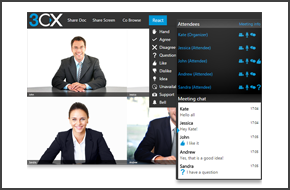
Version 12.5 is no longer available for download. To download the updated version click here. LONDON UK 15 JANUARY 2015 - 3CX, developer of the award-winning Windows VoIP PBX 3CX Phone System, today announced the launch of 3CX Phone System 12.5. The latest version of 3CX Phone System leverages WebRTC technology to offer click-to-call and video calling. With click-to-call, websi [...]

By |January 15th, 2015|Comments Off on 3CX Phone System 12.5 Leverages WebRTC Technology for Website Click-to-Call & Video Calling

Hotel phone systems – 10 Keys to customer service & sales

Hoteliers tend to neglect the importance of the phone system these days. Thinking customers use their mobiles, the phone system is seen as a cost centre rather than a profit centre. But eventhough the phone system is indeed used less and less by guests to make outbound phone calls, it plays an increasingly important role in providing good customer service. And with a bad Trip A [...]

By |January 13th, 2015|Comments Off on Hotel phone systems – 10 Keys to customer service & sales

3CX Phone System v12.5 RC2 - v12.5 is Coming Soon

Version 12.5 is no longer available for download. To download the updated version click here. 3CX Phone System 12.5 is just a breath away! With the second release candidate of 3CX Phone System 12.5 we have fine tuned the first release candidate and are ready for the final release. RC2 adds support for the Fanvil X3 IP phone, templates for Yealink IP Phones have merged and are t [...]

By |January 8th, 2015|Comments Off on 3CX Phone System v12.5 RC2 - v12.5 is Coming Soon

v12.5 Adds Many New Certified SIP Trunk Providers

A survey conducted recently on our blog, showed that many 3CX Partners would like to see more 3CX Supported VoIP Providers. That is why 3CX has invited VoIP Providers worldwide to complete our interop test, and be part of our ever growing list of supported providers. Following the release of 3CX Phone System v12.5 Beta, we would like to announce the inclusion of new VoIP Provid [...]

By |December 15th, 2014|Comments Off on v12.5 Adds Many New Certified SIP Trunk Providers

3CX Phone System v12.5 RC1 - Take it For a Test Drive

Version 12.5 RC1 is no longer available for download. To download the updated version click here. With the final launch just around the corner, it is time to try out all the new features of the 3CX Phone System 12.5 Release Candidate. In the Release Candidate we've given the Mac client a complete makeover, bringing the interface in line with that of 3CXPhone for Windows. We've [...]

By |December 11th, 2014|Comments Off on 3CX Phone System v12.5 RC1 - Take it For a Test Drive

Selecting HTTP/HTTPS Ports to Use for 3CX Phone System

3CX Phone System requires a web server for several websites including the management console, phone provisioning and to tunnel updates to 3CX clients. This web server can run on an existing IIS installation or on a dedicated bundled Abyss web server. You will need to configure on which ports these websites will run. The ports for both HTTP and HTTPS can be configured. When shou [...]

By |December 10th, 2014|Comments Off on Selecting HTTP/HTTPS Ports to Use for 3CX Phone System

How to Create an FQDN to 3CX Phone System that resolves locally

3CX Phone System requires that you have an FQDN that resolves locally. When a host is added to your DNS, a mapping is created between the domain and the IP Address of the Host. This guide will explain how to configure Microsoft DNS on Windows Server 2012 R2 to do this. Prerequisites A DNS Server in your local lan (Windows Server or any other configurable DNS Server) Step 1: Ena [...]

By |December 10th, 2014|Comments Off on How to Create an FQDN to 3CX Phone System that resolves locally

3CX Phone System v12.5 Beta 2 Brings New & Improved Features

Version 12.5 BETA 2 is no longer available for download. To download the updated version click here. We are pleased to announce that the second beta release of 3CX Phone System v12.5 is now available for download. Based on your feedback, this release offers new and improved features, including the flexibility to configure your own ports and support for Htek IP phones. Flexibili [...]

By |November 21st, 2014|Comments Off on 3CX Phone System v12.5 Beta 2 Brings New & Improved Features

3CX Phone System v12.5 Beta Leverages WebRTC

Version 12.5 BETA is no longer available for download. To download the updated version click here. 3CX takes a huge leap forward with the release of 3CX Phone System v12.5 Beta, bringing with it the 3CX WebRTC Gateway. The WebRTC Gateway revolutionizes the way you collaborate & communicate with customers and colleagues, as WebRTC phone calls can take place from any open sta [...]

By |October 21st, 2014|Comments Off on 3CX Phone System v12.5 Beta Leverages WebRTC

Latest 3CXPhone Update Supports iOS 8

Once again, 3CX innovates in the Unified Communications field by having one of the first VOIP-SIP clients to support iOS 8 and consequently iPhone 6. With the new update of the popular 3CXPhone for iPhone client, iPhone and iOS 8 users are notified when they receive an incoming call with a ringing sound instead of a normal notification sound, making it easy for them to distingu [...]

By |September 29th, 2014|Comments Off on Latest 3CXPhone Update Supports iOS 8