





Edit 16th September 2015: Please note that 3CX Phone System only works with MS Exchange Server 2013 and 2013 SP1 If you have enabled Exchange integration inside 3CX Phone System, with Outlook 2007/2010/2013 as an Email client you can take advantage of the "Play On Phone" feature. For details about enabling 3CX Phone System and Exchange Server Integration, please refer to the fo [...]

3CX Phone System Version 9 features the ability to easily upgrade your IP Phone's firmware network wide. This is done using the Phone Provisioning node located in the "Settings" section. Pre-requisites Download the latest firmware available for your phone model. It is recommended to use 3CX Tested firmwares 3CXPhone System Version 9 SP4 and up is required You can upgrade firmwa [...]
3CX Phone System features the ability to easily change your IP Phone's LCD display language network wide or on a per phone basis. Pre-requisites: Download & install the available language packs for your phone model - Not all models require Language packs. It is recommended to use 3CX Tested firmwares - not all firmwares support language display changes 3CXPhone System Versi [...]

3CX is pleased to announce service 3CX Assistant client installer for Terminal Services. This installer allows you to install the 3CX Assistant on a Windows Server operating system which has been promoted to a Terminal Server. [...]
[...]Sometimes a user may wish to have a professionally-created greeting message for his VoiceMailBox, rather than create it from his phone handset or headset. When a user wants to create a greeting message for his VoiceMailBox, all he needs to do is log into his VoiceMailBox, press "9" for options, and then press "8" to change his greeting message. When he saves his greeting messag [...]
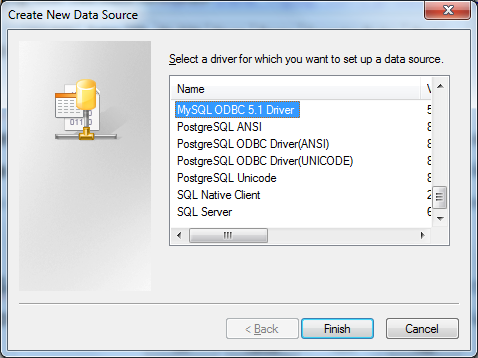
The 3CX Voice Application Designer (VAD) allows access to databases such as the SQL Server, Oracle and ODBC enabled database like MySQL. Pre-requisites In order to access a MySQL database through ODBC you need to install the ODBC driver for MySQL. This can be downloaded from the MySQL site. Once it is installed, you can continue with the creation of the “System DSN”. Creating t [...]
How do you make calls? Via a PSTN gateway or provider?
We recently held a poll asking 3CX users & partners which was their favorite IP phone. The poll enabled us to get some real data on what phones are really used in the field and allows us to decide on which to focus. We got a total of 509 votes, and the results we're as follows: Cisco/Linksys 166 31.44% Snom 97 18.37% 3CXPhone [...]
The 3CX Voice Application Designer (VAD) is a powerful tool for creating voice applications quickly and easily, without needing to have great programming or telephony skills. These applications are deployed to the server where 3CX Phone System is installed, and are implemented as digital receptionists. Through the management interface it is possible to define the circumstances [...]

Prior to V9, 3CX Assistant configuration required a separate profile for connecting from the LAN, from the WAN without the tunnel (direct), and from the WAN with the tunnel. For most users, 2 profiles would be necessary, and such users would typically have one profile for LAN connection and another profile for WAN connection using the tunnel. 3CX PhoneSystem V9 now allows yo [...]

 Copyright © 2026