





This guide will show you how to connect the bero*fix card with the LAN and WAN. Connecting the BeroNet berofix 400/1600/6400 Connect the box to the network and plug in the power supply The default IP address of the bero*fix is 10.0.0.2/16. If your LAN operates in the same network make sure that the IP during the configuration is free. If this IP is taken by another ho [...]

This guide will show you how to configure a Beronet bero*fix card. The main scope of this guide is to connect the bero*fix card via a network brigde with the LAN and WAN. Setting up the BeroNet bero*fix 400/1600/6400 1. Insert the Beronet Berofix into the PC. 2. After the system has booted you will have a new network device available. 3. Windows usually detects the card as a “R [...]

Virtualization is becoming increasingly popular and 3CX fully supports this technology. 3CX itself runs its PBX on Hyper-V, however we also test our PBX on VMware. This guide explains how to configure a virtual instance on Hyper V on which you can run 3CX Phone System. Prerequisites: For the purpose of this FAQ the following 4 assumptions shall be made. Microsoft documentation [...]

This blog post is only relevant to V14. The 3CX Phone System is designed to be multi-lingual. Each text element in the 3CX Management Console is stored in a file and referenced from this file. By creating a localized copy of this file, it is possible to easily translate the interface and allow users to select the preferred language option. You may then be able to choose the lan [...]
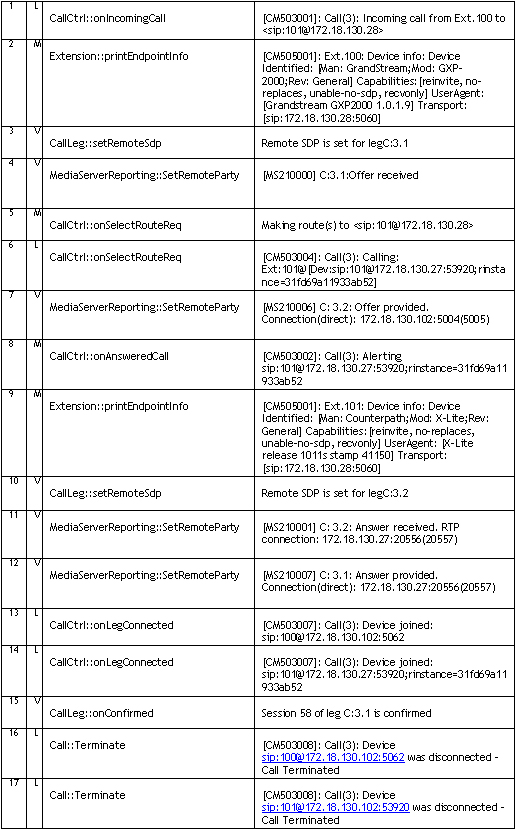
Introduction This chapter gives you an overview of how a call is established within 3CX and how you can trace through these steps by reading the server activity log. The Server activity log can be accessed by clicking on the Server Activity Log node in the 3CX Management Console. This server status log lists all important events that 3CX Phone System is processing, and is the m [...]

The 3CX Phone System IVR service is based on VXML and therefore integrates with the web server that you have chosen to use with 3CX. If there are problems with the web server integration, the IVR service may return the following prompt - “The call cannot be completed at this time. Sorry”. This article describes what you can check if you are running IIS. In some cases, other app [...]
This article helps you recover from Backup and Restore Errors including some tips to make this operation quick and seamless: The option "Include voice prompts and music on hold" should be enabled in the 3CX backup and Restore Tool. This will ensure that all your custom and system prompts along with voicemail intro-prompts are fully backed up and eventually restored. Delete an [...]

This guide describes the different caller ID formats and how to alter /rewrite the caller ID before it gets sent to the Telecoms provider when using beroFix VoIP Gateway cards. In this document we will use a German number (National code +49) from Dusseldorf (area code 0211) as an example how to format the caller ID: A telephone line-number (TelN) 12345600 (where "00" are the op [...]

With a Beronet Card, and proper configuration, you are able to choose the exact line/port from which to dial out. This feature is requested for lines that have different MSN/DID/DDI numbers. In addition it is useful for companies that are sharing a PBX and want to have each company use their telephone line to ensure transparent billing. This article explains how to configure th [...]

Edit 16th September 2015: Please note that 3CX Phone System only works with MS Exchange Server 2013 and 2013 SP1 This article describes how to setup Microsoft Exchange 2007/2010 server as a Unified Messaging Server and configure 3CX Phone System to use it for voice mail and auto attendants. For Microsoft Exchange 2013 read Configuring MS Exchange Server 2013. Important Note: Of [...]

 Copyright © 2026