





Holiday prompts configured per department in V20 Update 9.
Looking for an easy way to configure your holiday messages? Here it is!
In V18, holiday prompts were configured at PBX level. This worked, but required all inbound calls to follow a system-wide specification. In V20 Update 9, the feature returns using the V20 department model. This means holiday settings are now handled per department - which is particularly useful for large businesses with multiple departments in geographically different locations enjoying different holidays.
System Admins, as well as 3CX Partners supporting customer systems, can now configure 3CX holiday prompts easily at departmental level, allowing Department Managers to control their specific departmental holiday messages.
Read on to learn how to configure holiday prompts easily in V20 Update 9.
Easily Configure Holiday Prompts
Holiday prompts can now be configured at the department level and played on selected endpoints such as:
- Queues
- IVRs
- Ring Groups
This gives System Admins and Partners a simple way to manage holiday messages without changing call flows each time a holiday comes up. Better still, they can delegate the task to Department Managers to set up holiday messages specific to their departments.
3 Easy Steps to Configure Holiday Messages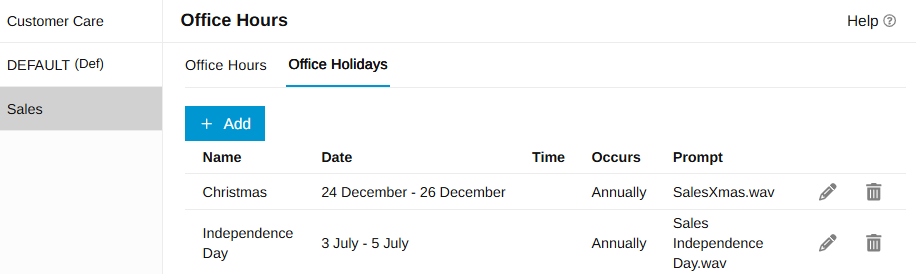
- Add the holiday to the department
- Upload or record the holiday prompt
- Enable the prompt on the endpoint
Managing Holiday Call Flows
If you’re looking for a comprehensive guide on configuring holiday announcements and call routing within 3CX, use our holiday prompts guide Automating Holiday Schedules in 3CX. It details two primary methods for managing holiday call flows: centralized department-based holiday schedules and the holiday.cs call script. Use the method that matches your call flow.
Reviewing Previous Holiday Prompt Set Ups
If you used holiday prompts in earlier versions of 3CX, the idea will be familiar. The difference is where the configuration now lives. In V20 Update 9, holiday prompts are configured at department level, not only at PBX level. This means you should review your previous holiday setup and recreate it using departments. Check the following:
- Unique holiday schedules per Department
- Personalized holiday prompts according to region, department etc.
- Queues, IVRs, or ring groups required to play the department holiday prompt?
- Old call handling rules requiring simplification?
- Advanced call scripts requirements, if any?
For most standard holiday setups, the new endpoint-level holiday prompt option will be enough.
How Large, Global Business Operations Benefit
If you’re a larger business with multiple departments or global locations following different holiday schedules - customer-facing teams whose holiday schedule will likely differ from your back office Administration team, for example - this is a useful feature for you. Alternatively, if your business in the USA doesn’t share the same public holidays as your operations across France, you can easily configure your 3CX to accommodate operational differences.
In summary, this update is useful for:
- System Administrators who manage call routing and office hours across multiple departments and / or locations
- 3CX Partners who configure and support customer systems
- Department Managers who need control over their own holiday messages
Saving Admin Time & Increasing Departmental Control
Until now, System Admins had to manually update prompts, adjust routing, or use more advanced scripts to handle these cases.
With department holiday prompts, this is much easier to configure. Each department can have its own holidays and its own prompts. Once configured, the correct message plays automatically when the department is on holiday, saving time for the System Administrator and giving each department more control.
In summary:
- Unique holiday dates self-managed per department
- Individualized holiday prompts
- Recurring holidays can be configured once
- One-off holidays can be added when needed
- Admins can enable holiday prompt playback on specific endpoints
- Call flows do not need to be changed every holiday season
Try It In V20 Update 9
Holiday messages are now easier to configure and easier to manage. Add your department holidays, upload the right prompt, and enable the holiday prompt on the endpoint. Your callers will hear the correct message at the right time.
Join the 3CX discussion in our dedicated Partner or Customer Forums. Follow us on X and LinkedIn to stay-up-to date on latest news and feature releases.









 Copyright © 2026