





The powerful tool for creating voice applications for 3CX Phone System, the 3CX Voice Application Designer (VAD) allows you to record the audio of a call and store it as a file to disk. Sometimes, however, the default 3CX web server configuration can cause the recording of the file to disk to fail. This article explains why this happens and how to fix it. The Application Genera [...]

The 3CX Training Team is pleased to announce a 3CX Partner Training event in Greece, to be held by 3CX Partner, Sectron. We would like to invite all new or active 3CX partners to attend the training on January 27th and 28th, 2012. [...]
[...]
The 3CX training team is pleased to announce upcoming 3CX Partner Training events in the USA. We would like to invite all new or active 3CX partners to attend training during March 2012 at Chicago IL, Irvine CA or Reston VA. [...]
[...]
IMPORTANT: This device has been tested for Voice using Firmware Version Mobilink-IP-1.2.13-C2P-SDX Setting up the Topex Mobilink IP Insert a SIM card into the Mobilink IP by opening the simtray by pressing the small yellow button with (for example) a pen. Insert the SIM card in the tray and slide the tray back in. Also, ensure both antennae are connected to the device. Start up [...]
Welcome to part two of Using 3CX MyPhone. Click here for Using 3CX MyPhone Part One. In this video, we will build on what you have seen in part one and look at more of the available features such as the Listen, Listen and Whisper and Barge in options included in the 3CX Call Center Module. We'll also show you the Parking feature and how to Transfer your calls. Skills Covered by [...]
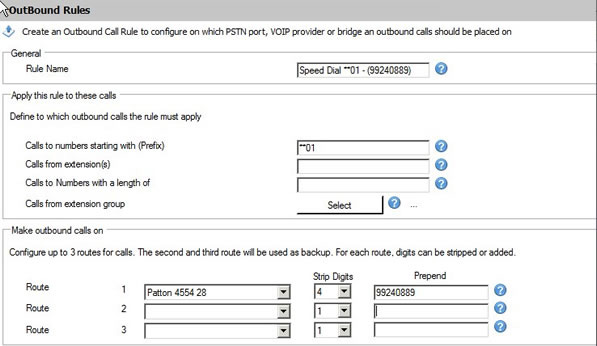
This step by step guide describes how to set up a speed dial, system based, using the "Outbound Rules" of 3CX Phone System. Open the 3CX Management Console and navigate to Outbound Rules. Click on “Add Outbound Rule”. Set the Outbound Rule as follows: Rule Name: "Speed Dial **01 – (Number)" Calls to numbers starting with (Prefix): "**01" Calls from Extensions: (use this only i [...]
3CXPhone for Windows is no longer available for download. To download the updated version click here. 3CXPhone for iPhone has won the Voxie Best iOS VoIP App 2011 Award out of a whole host of VoIP based apps from within the Apple App Store. “Few apps are as powerful as 3CXPhone for iPhone. If your office is using the terrific 3CX Windows-based PBX, then putting this a [...]
In Part One of the Using 3CX MyPhone video, you will see a general overview on how to use 3CX MyPhone. We'll also take a closer look at some of the features it provides and how you can make the best use of them, such as how to handle queue calls, your voice mails, the Call History report and your Phonebook. Click here for Using 3CX MyPhone part two. Skills Covered by thi [...]

3CX Phone System needs to be able to interact with services on the server where it is installed for proper functionality. In some cases, Anti-Virus software can stop 3CX Phone System from accomplishing this. This can cause certain issues where voice mails aren't recorded or saved properly. In this example we will configure AVG Internet Security 2012 so that it doesn't interrupt [...]

When Pluss, the UK’s largest social enterprise, needed to buy and install a 270 handset VoIP phone system in record time, they chose 3CX. The project went so well that they started a commercial arm to their IT department called Pluss Connect. Pluss Connect is a 3CX Certified Partner and aims to help other social firms and charities across the UK with their telephony requirem [...]

 Copyright © 2026