





3CX will be exhibiting at IT Expo East 2010 - the IP communications technology tradeshow - at booth 601 together with Sangoma. The show will take place between January 20 – 22, 2010 in the Miami Beach Convention Center. We look forward to meeting you you at the Sangoma partner stand! [...]
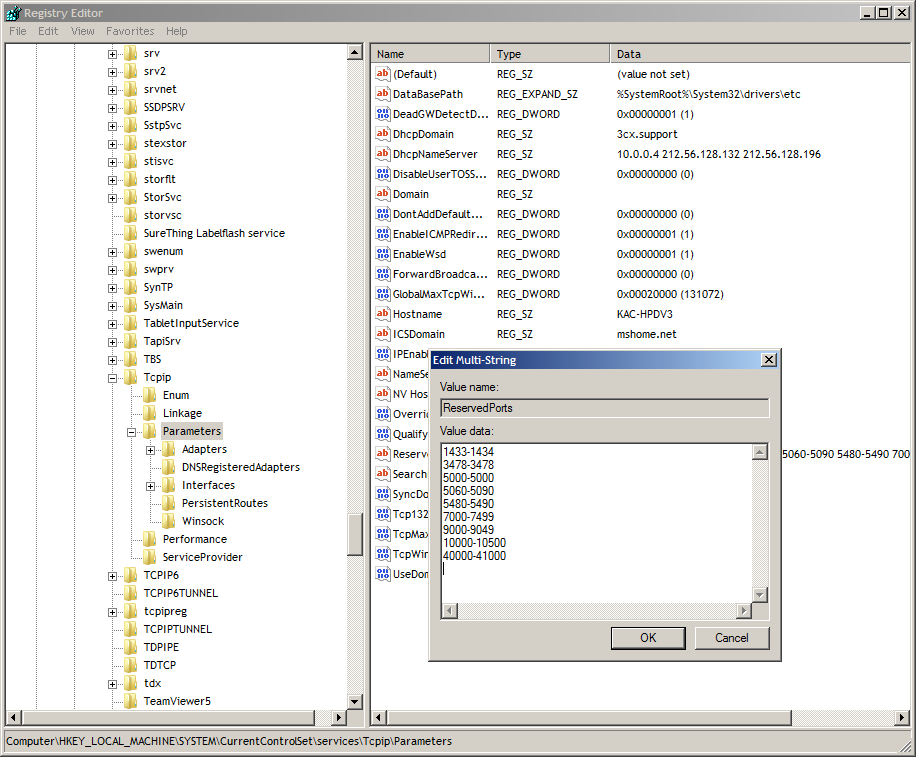
If the Media Server needs to allocate a port for media transmission, and cannot bind, it will generate a log message such as: MediaServerReporting:InitEndPoint [MS003003] C:179.1: RTCP socket 10.0.0.173:7023 binding failed with error code 10048 This is due to some other application already binding to some ports in the 7000-7499 range. This is typically due to the Microsoft DNS [...]

3CX’s popular free business soft phone gets intuitive new interface. 3CXPhone 4.0 has a similar look and feel to popular smart-phones, users will be able to make and receive calls without requiring any training.

VoipVoice, Italian VoIP provider offers free number rental for the first 6 months of 2010 on up to three PSTN numbers for accounts activated by new 3CX clients by 28th February 2010. London / Florence 11 January, 2010 – 3CX (www.3cx.com), the international developer of the multi-awarded 3CX Phone System for Windows, and VoipVoice (www.voipvoice.it), an Italian VoIP provider, ha [...]
For an updated version of this table please go here. The Custom Parameters contains a list of advanced settings for 3CX Phone System. The default value of these parameters generally applies to most installations, and should not be altered unless otherwise advised to do so by 3CX Support. The Custom Parameters can be found in the 3CX Management Console > Settings > Paramet [...]

This document describes how to fix and solve Internet Explorer Script Errors that come up in the 3CX Management Console every time one of the following actions is performed: Uploading an audio file to a Digital receptionist. Uploading an audio file to a Queue. Importing extensions using the Import Extension button. When the above actions are performed It is common to see an err [...]

This document describes how to resolve an issue when you try and access the 3CX Management Console or the 3CX MyPhone Portal and instead of getting the standard login screen, you see a blank white screen and "Done" on the lower left status bar of Internet Explorer browser window. This happens occasionally on Server 2008 operating systems with Internet Explorer as the default br [...]
3CX provides monthly free training Webcasts, and the next one is scheduled for Thursday 14 January 2010 at 1500hrs (GMT+1). This will be presented via Webex using its built-in VoIP for audio - so there will be no need to call into a conference call number. To Sign Up Go to http://meetwith3cx.webex.com Under the "Attend a Meeting" Node in the left hand side, click the "Browse Me [...]
Below is a list of VoIP Providers that have pledged support for 3CX Phone System. They can provide you with a 3CX VoIP Provider template upon request. Once you receive the template from the VoIP provider, copy it to the following location: C:\ProgramData\3CX\Data\Http\Templates\provider The Provider template will now be available in the list of providers in the 3CX Management C [...]
Updated IP phone configuration guides for the most popular phones supported by 3CX

 Copyright © 2026