





Custom templates and flexible firmware controls put more phone possibilities in the administrator's hands.
3CX Version 20 Update 10 brings more flexibility to IP phone management, with a new Phones page, per-model and per-device firmware controls, revised custom templates and easier phone reassignment.
Admins can keep 3CX-tested firmware as the default, use manufacturer firmware where required, make exceptions for individual devices and add additional phone models through custom templates. Provisioned phones, including Router Phones, can also be moved to another user while keeping their configuration and firmware assignment.
Read on to see how Update 10 simplifies phone management and gives Admins more control over firmware, provisioning and mixed phone deployments.
One Place to See and Act on Every IP Phone
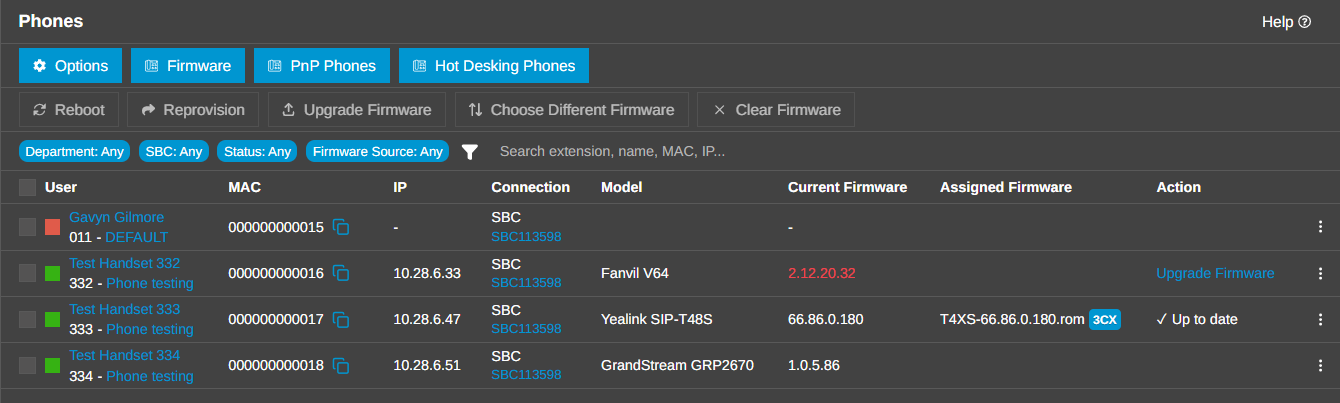
V20 Update 10 centralizes IP Phone work on the Admin Console's new Phones page. Instead of treating provisioning, status and firmware as separate jobs, administrators can review the user, MAC address, IP address, connection method, model, current firmware, assigned firmware and available action on a single line. Full details are in the Firmware management guide.
Search and filters make larger deployments easier to navigate. You can narrow the view by registration status, firmware source, department, SBC or router phone, and show only outdated firmware, router phones, IP phones or DECT phones.
The Dashboard's outdated-firmware indicator takes you directly to a pre-filtered list, while the Firmware library can open the phones assigned to a particular file.
Common actions are available where the device is listed: reboot, reprovision, upgrade firmware, choose a different firmware or clear an assignment. The same area also gives access to phone details, current configuration, template switching and the option to move a provisioned phone to another user while retaining its configuration and firmware assignment.
Choose the Firmware That Fits
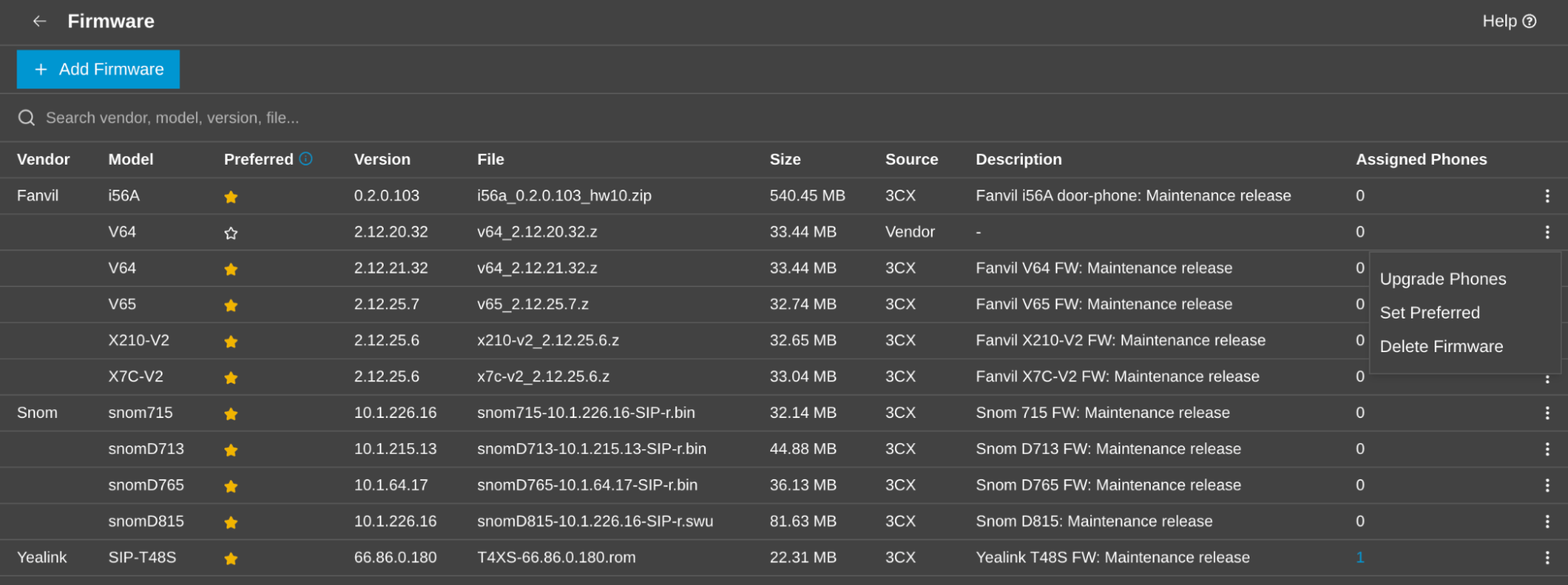
The new Firmware library, under Phones > Firmware, stores 3CX Firmware and administrator-uploaded Vendor Firmware together.
3CX Firmware remains the ‘validated by 3CX’ option for a model; it may intentionally differ from the newest release published by the manufacturer. Vendor Firmware gives administrators another option when a manufacturer's specific release is required.
Set a Sensible Default for Each Model
Exactly one file is marked Preferred for each IP Phone model. That file becomes the default target for first provisioning, scheduled maintenance and the Upgrade Firmware action. If a 3CX package is available, it is selected by default. You can upload a compatible vendor file and make that the model's Preferred target when your rollout requires it.
This is a model-level decision rather than one global switch. A mixed vendor deployment can therefore follow different policies: one vendor can stay on 3CX-validated firmware, another can use an approved manufacturer release, and each model retains a clear default.
Make Exceptions per Phone
A default no longer means every handset must move in lockstep.
- Choose Different Firmware assigns another available firmware file to an individual phone, including an older 3CX package or a vendor package.
- Clear Firmware removes the assignment without deleting the library file or removing firmware already installed on the device.
This flexibility is extra useful for device pilot rollouts, staged rollouts and troubleshooting. A registered phone is reprovisioned immediately and may reboot. A phone that is offline stores the assignment and applies it when it next connects and provisions.
Automate the Routine Work
Under Phones > Options > IP Phone Firmware, administrators can update phones when they are first provisioned and keep existing phones up-to-date on a schedule. Scheduled runs apply to each model its Preferred firmware file, whether its source is 3CX or the vendor. Failed firmware pushes are retried on the next eligible run.
Bring More Phone Brands and Models Into 3CX
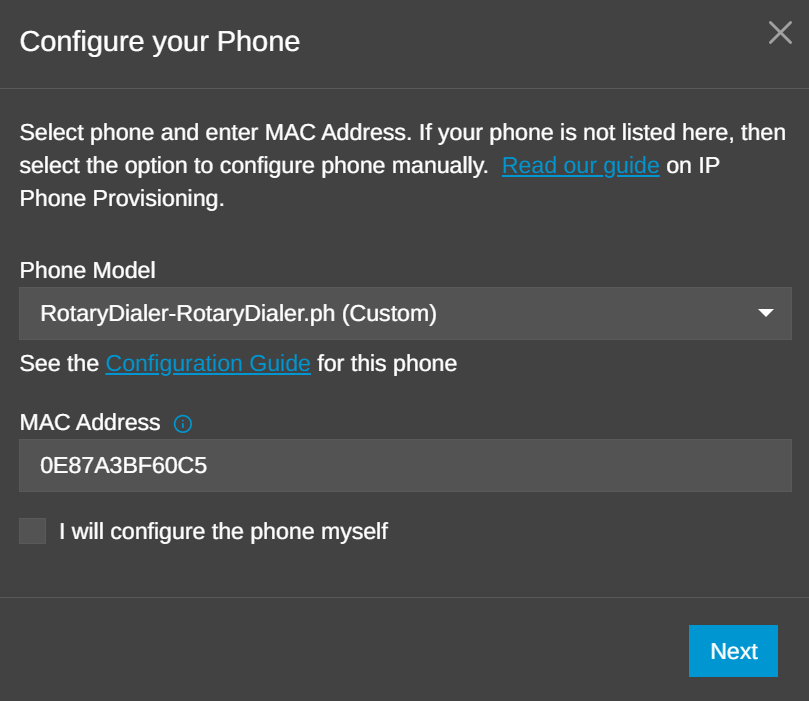
Firmware choice is only useful when 3CX knows how to provision the phone. Update 10's revised custom-template procedure gives administrators, partners and manufacturers a defined route for adding a brand or model that is not covered by a built-in template.
A phone template is an XML file that maps 3CX data to the configuration syntax expected by the handset. At provisioning time, 3CX selects the assigned template, replaces variables with the user's account and system values, evaluates network or model conditions, and generates the configuration file the phone retrieves.
Administrators can follow the custom-template guide, building or adapting a unique .ph.xml file, which can then be loaded into a test PBX for verification.
Start in Admin > Advanced > Templates > Phone Templates. Create a copy of the closest suitable template, give the custom file a unique name, and adapt it for your phone. The work should begin with the vendor's documentation and the phone's SIP User-Agent, provisioning rules and configuration format - not with guesses borrowed from a different manufacturer. Remember:
- Use a dedicated test extension and handset
- Stock templates cannot be changed
- Validate the XML
- Inspect the rendered configuration
- Retest after PBX or Firmware updates
A custom template remains the author's responsibility to maintain. The goal is more than SIP registration. A useful custom template should support the functions the deployment depends on, such as codecs, BLF and function keys, phonebook and message-waiting behavior, ringtones, language, time zone, VLAN, LLDP and the supported LAN or SBC route.
A Practical Policy for Mixed Phone Deployments
Consider an organization with several supported models and a smaller group of phones added through a custom template. The administrator can keep the 3CX-tested package as the update target for the standard fleet, upload a manufacturer release for one model that needs a specific fix, and assign that release only to a pilot phone first.
After testing, the same file can become Preferred for that model and roll out on schedule. If one handset repeatedly fails to apply it, the administrator can clear that phone's assignment while investigating, without removing the file or interrupting the rest of the deployment.
This combination of per-model policy, per-phone exceptions and custom provisioning support is a central change in Update 10: 3CX supplies a managed default, while administrators gain room to make deliberate choices around their own hardware, maintenance windows and validation process.
Know the Boundaries
Firmware uploads are available only for models that have a template in the 3CX Phone System, and the administrator must verify that vendor firmware is compatible with the selected model and hardware revision. Most unsupported phones cannot use the firmware-management feature's automations.
Firmware actions are also unavailable for unprovisioned phones and for DECT or FXS devices that 3CX does not manage as individual extensions. Because an upgrade or reprovision can reboot a handset, schedule changes appropriately and test vendor packages before wider deployment.
For step-by-step instructions, see IP Phone Firmware Management and Configuring IP Phones.
Join the Discussion
Join the 3CX discussion in our dedicated Partner or Customer Forums. Follow us on X and LinkedIn to stay-up-to date on latest news and feature releases.









 Copyright © 2026