





iOS BETA allows admins to control device settings with MDM.
This latest iOS BETA release includes Mobile Device Management (MDM) features. Admins can disable certain settings on a user’s phone by simply downloading an XML file onto the user’s device.
The 3CX app reads the file and sets the specified parameters accordingly. These settings are hidden from the UI itself so that users are not able to switch them back on/off.
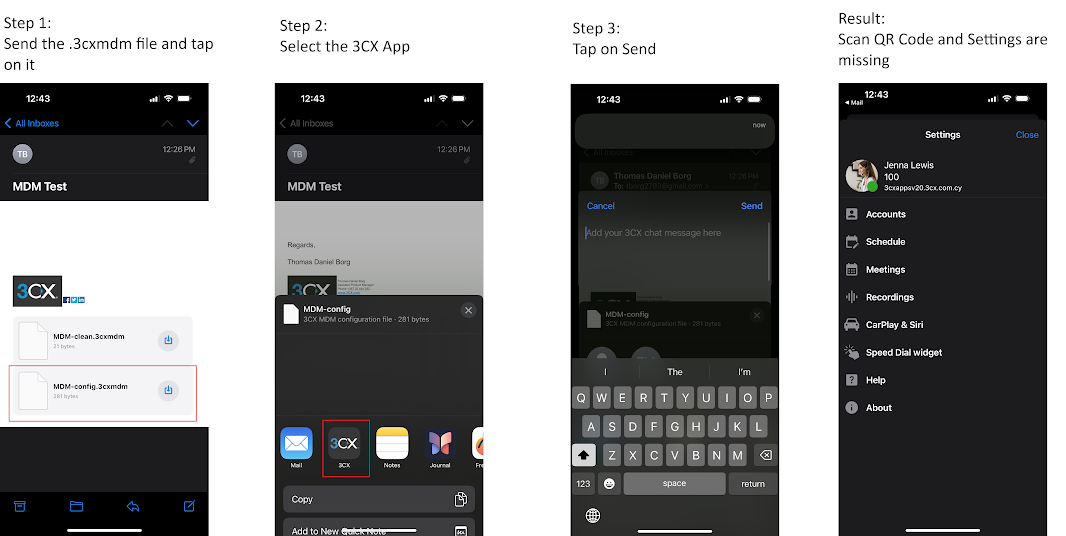
To configure the XML file simply send the .3cxmdm XML by email to the device, and then tap on the attachment which will automatically open in the 3CX App.
Below is an example of the settings you can disable/hide:
- Play Busy Tone
- Show Unregistered Extensions
- Integrate with device recents
- Resend credentials
- Scan QR Code
- Show settings menu
How to Edit the XML
Create an XML file and name it .3cxmdm. To hide all the features mentioned above add the below commands. Otherwise, remove or add the ones you do/don’t want.
<tiosmdm>

<PlayBusyTone>0</PlayBusyTone>

<ShowUnregisteredExtensions>0</ShowUnregisteredExtensions>

<IntegrateWithDeviceRecents>0</IntegrateWithDeviceRecents>

<ResendCredentials>0</ResendCredentials>

<ScanQRCode>0</ScanQRCode>

<SettingsMenu>0</SettingsMenu>

</tiosmdm>
NOTE: The .3cxmdm configuration is not destructive, i.e. what is not overwritten will be available to the user as originally set.
Uploading the XML
Below is a visual representation of the process:
Try the iOS Beta
Try out this BETA and any future BETAs by joining our iOS TestFlight program. You can provide feedback directly to our development team from within the app.









 Copyright © 2026