





Team filter in the Panel and Web Client configuration updates.
3CX Softphone V5.5 Beta (Build 1095) introduces improvements to extension management and configuration, alongside a strong set of stability fixes and usability enhancements. Read on for a breakdown of what’s new in this beta release.
Team Filter in the Panel
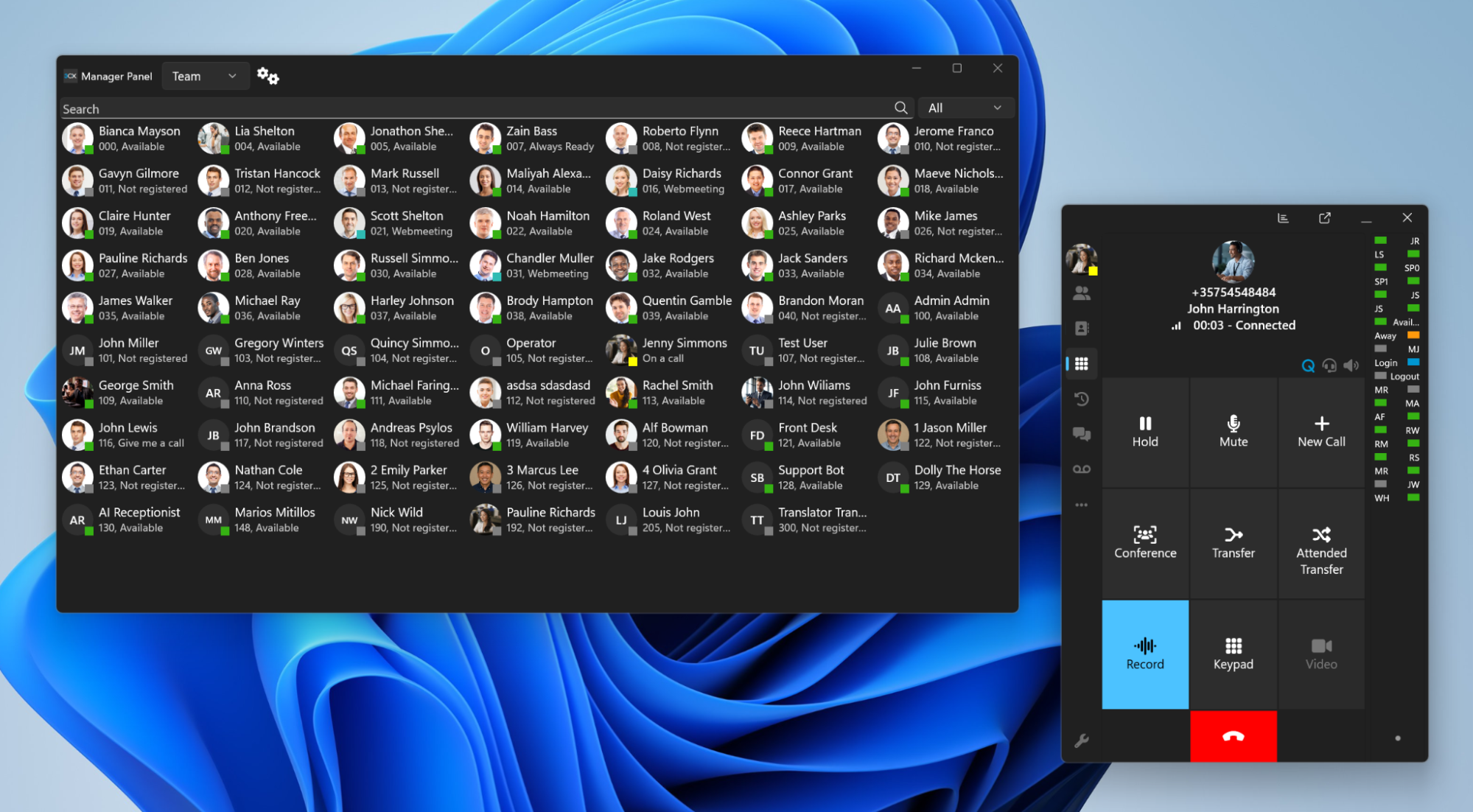
This beta release introduces a Team filter in the Panel, allowing users to narrow down extensions by team quickly.
This makes it easier to focus on the relevant group, particularly in larger deployments, helping reduce clutter and streamline day-to-day call handling.
Web Client Redirection for Key Configuration
This release also introduces setting up the following via the Web Client:
- Exceptions
- BLF configuration
- Webinars
This allows users to complete key configuration tasks directly via the Web Client when required, ensuring a smoother and more consistent setup experience.
Other Fixes and Improvements
Alongside the new functionality, this release includes a comprehensive set of fixes to improve stability and usability.
Headset & Chat Enhancements
- Improved headset selection persistence (Yealink SDK)
- Clickable links in chat
- Ability to copy selected portions of chat text
Conferencing & Call Handling Fixes
Multiple fixes have been implemented to improve conference functionality and general call handling behavior.
Additional Improvements
This update also resolves issues affecting:
- Call forwarding
- AI Agent status changes
- CRM lookup caching
- Queue drag-and-drop scenarios
- Provisioning edge cases
- Number pasting behavior
- Searching for names containing diacritics - the umlaut ü, the acute ó and the grave à for example - now works correctly, even when entered without special characters
View the complete changelog for a detailed breakdown of updates in this latest build.
How To Get 5.5 BETA
Go to the Microsoft Store to find and install 3CX BETA.
Note: Avoid running the production version alongside the BETA to prevent conflicts.
Windows Softphone Forum
Head over to the dedicated Windows Softphone Forum to let us know what you think.
Follow us on X and LinkedIn to stay up to date on latest news and feature releases.









 Copyright © 2026