Fine tuning v18 for its final release! This RC2 includes important fixes and improvements to the Web Client and Windows Desktop App, among others.
Client improvements
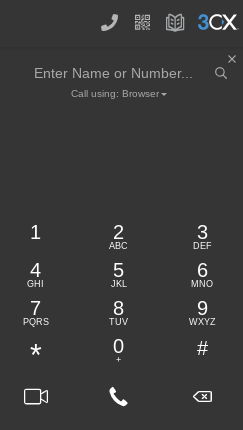
We improved the usability of the 3CX client in some key areas.
- The dial pad icon now at the top, has a handset icon - indicates that the user should click here to make a call.
- Enter name or number field at the top, to make it more obvious - it will try to match in both extensions and contacts.
- If there is no match, the user can just hit enter to dial entered number.
- Audio video settings now in drop down.
Coming in update 1, some important usability changes:
- Yealink headset support.
- Hotkey support for Windows Desktop App.
- Potentially MacOS version of client.
- Display of number type and company name when searching from dial pad.
Remove Google extension
Windows users must remove the Google Extension and install the Windows Desktop App. Otherwise the dial pad will show up twice which can be a little confusing. MacOS and ChromeOS users will have to wait until the release of a MacOS version.
Other fixes & improvements
- Updated Microsoft Teams Dial Plans to support 3CX Dial Codes.
- Fixed issue with Caller ID’s first digit being stripped on Incoming calls from Microsoft Teams.
- Fixed issues with SDP and early-media state.
- Fixed issue with Desktop App terminating a call when the dialer window is closed.
- Adjusted Desktop App installer/updater firewall rule to point to static path.
- Updated SIP Trunk templates for: Fuse 2 Communications, BT HSIPT, Ecotel and Skyetel.
How to get V18 Release Candidate
Try out V18 RC2 for Linux - 3CX V18 on Debian 10 ISO. You can also upgrade from V18 RC1 in the management console. Alternatively you can create a new, hosted trial account.
V16 users can get V18 RC2 by upgrading their OS.
View the complete phone system change log and 3CX Client changelog and give us your feedback in our dedicated forum.