





Following our Security Incident we've decided to make an update focusing entirely on security. We hope to release this update to QA in the coming days. We’ll then release an Alpha and Beta next week - with the final in the week following. Here’s what we’re including:
A BLF Panel in the Dialer of PWA “App”
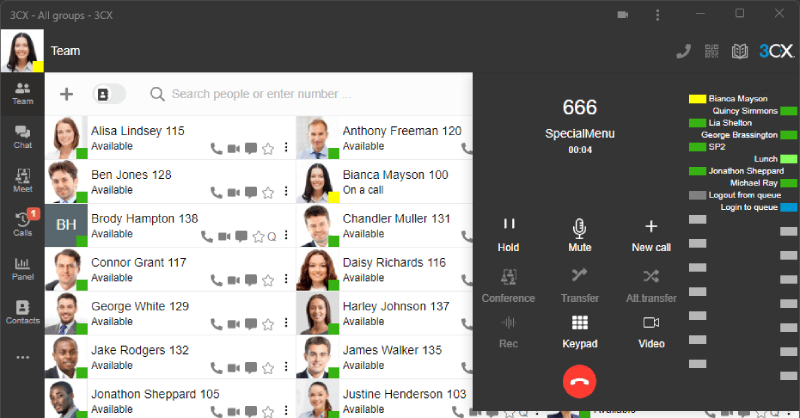
This feature mimics a deskphone and shows BLFs similar to a deskphone. BLFs will show the status of a user and allow for easy, one-click transfer. Admins can configure BLFs for all users by going to “Admin > Users > Add / Edit User” and then the BLF tab. Users can configure their own BLFs from “Settings > BLF”.
Hashing Passwords
In this update, all web passwords are hashed in the system. It doesn't mean they were completely insecure before. You still needed admin rights to access them. But it's not good practice and it's been the subject of CVE-2021-45491. This has been addressed in Update 7A.
After applying the update a conversion will be done by the System Service that gets all current passwords and hashes them. Users can log in with their current password, but we recommend changing it.
The hashing of passwords applies to the Web Client login only. For backward compatibility reasons, we will not hash SIP auth ID and password, SIP trunk and gateway passwords or the tunnel passwords. If hacked these credentials can only be used to get calling access to the PBX. These user credentials cannot be elevated to login to the PBX. In future builds we will hash these passwords also.
Removal of Password and Config File from Welcome Email
The Welcome email used to have the Web Client password as well as the config file for the old style configuration of the app. We’re now removing this from the Welcome email. This means:
- Before logging in, users must set a password first.
- Android and iOS apps must be provisioned using the QR code.
- If you want to use the old style Windows legacy App (not the viewer electron based Desktop App) you must provision it via PNP
- Connect legacy client to network
- Approve from Management Console
- The New Welcome email reflects this. Those who have implemented custom Welcome email text must update it.
Restrict Web Client Web Admin Access by IP
You could already limit access by IP for the Management Console. Now you can also do this for System Admins that have access to the Admin section in the Web Client.
PWA Web App where Possible
Although we’ll be releasing a new version of the DesktopApp soon, we still believe for network management reasons it's good to use the PWA app where possible. All users that use a deskphone or an Android/iOS app for the actual calling should use the PWA client. The combination of the smartphone app with the PWA web app is an excellent one - take calls anywhere you go, in or out of the office, without requiring an expensive DECT headset!
In Update 7A we now promote the PWA web app exclusively in the left hand side notification.
PWA requires a proper FQDN that works everywhere. Any system in the cloud (StartUP / 3CX Hosted / Private Cloud) will have this. On-premise systems must implement split DNS, but this will be a requirement for all systems at some point anyway.
The Windows or Mac Desktop Apps are now located only on the Apps page shown at the bottom left hand side.
Stay Informed
Hit the follow button on Twitter and LinkedIn for announcements and blog updates on this Update 7A release. Stay up to date in the ongoing investigation via our RSS feed. Join the conversation in our dedicated help forum.









 Copyright © 2026