Version 18 Update 6 Simplified. Modernized.

  • Like
Reactions: N_G
It basically means that in the WebClient/DesktopApp the wizard that adds a remote phone won't let you add a normal (i.e. non-router) phone unless you already have either a router phone or an SBC. This prevents misconfigurations from less experienced admins.
I appreciate your response, but perhaps you can clarify further.

Does "normal (non-router) phone" specifically refer to a SBC phone that is not the router-phone, or are you saying that on a new V18 U6 deployment, the ONLY type of remote phone you can provision is a SBC type with a router-phone?
 
Does "normal (non-router) phone" specifically refer to a SBC phone that is not the router-phone, or are you saying that on a new V18 U6 deployment, the ONLY type of remote phone you can provision is a SBC type with a router-phone?
If an extension already has a non-"router phone" then you can't add a router phone. The router phone has to be added first, then you can add more phones to that extension.

If the location where the phone is already has an SBC, or router phone, you don't need another one (unless you have a lot of phones there).

If these are phones that will travel (taken home), they can each be their own SBC now.

The web client admin interface seems geared more towards StartUP where an SBC is required.
 
  • Like
Reactions: N_G
Any update as to when partners will be able to host their own Startup instances?
 
@ngingras - STUN phones configured will remain working as John said.

I think @SweetAction described it perfectly.

But to answer your post further down - Router phones are required for cloud installs (whether 3CX or private cloud). You only need one per site. So in your example the sites with Yealink T33G phoones just need ONE phone to act as the SBC. You will see that supporting these remote sites will become MUCH easier. STUN can be unpredictable at best. Having it all centrally configured in a supported config is going to save you support time. I think its explained in dialog and in manual :)

We are not disabling or removing anything, just not making the option available in the new admin page on the web client.

@Osney Santos - You can go and change this afterwards to the desired extension.

@SteveITS @Mike Hammett- yes update 7 has the generic template in there. Its really for countries where we dont have good providers, but of course can be used anywhere.

@IT Dept - TS - The standard edition is going away. The price difference is minimal and we have not increased our prices significantly since our founding in 2006. That said, I am happy to give you a full refund for the year that you renewed if you prefer to move to another solution.

@ScallViz - Setup should be fine but you should really use a DNS server and give it a secure URL. If your users are accessing the site internally via http and not https it simply isnt secure. And there will come a day that Google Chrome will no longer let you access sites with local IPs or at least they will be very limited in their function. Also provisioning of phones will require a secure URL soon for security reasons.

@bkepley - good point. Its not in the new web admin yet but its easy to do and makes sense.

@Mike Hammett - StartUP will only be available for larger installs, you will need to onboard significant number of customers (250+) for it to make sense for us to support it... And we want to be sure its deployed correctly as our brand is on it.
 
hi,

im just added some yealink router phones at a costumer and the email template "Your phone configuration instructions" with the 2 weeks valid rps pin is not editable via mgmt. console.
i think it makes sense to make this editable as its very short and we would like to add video tutorial links. etc.
 
  • Like
Reactions: SweetAction
One of the first things i do after a new installation is put our IP addresses in the Console restrictions so access to the MC is only allowed from specific IP addresses.
Somehow it feels less secure now with the new system owner extension because all the extra management functions in the webclient.
Can you make it so that the extra management functions in the webclient only are accessible when logged in from the specific IP addresses allowed under console restrictions?
 
Last edited:
One of the first things i do after a new installation is put our IP addresses in the Console restrictions so access to the MC is only allowed from specific IP addresses.
Somehow it feels less secure now with the new system owner extension because all the extra management functions in the webclient.
Can you make it so that the extra management functions in the webclient only are accessible when logged in from the specific IP addresses allowed under console restrictions?
Yes, this is important for security.
Integrated 2FA or RADIUS Support would be even better
 
yes we are doing this. You have 2FA already in the webclient with SSO with Google or Microsoft take your pic
 
Is there any reason why a user set to manager receives email about system owner even though their email is not set for notifications ??


IMPORTANT! With Update 6 you’re required to assign an extension user with System admin / Root privileges.
Upon upgrading, you’ll receive a warning in the Management Console to assign System Owner privileges to an extension user. In most cases the System Administrator / Owner already has an extension on the system.
If your current 3CX Administrator only has a root account but does not have an extension, then you must create one.

How can I assign an extension with System Owner rights?
Go to the User account, click on the ‘Rights’ tab and select ‘System Owner’ role in the Group Membership section.
 
I think the user happens to have the same email address as the owner of the key..
 
Hello, I am contacting you because we are 3CX integrators and since the last update it is impossible to install 3CX from the AZURE market place with a CSP subscription. This is very problematic because it worked very well before and we had to install 3CX from the market place because the SFR SIP trunk requires changing the sip port to 5070. This is impossible via the pbxexpress. Is it possible to re-enable the installation on an AZURE CSP subscription? This impacts many customers that we need to deploy quickly. Do you know why this is no longer possible?
Thanking you in advance.
Hello Kevin, before the response of Microsoft you can deploy with 5060 and after use magic command on ssh for relunch wizard and change port :) juste think to adjust port on azur nat.
 
am i remembering correctly that with update 6, you could deliver SMS to an auto attendant again and have it forward to a special ring group? right now we have a group that uses 3cx for offroad recovery dispatching (1 phone number, 20 dispatchers). i have to deliver all their calls to a SMS ring group for 1 second (so they can receive SMS) so all their phones ring for 1 second and hang up on them before it drops to the auto attendant for callers to reach the right people. if we could change the flowroute sip trunk back to going straight to auto attendant, and forward SMS to the dispatch team, that would be ideal. (this is how it used to work prior to SP5). i recall hearing that would work again in a webinar but can't seem to find the setting.
 
am i remembering correctly that with update 6, you could deliver SMS to an auto attendant again and have it forward to a special ring group? right now we have a group that uses 3cx for offroad recovery dispatching (1 phone number, 20 dispatchers). i have to deliver all their calls to a SMS ring group for 1 second (so they can receive SMS) so all their phones ring for 1 second and hang up on them before it drops to the auto attendant for callers to reach the right people. if we could change the flowroute sip trunk back to going straight to auto attendant, and forward SMS to the dispatch team, that would be ideal. (this is how it used to work prior to SP5). i recall hearing that would work again in a webinar but can't seem to find the setting.
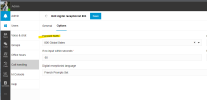
1676040732941.png
 
OK as an update we have decided to allow extensions starting with 0 again. The reason it was done is because using 0 or 00 messes with international dial out prefixes and creates some outbound rule issues.

However, if you know what you are doing sometimes its good to have it. So we are putting it back in the management console in update 7 but leaving it out from the new web admin....

hope this helps.
 
am i remembering correctly that with update 6, you could deliver SMS to an auto attendant again and have it forward to a special ring group? right now we have a group that uses 3cx for offroad recovery dispatching (1 phone number, 20 dispatchers). i have to deliver all their calls to a SMS ring group for 1 second (so they can receive SMS) so all their phones ring for 1 second and hang up on them before it drops to the auto attendant for callers to reach the right people. if we could change the flowroute sip trunk back to going straight to auto attendant, and forward SMS to the dispatch team, that would be ideal. (this is how it used to work prior to SP5). i recall hearing that would work again in a webinar but can't seem to find the setting.
hold that thought, i found it in the web client. that is going to take some time to get used to.
 
  • Haha
Reactions: David B. Kite
The question
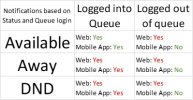
I am not sure if this is a change in U6, or if it has always been this way. We noticed this morning that when SMS is routed to a queue, all queue users receive notifications of new SMS messages on their desktop app and in the web client, even when not logged into the queue and regardless of the extension status. Mobile app notification ignore the extension status, and only consider the queue login status. Is this by design? Should I post this some place more appropriate as a suggested change?

The need
A few of our customers need to not have SMS messages going to some queue members during certain days and times, and this does not appear to be possible currently without removing them from the queue.

Testing
I have attached the results test matrix. I have red text for the notifications results for SMS that I think are opposite of voice calls ringing to a queue.

Thank You for any suggestions.
 

Attachments

  • SMS Notification Matrix.jpg
    SMS Notification Matrix.jpg
    31.6 KB · Views: 7
Yes thats a good question.

The message is always posted to the queue as its not real time and any agent can then answer if they want or not.

However, they will only receive a push notification if they are logged in. You can make logged in status in sync with extension status

Let me know if this is as its working on your install.
 
OK as an update we have decided to allow extensions starting with 0 again. The reason it was done is because using 0 or 00 messes with international dial out prefixes and creates some outbound rule issues.

However, if you know what you are doing sometimes its good to have it. So we are putting it back in the management console in update 7 but leaving it out from the new web admin....

hope this helps.
Good to know currently migrating customer like for like and a over half the extensions start with 0 or 00 ..is there a date for update 7 ?
 

Forum statistics

Threads
111,973
Messages
590,079
Members
164,898
Latest member
grahamaskew