
Nick Galea

About Nick Galea - Page 84

CEO, 3CX

Nick is the CEO and Founder of 3CX. His love for innovation, visionary leadership, and 35 years in the software development industry have helped drive 3CX towards becoming one of the top communications systems across the globe. Presently, he continues this mission by placing most of his energy towards company operations, product strategy and vision.

How Can I View SIP Traffic With the Wireshark Network Capture Tool?

To troubleshoot or analyze a particular problem, it is often handy to take a closer look at the actual SIP traffic being sent to and from 3CX Phone System or the 3CX client. For example: You can check whether SIP traffic is arriving at the server, and thus verify that traffic is not blocked by a firewall on the client or by a firewall sitting in between the server and the VOIP [...]
By |March 4th, 2009|Comments Off on How Can I View SIP Traffic With the Wireshark Network Capture Tool?

How do I install Microsoft Fax services on Windows Server 2003

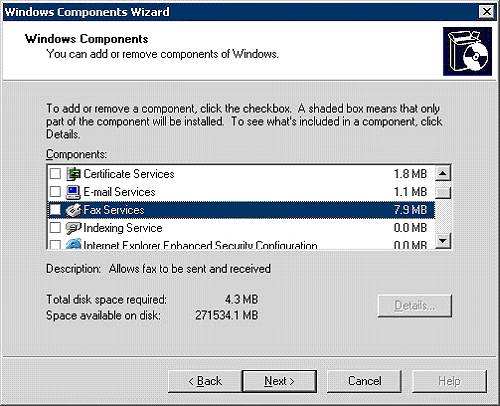
Note: The 3CX Fax Sending module is deprecated, and no longer supported. This article is for informational/historic purposes only. This guide is imporant to be able to enable Fax on Windows Server 2003 The Fax Sending module can then be installed on this machine and can be used to send faxes through Microsoft Fax Step1: Enable Windows Fax Go to Control Panel, Add Remove program [...]

By |March 1st, 2009|Comments Off on How do I install Microsoft Fax services on Windows Server 2003

When and How Can I Switch Off STUN Resolution?

STUN resolution is necessary for the PBX to understand what it's public IP Address is, and what port mappings are in effect for Media (to attempt NAT traversal when port forwarding is not implemented). STUN resolution may be disabled when: No External entities are in use (no bridges, voip providers, extensions) AND/OR Static Port Forwarding is in place for reliable media exchan [...]

By |March 1st, 2009|Comments Off on When and How Can I Switch Off STUN Resolution?

How do I install Microsoft Fax services on Windows Server 2008?

Note: The 3CX Fax Sending module is deprecated, and no longer supported. This article is for informational/historic purposes only. Windows Server 2008 needs to have the fax services role enabled to be able to use the 3CX Fax sending module to send faxes via Microsoft Fax. This document applies to Windows Server 2008, Server 2008 R2, SBS Server 2008 Access Server Manager. (Admin [...]

By |March 1st, 2009|Comments Off on How do I install Microsoft Fax services on Windows Server 2008?

What Call Progress Tones should I enter for my country?

Call Progress tones are audible tones used by the public switched telephone network (PSTN) central office or a private branch exchange (PBX) to signal calling parties the status of phone calls. VoIP Gateways must understand these Call Progress Tones in order to detect a busy tone, dial tone or hangup correctly. Unfortunately these Call Progress Tones can vary per country, and i [...]

By |March 1st, 2009|Comments Off on What Call Progress Tones should I enter for my country?

How to test a VoIP gateway

General Reset gateway to factory default and ensure you are running the latest firmware. Review vendor documentation and assign a IP / Subnet mask / default router or gateway / DNS entries to the device. Ensure you are documenting all this with notes and screenshots for eventual publication as an FAQ. Disable any automatic firmware upgrades to ensure the device remains on the t [...]

By |March 1st, 2009|Comments Off on How to test a VoIP gateway

3CX Phone System 7.1 Beta 1

The top 3 features are: 3CX Assistant - This utility is installed on the users desktop and allows users complete call control, as well as extensive presence and queue information. 3CX assistant works in tandem with a software or hardware IP phone, or even an analog phone (using ATA or FXS Gateway) and gives users the ability to pick up, divert, transfer and park calls with a mo [...]

By |February 26th, 2009|Comments Off on 3CX Phone System 7.1 Beta 1

How do I install the Microsoft Windows Vista fax client?

System requirements for the clients: Windows Fax and Scan should be installed. Print Services should also be enabled. The Fax printer on the Server machine should be shared to network users. Network Users should be granted permission to be able to print on this Fax Printer. To install the client: Click on Start, Programs and click on 'Windows Fax and Scan'. Select 'Fax Accounts [...]

By |February 24th, 2009|Comments Off on How do I install the Microsoft Windows Vista fax client?

3CX Launches YouTube Channel with Technical VoIP Nuggets

Innovative video clips provide FREE online visual training on VoIP, SIP and 3CX IP PBX London – 17 February, 2009 - 3CX (www.3cx.com) the international developer of telecommunications software has announced the launch of its Youtube channel, which contains a series of technical videos called “VoIP Nuggets”. These are short video clips, published on Youtube, which provide online [...]

By |February 17th, 2009|Comments Off on 3CX Launches YouTube Channel with Technical VoIP Nuggets

Magically Expanding Call Queues

One of my favorite things about 3CX is that it is so easy to get creative about how we leverage the great features the product has to offer. It never ceases to amaze me how I can build some fairly complex call handling logic using just a handful of basic features built on each other in succession. A few simple features, when combined, give us a whole new function we hadn’t thou [...]

By |February 17th, 2009|Comments Off on Magically Expanding Call Queues