




To understand why information might seem to be inconsistent between reports, let's first take a better look at the information provided in each report. The Call Log Report provides a list of calls that have been affected in the time period specified. On the other hand, the Extension Statistics Report is a summary report showing how many inbound and outbound calls have been made [...]
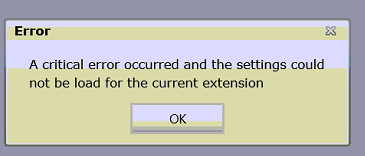
When loading 3CX MyPhone, you might encounter the following error: A critical error occurred and the settings could not be load for the current extension A screen shot of the error is shown below. Solution This problem is caused when you have Microsoft Visual Studio installed on the same machine running 3CX Phone System. Perform one of the following to solve the problem: Un-ins [...]

In general, iPhone prioritizes voice (GSM) calls over data traffic, and VoIP calls such as the ones made using 3CXPhone are perceived as data traffic. The following scenarios have been observed when a GSM call and a VoIP call (on 3CXPhone for iPhone) occur at the same time on an iPhone. If during a VoIP call, a Voice (GSM) call is received, it will be given priority over the Vo [...]

Group Policies provide the ability to deploy applications and configurations across hundreds or even thousands of computers in an organization. It is very important that procedures like these are tested thoroughly in a non-production environment before it goes live. This article describes how to distribute 3CX MyPhone Silverlight Out of Browser on your network or to each user o [...]

The 3CX Server Activity Log allows filtering of log entries, which comes in handy when troubleshooting busy phone systems where multiple extensions and gateways might be interacting with the 3CX Phone System simultaneously. Filter by Log Type One of the new features is filtering by entry type. A log entry can be categorized as either Error, Warning or Informational. In addition [...]
There are situations when you are making an outbound call and you need to know which outbound rule is being matched for the call. When you are using multiple outbound rules, it might be difficult to figure out which rules are being used. You might need to determine this in order to configure priorities. You can find out which outbound rule is being used using the 3CX Server Act [...]
In this post, we will show you how to find out why a call to another extension is failing, and 3CX is indicating that the called party is busy. Reproduce the problem by making a call to the extension number causing the problem. Load the 3CX Management Console. Go to the "Server Activity Log" node. At this point, you have two options – filter by one of the extensions or filter b [...]
In this scenario, we are going to show you how to use the 3CX Server Activity Log to identify why a call to another extension is failing. In our scenario, the phone of the calling party shows "Forbidden" when the call is made, while the phone of the called party will never ring. The procedure described below can be used to troubleshoot similar situations. Proceed as follows: As [...]
In this troubleshooting scenario, we are going to use the 3CX Server Activity Log to troubleshoot a situation where a user is trying to make an outbound call, however the call is terminated immediately and he receives the error: "Destination not found" on his phone. Load the 3CX Management Console. Ask the caller to try and make the call again, reproducing the problem. Go to th [...]
The 3CX Activity Log is an important troubleshooting tool that can help you identify the cause of simple (and possibly not so simple) issues. In this example, we have a scenario where a Director (having extension 100) is trying to call another extension (120), however the call is being transferred immediately to voicemail. Here is how to troubleshoot such a situation using the [...]

 Copyright © 2026