





Use prompts, live PBX context and role-based actions to guide every conversation.
3CX AI Agents can do more than answer questions. With agentic tools, they can use live PBX information and take supported actions during a conversation. This means an AI Agent can understand what a caller needs, find the right destination, search a Knowledge Source, or complete a supported handoff without relying on a fixed menu flow.
For Admins, the main benefit is control. Keep the default behaviour or add prompt instructions when a workflow needs a specific sequence or outcome. Read on to learn more.
Using Agentic Tools to Move from Conversation to Action
Agentic tools are functions an AI Agent can use when an action is required. Depending on the AI Agent type, these can include:
- Finding directory information
- Checking Route by Topic entries or current date and time
- Transferring a call
- Sending a notification
- Storing the detected language
- Searching a configured Knowledge Source
The AI Agent already knows which tools are available. Admins don’t need to list every tool in a standard prompt. Add instructions when you want to control a specific workflow, define an order of actions, or tell the agent how to handle a particular request.
Route Callers by Topic
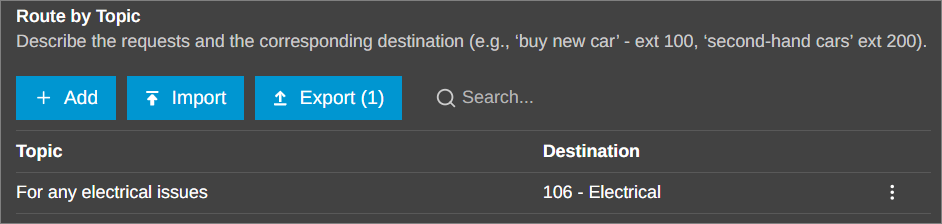
Route by Topic lets the AI Agent turn a caller’s request into a direct routing decision. For example, if a caller asks about billing, the AI Agent can identify the topic and connect them to the configured billing destination. This reduces the need for callers to work through menu options and gives Admins a simple way to map common requests to the right destination.
Guide the Agent with Clear Prompt Instructions
Start with the outcome you want. If a caller asks for a department or describes a problem, you can tell the agent to check the configured topics first and resolve the handoff destination without giving a long informational answer.
This approach keeps the prompt readable while giving the agent a clear decision path: understand the request, consult the relevant PBX information and then take the supported action.
Add Conditional Logic with Mustache Syntax
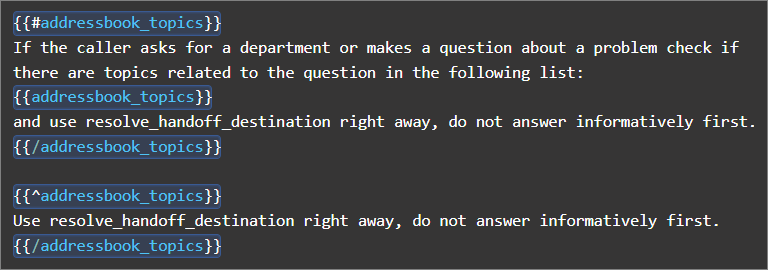
Use simple 'if-then' conditions to guide your AI. For example, 'If a department is selected, connect the caller directly; otherwise, ask for more information.' This helps the agent make quick, smart decisions based on the situation.
Match Workflow to AI Agent Role & Channel
Available tools depend on the AI Agent role. AI Receptionist, AI Personal Assistant and AI Customer Service Agent workflows share many actions, but some tools are specific to the role. PA workflow can classify an incoming request before handoff, while other routing actions depend on the selected agent type.
The same prompt is also used across voice and text conversations. Most information and decision tools can work across both channels. Voice-specific actions, such as sending a caller to voicemail, apply only to calls.
Admins should therefore build the workflow around both: the AI Agent role and the channel where it will be used.
Example: Announce the Call Duration
Agentic tools can also be combined with prompt instructions for more specific workflows. An AI Agent can use the get_current_datetime tool at the beginning and end of a call. The prompt can then instruct it to calculate and announce the call duration before completing the final action. This is one example of how a tool can be used with a focused prompt.
- Before speaking, you MUST call get_current_datetime and make a note of the call start time......# Call end
- Before performing the final action that ends the conversation (such as creating an email, transferring the call, or ending the call), you MUST call get_current_datetime, calculate the minutes since the call start and anounce this duration.
Read the guide for the full list of supported tools and more configuration examples.
Build a Focused AI Workflow
A good AI Agent prompt should define the outcome without trying to control every part of the conversation. When configuring a workflow:
- Decide what the AI Agent should achieve
- Identify which PBX information it needs
- Add conditions only where the order or outcome matters
- Test with realistic caller requests
- Check both the normal route and fallback behaviour
With the right tools and a clear prompt, a 3CX AI Agent can move from understanding a caller’s request to taking the next supported action within the same conversation.
Join the Discussion
Join the 3CX discussion in our dedicated Partner or Customer Forums. Follow us on X and LinkedIn to stay-up-to date on latest news and feature releases.









 Copyright © 2026