




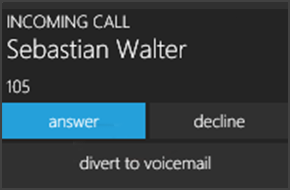
The Call Alert Popup notifies you of an incoming call without stealing focus and allows you to see who is calling. From the popup you can answer, decline or divert the call to voicemail. Using the Call Alert Popup To use the Call Alert Popup follow these steps: Minimize the 3CXPhone for Windows client to the notification area of the taskbar by clicking "X" on the upper right co [...]

Version 12 SP5 is no longer available for download. To download the updated version click here. We are pleased to announce a new update for 3CX Phone System 12. Service Pack 5 is now available for download directly from the 3CX Phone System Management Console. Special focus was made on User interface improvements to the 3CXPhone clients for Windows, iOS, Android. Fixes Improved [...]

3CX Phone System Pro customers can integrate 3CX Phone System and customer relationship management (CRM) systems to achieve improved productivity and to offer an enhanced customer experience. With customer service being a key differentiator in today’s competitive global market, the 3CX CRM Module offers great returns for all sizes of business by enabling them to be truly custom [...]
The following document is intended for VoIP Provider Engineers. It highlights relevant information on how to generate templates for the 3CX Phone System. The templates contain the most common set of parameters as observed during validation and verification testing. Introduction The majority of providers today, when interpreting signals, use a standard set of parameters. If a ne [...]

3CX and 3CX Distributor, Göztür Anonim Şirketi are organising a free 3CX Product Training in Istanbul, this May. 3CX and Göztür Anonim Şirketi would like to invite all new or active 3CX Partners to attend this training as this event is not only free but it also provides the perfect opportunity for all 3CX Partners to learn how to generate profit from selling 3CX Phone System. L [...]

The release of 3CX Phone System 12 also marked the release of new clients for Android and iPhone. These clients take advantage of a new feature in 3CX Phone System 12, called Push Technology. Using 3CX Phone System's 12 Push Technology will help you avoid missing phone calls. 3CX Phone System 12 Push Technology Push technology is a way of sending information to the user instea [...]

UPDATE: 25 April 13:15 (UTC +2) All 3CX partners and existing Version 12 3CX Users can now signup for a free 3CX Webmeeting account Thank you to all our Partners who gave their feedback on 3CX WebMeeting Alpha. We have listened to your suggestions and have today released 3CX WebMeeting Alpha 2 with the fixes listed below, making our video conferencing feature more accessible an [...]

Conference calls allow you to easily setup a call between multiple users – up to 32 callers (licence permitting). Although many conference call services exist, it’s often easier and cheaper to host your own audio conferences. You can set-up Ad-hoc conference calls, without the need to reserve a conference room. This has been done to simplify the set-up of conference calls. If y [...]

You can manage your voicemail using any Desk Phone, make or model, configured on your extension, by dialing “999” (3CX Phone System default). A voice menu system will ask you to enter your Personal Identification Number (PIN) followed by "#". The initial options you are presented with, are the following: Dial * to play your messages. Dial “9” to go to options. Dial pound “#” to [...]
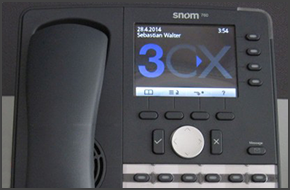
In this example we will demonstrate how to perform a blind and attended (consultative) transfer using a Snom 760. This procedure applies to Snom 760, 720, 715 and 710. Note: A Blind Transfer is a transfer to another extension without actually initiating a call to the end destination. The call is blindly transferred to the destination. By comparison, an attended transfer is a tr [...]

 Copyright © 2026