



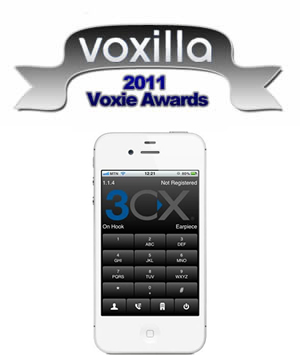
3CXPhone for Windows is no longer available for download. To download the updated version click here. 3CXPhone for iPhone has won the Voxie Best iOS VoIP App 2011 Award out of a whole host of VoIP based apps from within the Apple App Store. “Few apps are as powerful as 3CXPhone for iPhone. If your office is using the terrific 3CX Windows-based PBX, then putting this a [...]
In Part One of the Using 3CX MyPhone video, you will see a general overview on how to use 3CX MyPhone. We'll also take a closer look at some of the features it provides and how you can make the best use of them, such as how to handle queue calls, your voice mails, the Call History report and your Phonebook. Click here for Using 3CX MyPhone part two. Skills Covered by thi [...]
3CX Phone System needs to be able to interact with services on the server where it is installed for proper functionality. In some cases, Anti-Virus software can stop 3CX Phone System from accomplishing this. This can cause certain issues where voice mails aren't recorded or saved properly. In this example we will configure AVG Internet Security 2012 so that it doesn't interrupt [...]

When Pluss, the UK’s largest social enterprise, needed to buy and install a 270 handset VoIP phone system in record time, they chose 3CX. The project went so well that they started a commercial arm to their IT department called Pluss Connect. Pluss Connect is a 3CX Certified Partner and aims to help other social firms and charities across the UK with their telephony requirem [...]

This article describes how to deploy "3CXMyPhoneDesktopComponents" via Group Policy Management Console in Windows Server 2008. Prerequisites Each client computer must have the following applications installed: Windows installer 4.5 or higher Microsoft .NET Framework 4 Extended (FULL) Microsoft Silverlight Visual Studio Tools for Office 2003/2007/2010. More information on VSTO i [...]

Kindly note that the 3CX Support Center shall be operating normally during the festive season with the exception of the days below: 21st December - Open until 1:30PM Eastern Standard time / 7:30pm Central European Time 24th December - Closed 25th December - Closed 26th December - Closed 31st December - Closed 1st January - Closed All Support Center Operations shall return to no [...]

Castelnou Aparthotel uses VoIP Hotel PBX, 3CX Phone System and the 3CX Hotel Module to lower its hotel phone bills London, UK, and Ghent, Belgium, December 9th 2011 – 3CX, developer of the award-winning Windows VoIP PBX 3CX Phone System, has today announced that 3CX Phone System with the 3CX Hotel Module has been implemented in the Castelnou Aparthotel, saving the hotel 75% [...]

Have you read 3CX Partner Kerry Garrison's 3CX Version 10 Book? It's a fantastic read, designed to take you from installing and configuring 3CX Phone System to understanding the best practices for deployment and development [...]
[...]
3CX is pleased to announce a new release of 3CX Phone System 10, build 22686. Service Pack 5 fixes numerous 3CX Wallboard issues and also adds a new and important caller ID feature. To download this update, simply login to the 3CX Windows Management Console from Start, All Programs, 3CX Phone System, Windows Management Console and navigate to the 3CX Phone System Updates nod [...]

3CX expands operations with new office to target and serve the South African market London, UK and Centurion, South Africa - December 7th 2011 - 3CX, international telecommunications developer of Windows-based PBX software, today announced that it has opened an office in Centurion, South Africa, to meet the high demands in the region. [...]
[...]
 Copyright © 2026