




London, 11 March 2009 – 3CX (www.3cx.com), the international developer of the award-winning 3CX Phone System for Windows has announced a distribution agreement with Halokwadrat, a distributor of quality voice over IP solutions in Poland. “Halokwadrat is an established and innovative distributor of VoIP products in Poland and we are delighted to be able to partner with Halokwadr [...]
3CX Phone System v7.1 is nearing release - we have ironed out pretty much all remaining issues and we recommend this build. Here is the change log: Added: Japanese Language files Added: Gateway for the Linksys 3102 gateway with tone sets added for various countries Added: New startup page for the Call Reporter Added: Two additional reports - Call Statistics and Agent Statistics [...]

To troubleshoot or analyze a particular problem, it is often handy to take a closer look at the actual SIP traffic being sent to and from 3CX Phone System or the 3CX client. For example: You can check whether SIP traffic is arriving at the server, and thus verify that traffic is not blocked by a firewall on the client or by a firewall sitting in between the server and the VOIP [...]
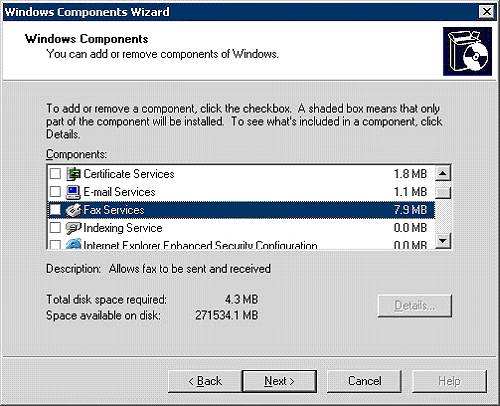
Note: The 3CX Fax Sending module is deprecated, and no longer supported. This article is for informational/historic purposes only. This guide is imporant to be able to enable Fax on Windows Server 2003 The Fax Sending module can then be installed on this machine and can be used to send faxes through Microsoft Fax Step1: Enable Windows Fax Go to Control Panel, Add Remove program [...]
STUN resolution is necessary for the PBX to understand what it's public IP Address is, and what port mappings are in effect for Media (to attempt NAT traversal when port forwarding is not implemented). STUN resolution may be disabled when: No External entities are in use (no bridges, voip providers, extensions) AND/OR Static Port Forwarding is in place for reliable media exchan [...]

Note: The 3CX Fax Sending module is deprecated, and no longer supported. This article is for informational/historic purposes only. Windows Server 2008 needs to have the fax services role enabled to be able to use the 3CX Fax sending module to send faxes via Microsoft Fax. This document applies to Windows Server 2008, Server 2008 R2, SBS Server 2008 Access Server Manager. (Admin [...]
Call Progress tones are audible tones used by the public switched telephone network (PSTN) central office or a private branch exchange (PBX) to signal calling parties the status of phone calls. VoIP Gateways must understand these Call Progress Tones in order to detect a busy tone, dial tone or hangup correctly. Unfortunately these Call Progress Tones can vary per country, and i [...]
General Reset gateway to factory default and ensure you are running the latest firmware. Review vendor documentation and assign a IP / Subnet mask / default router or gateway / DNS entries to the device. Ensure you are documenting all this with notes and screenshots for eventual publication as an FAQ. Disable any automatic firmware upgrades to ensure the device remains on the t [...]
The top 3 features are: 3CX Assistant - This utility is installed on the users desktop and allows users complete call control, as well as extensive presence and queue information. 3CX assistant works in tandem with a software or hardware IP phone, or even an analog phone (using ATA or FXS Gateway) and gives users the ability to pick up, divert, transfer and park calls with a mo [...]

System requirements for the clients: Windows Fax and Scan should be installed. Print Services should also be enabled. The Fax printer on the Server machine should be shared to network users. Network Users should be granted permission to be able to print on this Fax Printer. To install the client: Click on Start, Programs and click on 'Windows Fax and Scan'. Select 'Fax Accounts [...]

 Copyright © 2026