





Consultative & direct add conference calling, Department Phonebook & Android 16 support.
We’ve released V5.4 Beta for the 3CX Android app. This version introduces new conference call options, Department Phonebook for department-level contact sharing and support for the latest Android 16 version. Read on for more.
Consultative & Direct Conference Calls
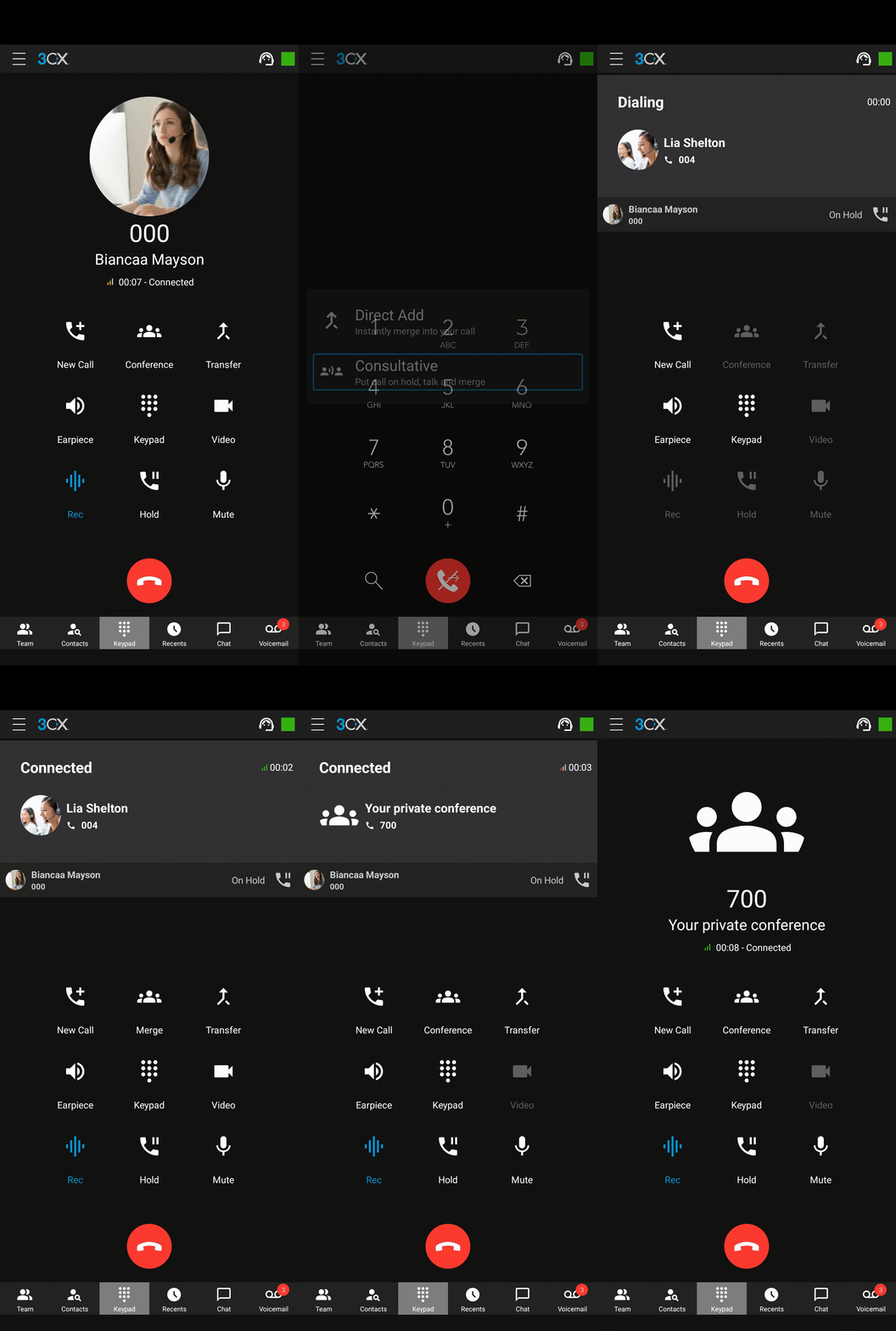
There are now 2 options when performing a conference call:
- Direct Add: After tapping on the conference button and selecting ‘Direct Add’, the user is asked to dial or search for a contact. As soon as the second caller answers, the call is immediately elevated into a conference call.
- Consultative: After tapping on the conference button and selecting ‘Consultative’, the user is asked to dial or search for a contact. As soon as the second caller answers, a conversation can take place whilst the first call is set on hold. You can switch between one call and another, until the user taps on the Merge button, which elevates the call into a conference call.
Support for Android 16
The app now supports the latest Android 16 version, which includes updates to the internal libraries, improves security and ensures reliable connections, reducing the likelihood of call drops even during peak usage times.
Department Phonebook
Users now have the ability to add contacts to their Department phonebook. These contacts are shared via other users who belong to the same department. They are not shared with the whole company.
A new checkbox is present in the Add Contact form to allow you to save a contact as a Department contact type. These contacts can be found in the Contacts tab under the Company filter.
This also gives the ability for Multi Company Mode users to utilize a company phonebook to share across users within the same company.
Note: Requires Version 20 Update 8 or later.
View the Changelog for a detailed breakdown of updates in this latest build.
Get Involved
Test these new features by joining our Android Beta program. Provide feedback directly to our development team and help shape the future of the 3CX App.
For instructions on how to install and provision the 3CX Android app, see our configuration guide.
Android Forum
Head over to the dedicated Android Forum to let us know what you think.
Follow us on X and LinkedIn to stay-up-to date on latest news and feature releases.









 Copyright © 2026