





Department phonebook, local transcription and new AI-powered receptionist.
V20 update 8 Alpha comes packed with enterprise-centric features. In this release, we introduce a separate phonebook per department - or company phonebook if it’s a multi-tenant installation, as well as the new AI-powered, Open AI-leveraged, AI Receptionist. You can also configure your own low cost transcription engine keeping your data confidential, as well as call upon reliable speaker diarization for accurate call logging. There’s also enhanced Receptionist capabilities including drag and drop, compact view and set status. If you want to instantly verify the compatibility of new or existing VoIP providers, you can now do so with the built-in VoIP provider/SIP trunk checker. There’s also more PowerBI dashboard templates and improved license expiry notifications along with a host of other business optimisations. Read on for details on each.
Department/Multi Tenant Phonebook
In addition to the company wide phonebook, you can now have a separate phonebook for each department. If you’re running a multi tenant edition of 3CX then this department phonebook will be the company phonebook for the tenant. The department phonebook is available from the apps and the client and will be used for contact matching as well.
Receptionist Rules! Drag and Drop, Compact View, Set Status

We’ve beefed up the receptionist capabilities to make life easier for the receptionist. We have a new compact view for the receptionist panel which allows a receptionist to see more extensions and inbound calls simultaneously. You can drag and drop calls to automatically transfer them.
Receptionists can now set the status for other users (if they are given the rights to) enabling them to sort call forwarding in case the user has forgotten to set themselves out of office or in office. Previously available in Windows Softphone and now available in the Web Client too.
New AI Powered Receptionist
Previewing the new AI powered Receptionist leveraging OpenAI for smart call handling and dynamic responses. The 3CX AI Receptionist answers and routes calls automatically, making sure no inquiry is missed in multiple languages.
Local Transcription Service - Data Confidential + Save $$$$
Configure your own transcription engine to ensure data remains confidential and deliver yourself massive cost savings versus using OpenAI or Google. One server with one 5090 GPUs (cost approximately $4k) can do a minimum of 15k call transcriptions per day. It is planned that this feature will require a 32SC enterprise license although the decision is not yet final.
Upon the release of update 8, our 3CX cloud transcription service will move out of BETA and into a paid service. Free voicemail transcription in the PRO edition will cease and will only be available in the enterprise edition. Prices to be announced.
Stereo Recording = Reliable Speaker Diarization
Whereas other solutions try to guess who said what, 3CX can now reliably diarize a conversation logging accurately who said what by enabling stereo recording. Stereo recording will separate both conversation tracks and therefore allow identification of who said what with 100% accuracy. It should also be noted that in the case of other transcription services the guessing of who said what requires a lot of processing by the AI model resulting in much increased cost.
The Stereo Recording is a function for 3CX Cloud Transcription & locally installed 3CX Transcription Engine only.
Because OpenAI and Google do not support this yet - stereo function cannot be enabled. To enable stereo choose 3CX and enable the "Stereo Mode" option.
VoIP Provider/SIP Trunk Checker
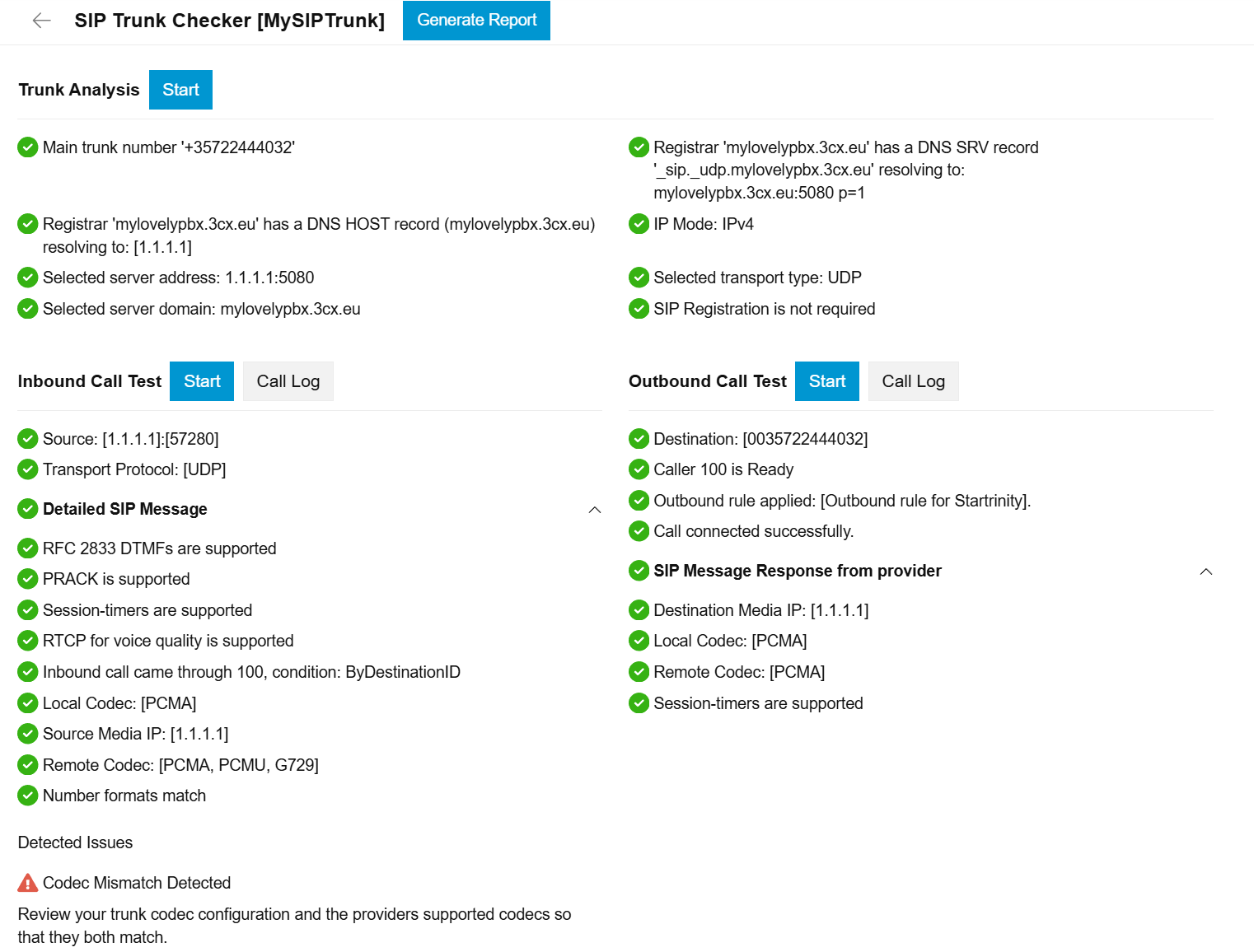
Do you have an unsupported VoIP provider you absolutely must use? Now, with the VoIP Provider Checker - a built-in tool for testing and validating SIP trunk configurations - you can instantly verify the compatibility of new or existing VoIP providers. The checker will run all important tests checking if the provider will work with 3CX or not, and show which tests have failed to allow you to escalate this to the provider.
New PowerBI Dashboards
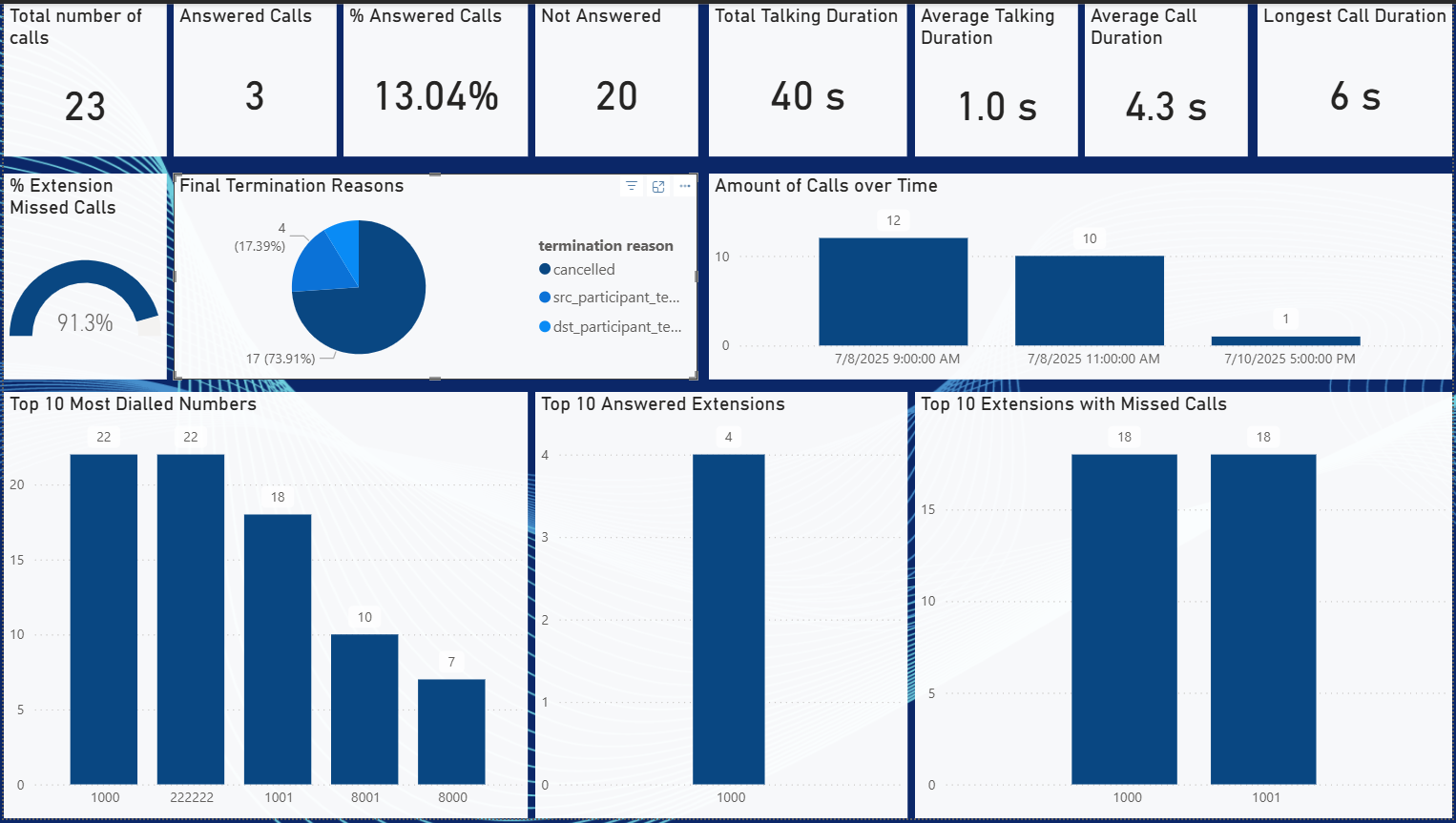
New visual dashboards for analyzing call data exported via Data Connectors are available. When your PBX data is offloaded to a Microsoft SQL Server, or Azure SQL using the 3CX Data Connectors feature, you can use the Power BI Desktop templates to easily connect and visualize your data. To learn more about PowerBI reports and Dashboard with Microsoft SQL Server/Azure SQL follow our guide. Download and try the Power BI templates here.
License Expiry Reminders

License expiry notification improvements bring clearer messaging and better visibility in the Admin Console with a new banner letting you know when your 3CX subscription is expiring and plenty of notice to renew ahead of time to avoid any unnecessary service disruptions.
Features in Brief
- Number of user extensions: Now visible in the Admin Console.
- SBC connection metrics: Added live metrics and connection details for SBCs to improve troubleshooting and monitoring.
- TLS certificate expiry exposure: TLS certificate expiry now displayed in trunk settings for proactive management.
- CRM sentiment reporting: Call sentiment is now logged in CRM call journaling when transcription is enabled.
- Conference DTMF relay: DTMF tones can now be forwarded during conferences for better integration with external systems.
- IVR – Made direct dial configurable.
- Status indicator description: improvements for people with color blindness.
- Accessible status indicator: Added accessibility improvements for user presence and status indicators in the Web Client.
- Data Connectors: Monthly frequency option: Added monthly export scheduling to all Data Connectors.
- Data Connectors performance improvements: Indexed configurations for faster offload processing and improved reliability.
- Call Manager optimizations: Enhanced call routing logic, department support, and accuracy of call duration reporting.
- Queue Manager optimizations: Simplified internal queue operations and improved call polling efficiency.
- Web Client consultative conference transfer: Enable seamless consultative transfers during active conferences.
View the complete changelog here.
Get Started with Update 8 Alpha
To try out these new features, upgrade to V20 Update 8 Alpha.
- Log in to the Admin Console
- Navigate to System > Updates
- Select Update 8 Alpha and click Download
⚠ Important: The Alpha version should be installed for evaluation purposes only. It is not recommended for production systems.
Join the Discussion
Join the 3CX discussion in our dedicated Partner or Customer Forums. Follow us on X and LinkedIn to stay-up-to date on latest news and feature releases.









 Copyright © 2026