





Reconnect, compatible with the latest Android OS & newest phones, re-designed & easy to use UI
The 3CX team has literally pushed the button with the release of the new 3CX Android App. This new app optimized for Android 10 and latest OS is available on 3CX version 16. This version completely replaces the old app which has been pushed to legacy.
The 3CX Android App now features a redesigned User Interface (UI), developed with speed and functionality in mind. It is packed with smart features such as Push Per Status allowing you to set enable or disable Push messages for each status; automatic GSM call priority over SIP calls, and secure calls by default.

Brand New UI redesign
The completely redesigned interface brings functionality to the forefront without sacrificing on design or compatibility with newer Android devices. Updated elements include an expanded and more intuitive screen, functional layout and shortcuts, as well as changes to the call screen and set status functions.
Connectivity reassured - Reconnect calls automatically
3CX will now automatically reconnect an ongoing phone call if you change between networks (for example move from WiFi to 4G) or temporarily lose the connection. All this without you having to redial the number.
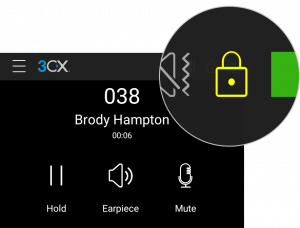
Default secure communication with the tunnel encryption capability
The 3CX Android App leverages the new tunnel encryption available in v16 to provide out-of-the-box, secure communications. Whether in your network environment or on the road, simply access your extension with the new app. Upon making a call, you will get an on-screen padlock icon, denoting the call is encrypted.
Set Push Per Status
With one simple tap, you can configure your status and set the “Accept Push Messages” option when it suits you best. You can enable or disable Push messages for each status, to get calls on your 3CX app or on another IP phone.
Other enhancements
- Quick action menu to take ownership of a chat or transfer from chat view.
- Faster loading for chat conversations and contacts.
- Attachments now stored and accessible in the “3CXPhone\3CX” device folder.
- Ability to search by Company name.
- GSM Call Priority.
- Quick Mute to silence an incoming call.
Requirements
3CX Android App is only compatible with Version 16, which must have an active maintenance or subscription. It is supported on Android 7 Nougat, Android 8 Oreo, Android 9 Pie and Android 10 Q.
If you’re running an old version of 3CX, we recommend upgrading to v16 - it's more secure, has plenty more features, and it’s free to upgrade. Alternatively, you will need to disable auto-updates from your Android device.
How to Update to v16
Click on “Updates” in the Management Console’s Dashboard, select “v16 Update 3” and click on “Download Selected” to install this update on your PBX.
Alternatively, you can get the v16 Update 3 for Windows or Linux:
- Windows: 3CX v16 Update 3.
- Linux: 3CX v16 on Debian 9 ISO – choose “Stable” on the “3CX Update Channel” screen.
Downloading 3CX Android App
Download the new 3CX Android app through the Google Play Store. Read our comprehensive Android app user guide for more info on its features and functionality.









 Copyright © 2026