





iOS 18.2 lets you set 3CX as your default calling & messaging app.
A new Beta version of the 3CX iOS App is now available for testing. With support for iOS 18.2, this update introduces the ability to set 3CX as your default phone and messaging app! Read on to learn more.
Set 3CX as Default Calling and Messaging App (iOS 18.2+)
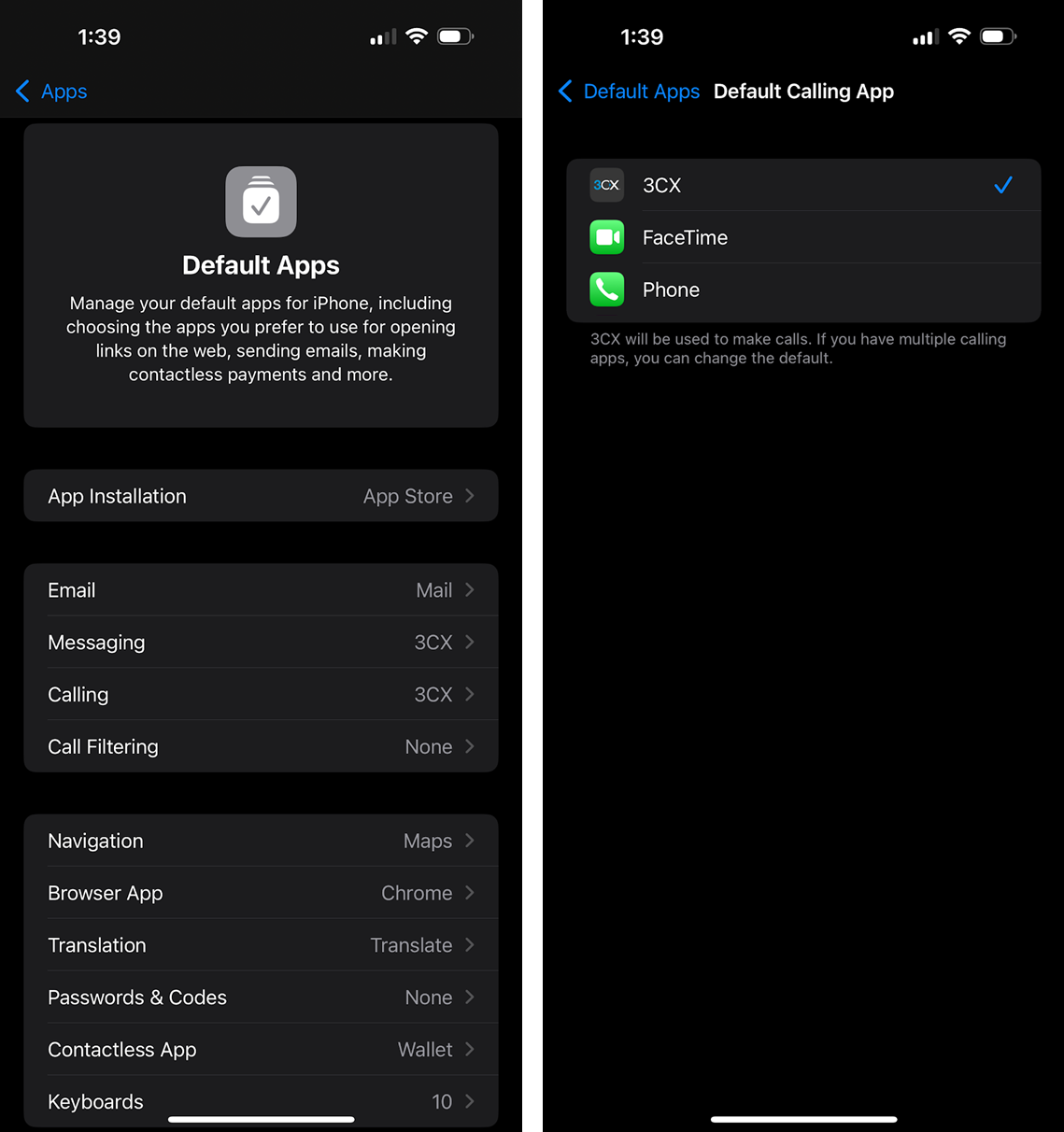
iPhone users running iOS 18.2 or later can now set 3CX as the default app for both calling and messaging. This allows immediate use of 3CX when tapping telephone numbers from Safari, Mail, Contacts, or other apps.
To set 3CX as the default:
- Go to iPhone Settings
- Tap Apps > Default Apps
- Select Calling > choose 3CX
- Select Messaging > choose 3CX
Get Involved
Join the iOS TestFlight program to test this beta and provide direct feedback to our development team.
For instructions on how to install and provision the 3CX iOS app, see our configuration guide.
View the changelog for a detailed breakdown of updates and fixes in this latest build.
iOS Forum
Head over to the dedicated iOS Forum to let us know what you think.
Follow us on X and LinkedIn to stay-up-to date on latest news and feature releases.









 Copyright © 2026