





Smoother performance and easier conference management.
Following the previous iOS App update, the latest 3CX iOS App BETA now offers full compatibility with iOS 18, just two weeks after Apple’s release of iOS 18.1 on October 28, 2024. With this update, 3CX continues to deliver unmatched reliability in its mobile apps, improving performance and enhancing conference call management - all at no additional cost.
What’s New?
Apple’s iOS 18 introduces system-wide updates and new features, such as more advanced widgets, enhanced multitasking, and upgraded privacy settings. To ensure compatibility, 3CX updates its internal libraries, aligns with structural changes, and optimizes the app for the latest performance enhancements.
Here’s how 3CX adapts to Apple’s updates:
- Better Stability: 3CX has updated its internal libraries to match iOS 18, which helps reduce crashes and makes calls run more smoothly.
- Reliable Calls: With this update, your calls stay clear and steady, with reliable audio and video quality.
- Continued Compatibility: By keeping up with iOS 18 changes, 3CX ensures a smooth, uninterrupted experience, even as Apple makes updates.
Improved Conference Call Management
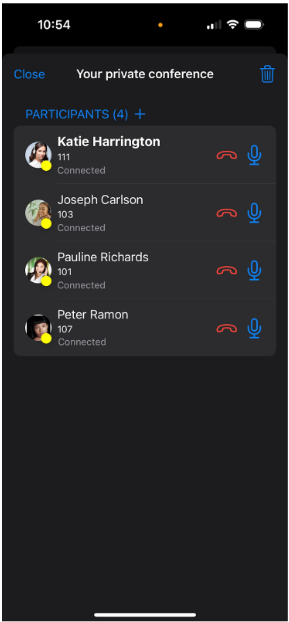
This update also improves the way you handle conference calls, giving you more control over the call and the participants.
Key Conference Features
- Larger Conferences: Host calls with three or more people, making it easy to connect with groups.
- Control Participants: Mute, redial, add, or remove people during a call, giving the host control over the conference.
- Easier Call Merging: The merge feature lets you add a new caller to an active private conference, keeping everyone connected without hassle.
How to Start and Manage a Conference Call
- Start the Call: Begin by calling any user.
- Add People: Tap the Conference button to add a second person. Once they join, you’re in a 3-way conference.
- Use Controls: Tap the Conference button again to mute, redial, or remove people as needed.
- Add More People: Tap the "+" icon next to the participant counter to add others from your phonebook or sorted by extension.
- Merge Incoming Calls: If a new caller joins, you can add them to the conference by tapping the conference button, now titled "Merge."
Important: Only the person who started the conference can control these features. Each user can only have one private conference at a time. Merge functionality is only available in Version 20 Update 3 and above.
See the full changelog here.
Try This iOS BETA
Try out this BETA and any future BETAs by joining our iOS TestFlight program.
Our TestFlight program enables you to provide feedback directly to our development team from within the app.









 Copyright © 2026