





The 3CX iOS App official release is now ready to be downloaded via the App Store. Interact with the app faster than ever before with the benefit of a new command menu, icon badges, and Live Chat actions.
Home screen shortcuts & notification badge
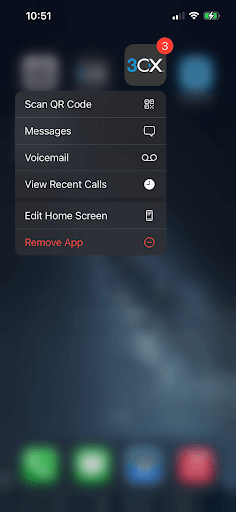
The new app now includes a command menu when long-pressing the icon on the home screen. Access messages, voicemail, and call history even quicker than ever. A notification badge is shown if any chat messages are unread making sure you are kept up to date.
Manage live chat on the go
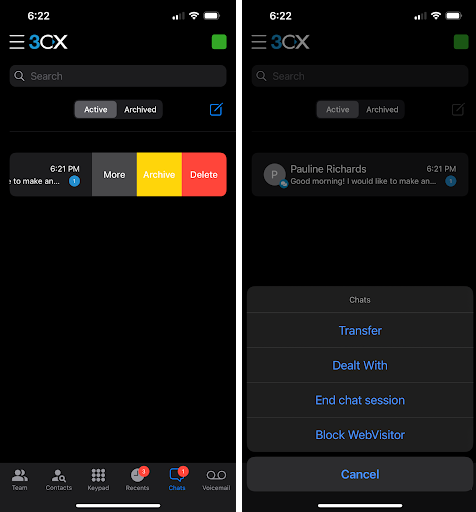
Live chat messages from your website can be managed on the move with the latest app update. Swiping the conversation and selecting ‘More’ allows users to ‘Transfer’, mark chats as ‘Dealt With’, and take ownership of messages, all from a single interface.
Other fixes and improvements
- Added profile avatar and status in the main menu
- Added button to elevate group chat to a scheduled conference
- Added "scale-and-crop" avatar on edit/create contact
- Fixed compatibility with iOS15 email, photos, documents, and calendar pickers
V16 users, upgrade to V18!
As previously communicated, the 3CX iOS App will no longer connect to Version 16 instances. Upgrade your PBX to the latest version which brings a better mobile experience, in terms of audio, reconnection functionality, and reliable call notifications.
Alternatively, you can consider our new cloud instance 3CX StartUP. Trade-in and free hosting options are available.
Install now
Download and install the app from the iOS App Store and don’t forget to leave your feedback in the 3CX forum.
View the complete changelog.









 Copyright © 2026