We are full steam ahead this summer at 3CX. The new StartUP mode is being integrated into our main 3CX build and this means quite a lot of changes and adjustments. We wanted to give you a heads up on the direction we are headed and why we have to do it this way. Despite the usual Corona headwinds we hope to deliver on the below before the end of Summer!
Shared or Dedicated? DIY or Hosted?
Shared or Dedicated?
Until now all 3CX installs were dedicated - now we have a choice of shared or dedicated. StartUP is our shared instance for smaller companies whilst Dedicated is for larger or more complex telephony requirements. StartUP is available hosted only, whilst Dedicated - PRO and Enterprise - are available Hosted by 3CX - or on-premise or in a private cloud (we call the latter two DIY). Medium term we think customers and partners should move smaller customers to StartUP as it will be much simpler to manage and support and at a lower cost. For dedicated installs we still recommend using 3CX hosted where possible because it's significantly easier to manage and support for both 3CX and partner.
Four main editions: StartUP, StartUP PRO, PRO, Enterprise
We plan to have 4 main editions - StartUP, StartUP PRO, PRO and Enterprise. With the release of StartUP the Standard edition becomes extra and to keep things simple we will be removing this edition.
Two free versions: StartUP Free, Dedicated Free (ex Standard)
We will be offering two free editions - StartUP Free up to 10 users and the “old” Standard edition up to 4SC. StartUP Free will be free of charge including hosting, whilst the new “DIY” Free edition will have just 2 months of free hosting and 4 sim calls.
Trial changes
The StartUP edition now includes free hosting forever, whilst all dedicated instances will get 2 months of free hosting. The free one year hosting offer will no longer apply.
To get a PRO trial of StartUP, a customer will have to link themselves to a partner! This will be an automatic process and should ensure high quality leads for partners in their area.
We hope to release StartUP PRO for sale in September 2022. However, meanwhile you can already use StartUP PRO free of charge, just a few features are missing.
Product Roadmap
StartUP and Dedicated - One installation/system
For our StartUP edition to be based on our main product, we had to accommodate some changes within 3CX Phone System. Short term it means that in Update 4, 5 and 6 we have some things that need to be done “under the hood” which require some adjustment until we release all the changes (i.e. for example the Management Console is not completely in sync with Web Client settings. Some settings, for example live chat, can only be done from the Web Client and for StartUP).
However after we deliver Update 6 we will be able deliver features at the same fast pace we do now and simultaneously to both versions.
Update 5 - WhatsApp, SMS
So what's coming in Update 5?
SMS/MMS Improvements
First of all we have redeveloped our SMS integration. Rather than having to configure it separately, you can now configure it at SIP trunk level. All that is needed is an API key and Webhook URL. Then all numbers become SMS enabled (for the US, it works differently in Europe). Initially we will be supporting DIDLogic, Voxtelesys, CloudCo, Telnyx (3rd party supported only) and Bandwidth. We will have a public document for providers on how they can interface with our SMS functionality. The old “separate” SMS functionality will be phased out in time and you will have to reconfigure SMS in the new way.
WhatsApp Integration
Yes! WhatsApp integration. Mark Zuckerberg personally announced a phenomenal new API that makes this easy to do and support. So how it will work is that you will be able to connect your WhatsApp Business account via a webhook to 3CX and answer any WhatsApp messages with your whole team via 3CX! There are some WhatsApp limitations, for example you must answer the message within 24 hours. If you want to prepare you can start by setting up a WhatsApp Business Account as this will be a requirement for sure.
New Live Chat UI
In Update 4 we greatly improved the backend and “plumbing” of our Live Chat. We didn't have time to improve the actual look and feel of the live chat bubble as well as the 3CX Talk interface. We will address this in Update 5 to make it much better looking. However, unfortunately dedicated instance users will not have the same chat bubble configuration options until Update 6.
Web Client Update
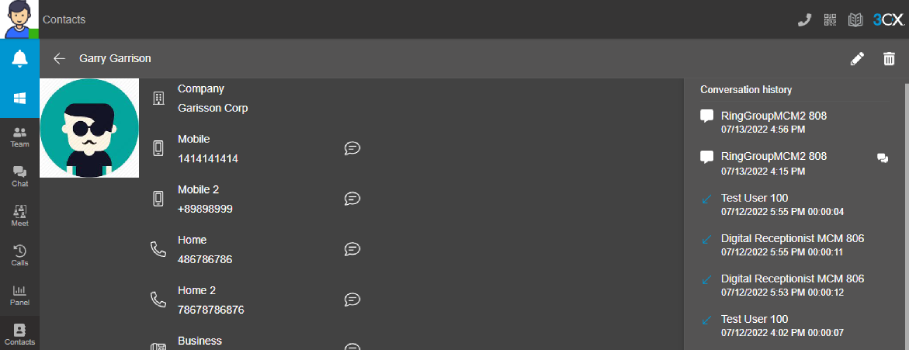
New contact screen with contact history
In between Update 5 and 6 we hope to release a Web Client update. There will be a great number of interesting new features such as better client-based CRM integration (easy to integrate with any CRM for just caller ID to contact lookup), answer templates for chats, call/chat history in chats and contacts (so you can quickly see what the comms history was for a contact).
Update 6 - Group / StartUP mode
StartUP / Group mode
3CX StartUP is in effect a 3CX Group on steroids. Many of the 3CX StartUP features are also useful in dedicated deployments. Separating out users into a dedicated group allows for more granular delegation of management rights.
It also has allowed us to make separate office hours for each group. Rather than one single set of office hours for the whole instance, you can now have separate ones for each group. This will make profile and inbound rule management MUCH easier.
Importantly group time is NOT based on system time, but on the time zone you set. This is important if you host in a data center in a different time zone or have departments in different time zones.
For example, how we will use this at 3CX is to have our US and German offices in separate groups with separate time zones and holidays. Extensions in these groups will automatically inherit these times. Calls can be routed to groups and based on these group hours routed to queues that are part of the group and inherit these office hours.
Web Client
In Update 6 we plan to revamp the current call logging interface and lay the groundwork for new improved reports.
And what is deprecated?
The Instance Manager
The Instance Manager did monitoring, but simply not good enough. There are many monitoring solutions out there that can do this job better. We feel that we have an excellent hosting option now for 3CX in which we will monitor your instances (using Prometheus) and if you want to do your own hosting you also have to do your own monitoring. You can set up Prometheus for example or get it hosted but there is no need for 3CX to build its own monitoring solution.
One thing the Instance Manager did well was allow for mass “manual” updating. In Update 4 we delivered a new function to automatically update instances one month after the release of an update. This leaves more time for an update to mature but removes the need for an update to be triggered manually. In Update 5 the Instance Manager functionality will be taken out of the product. Some basic monitoring functions might make it back into the customer portal over time.
Apps will no longer connect to V16
Just as a reminder in our blog post, new versions of our apps are now optimized for v18 and will no longer connect to v16. If you have customers on v16 still using our apps you have to move them in the coming 2 weeks!
That’s it for now! Have a great summer while we ready these updates!