





V16, Update 2 is now stable and available to install. In case you missed the BETA, Update 2 includes the usual mix of core improvements and fixes as well as a milestone upgrade to the 3CX SBC (Session Border Controller). Also added is a quick reference guide for users, attached to the welcome email and available in all main languages. And to sweeten this release even more, the latest 3CX Live Chat & Talk has some new cool customization tricks up its sleeve!
Re-engineered SBC

Update 2 brings a major upgrade to the solid and stable PBX companion, the 3CX SBC. The re-designed SBC now offers:
- Simplified install - creating a new SBC connection is now like A-B-C:
- Add an SBC connection in “Management Console” > “SIP Trunks”.
- Based on your PBX FQDN and Authentication Key ID, install the SBC at the remote site.
- Connection comes up in Management Console - restart your phones to connect and provision.
- SBC management - easily update and re-configure your SBC connections remotely in “Management Console” > “SIP Trunks”.
- SBC monitoring - each SBC connection in “Management Console” > “SIP Trunks” now provides a birds-eye view for admins, with status updates, system and connection stats, logging and email notifications.
- Upgraded legacy Linux SBCs - automatically and manually upgraded legacy Linux SBCs are auto-created as new SBC connections in “Management Console” > “SIP Trunks”. Just select the upgraded SBC(s) and click on “Push Config” to re-configure.
For more info, check out the guide on how to configure and install the new 3CX SBC.
Customized Website Chat
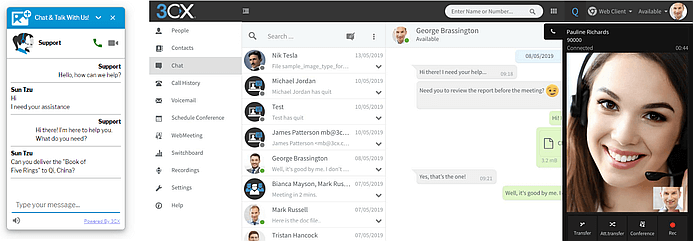
Never one to stay behind in improvements and new features, the up and coming 3CX Live Chat and Talk gets a customization boost with:
- Additional mode property - the “Chat and Phone - ignore queue ownership” allows agents to ignore the “Take” ownership in queues, enabling video and phone calls for the visitor irrespective of the conversation ownership status.
- Sound notifications - enable to make the visitor experience on your website even more interactive with audible notification when they receive a chat message.
- Chat panel size control - use the new vertical and horizontal size parameters to customize the size for the chat panel and offline form.
- Minimized styling - you can now choose between “Bubble” and “Tab” styles to customize the chat panel when minimized.
- Enable on mobile - this new option enables you to show or hide the chat panel for visitors on mobile devices.
To get the new version download or update the plugin for your WordPress site or download and install the Javascript version for non-WordPress sites.
Known Issues & Requirements
- New SBC and 3CX Live Chat & Talk require V16 Update 2 with a valid, not self-signed, SSL certificate.
- Sound notifications for 3CX Live Chat & Talk are not compatible with the Safari browser on Apple iOS.
How to Upgrade
Click on "Updates" in the Management Console's Dashboard, select “v16 Update 2” and click on "Download Selected" to install this update on your PBX.
Alternatively, you can get the v16 Update 2 for Windows or Linux below:
- Windows: 3CX v16 Update 2
- Linux: 3CX v16 on Debian 9 ISO – choose “Stable” on the “3CX Update Channel” screen.
- Debian & Raspbian manual install: follow the instructions in the Debian and Raspberry Pi install guides.
View the change log for this version and give us your feedback via the community forum.









 Copyright © 2026