





Improvements to the Web Client greatly simplify call handling, ideal for busy receptionists. We’ve also handed over status control to the User to set up their own personal schedules. All this and more, with Update 4 Beta out now.
More visibility with the new receptionist view
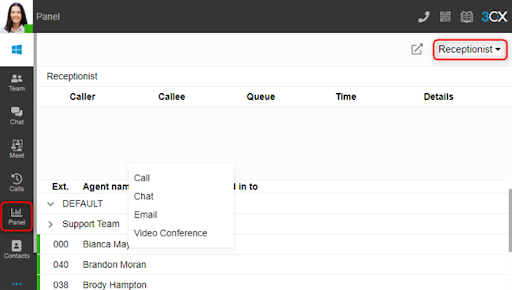
It’s now easier than ever for receptionists to handle incoming and internal communications. We’ve added a new view in the ‘Panel’ for the Web Client and Desktop App. It allows users assigned a ‘Receptionist’ role easy access to team members in their respective groups. Right-clicking on an extension displays quick actions like call, chat, email, and video conference.
New status scheduler for users

Users can now control their status by setting up their own specific schedules. The option is found in ‘Settings > Status > Status Scheduler’. The auto-switch configuration setting has been moved from the management console to the Web Client & Desktop App. Any existing configuration will remain intact until it is updated by the user via either of the client options.
Combined URLs to Talk & Meet
Users can customize their own Talk and Meet links with their chosen ‘friendly name’. The URL can be edited in the client ‘Settings > General’. Users with existing different URLs for each will continue to work. However, when the extension is edited in the management console, a prompt will require the URLs to be merged with a single friendly name.
Live Chat customization moves to the management console
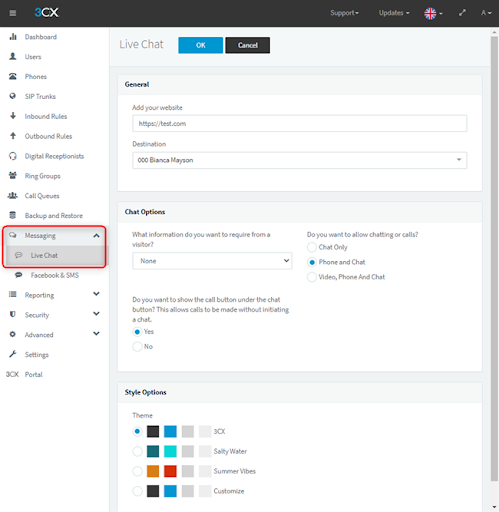
3CX Live Chat bubble options have been moved into the management console. Now admins can easily update the options and customize the styling without having to log into the website admin console.
Other fixes and improvements
- Improved memory and speed when carrying out backup & restore functions.
- Added the ability to enable contact synchronization and creation for CRM integrations
- VoIP providers are grouped into ‘Preferred’, ‘Supported’ & ‘3rd Party Vendor Supported’
- Automatic updates can now be scheduled monthly in addition to the existing daily or weekly options.
How to get V18 Update 4 Beta
Try out v18 on Debian 10 ISO. After installing v18 you can upgrade to Update 4 Beta from the Management Console. Current version 18 users can also upgrade to Update 4 Beta directly from the Management Console.
Alternatively, you can create a new, hosted trial account.
View the changelog to learn more about this version and join us in the 3CX Community Forum to tell us what you think!









 Copyright © 2026