Latest release includes Deskphone Control & Quick Access Panel.
Download the latest 3CX Windows Softphone and control your deskphone from your desktop. To use this feature a deskphone must be assigned to your extension - read our deskphone control guide for more configuration steps.
This update enables you to download the softphone as MSIX. Read the BETA release for more details on how to do this and what you need to be aware of such as ensuring you manually install updates etc.
Easy Login/out of Queues - Quick Action Panel
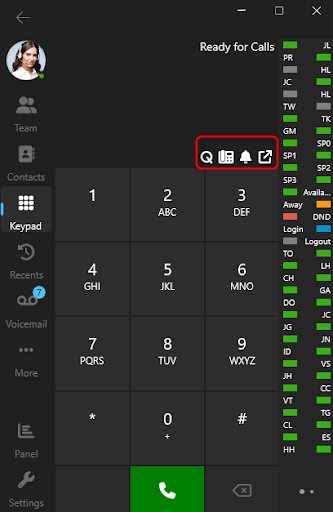
With the new quick action panel you are able to easily login/logout of queues and turn the ringer on/off. It also includes an icon showing your registered device.
Get the Latest Softphone
Download the latest Windows Softphone from the Microsoft Store or the Microsoft Store website - if you don’t have an account.
Read the Windows Softphone guide for more information on how to use and configure your softphone.
View the complete change log.