Virtual extension office hours

Status
Not open for further replies.

Don M

New User
Joined
Mar 21, 2022
Messages
4
Reaction score
0
Hi,

I have created unregistered extension numbers 901, 902, 903 and 904 which is not in 3CX system range (registered range of numbers at provider is from 700 to 899) and I try to set "Automatically switch status to available during office hours". For numbers from 700 to 899 si working smoothly but for those (not registered) it's not working.

Any ideas why this is not working?

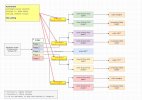
I need this number for IVR - I have this schema for my company - any better solutions?.

2022-03-24 at 09-10-59.jpg
 
If an extension is unregistered then they are considered as unavailable. You could try checking "ring my mobile simultaneously" and putting a 1 in the number to make it come online - see if that works?
 
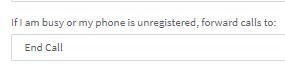
Regardless of whether the extensions are registered or not, profile status autoswitching should still occur. Just bear in mind that, when in office hours hence when the extension is available, the forwarding rule to be triggered will be the busy/unregistered forwarding rule:
1648112539273.png


I would recommend that, instead of using the Profile status and auto-switching feature, you use forwarding rules exceptions. You can set exceptions in the extension's forwarding rules to apply for specific hours only and for specific Caller IDs only (to match all calls just enter *). These exceptions supersede the profile status forwarding rules and the fact that they are all in one list will make management easier.

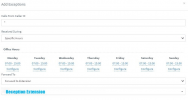
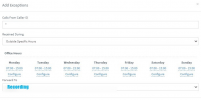
Here's what it would look like for extension 901:

1st Exception:
1648112946740.png

2nd Exception:
1648112989008.png
 
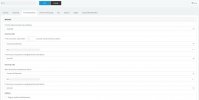
Thank you Kieferschild now status is changing according to office hours. But when status is DND does not forward calls to Voicemail. Here is my setting.

2022-03-24 at 11-09-45.jpg


Any idea?
 
Thank you Kieferschild now status is changing according to office hours. But when status is DND does not forward calls to Voicemail. Here is my setting.

View attachment 28985


Any idea?
Can you ring the extension directly and see what it does?
 
Regardless of whether the extensions are registered or not, profile status autoswitching should still occur. Just bear in mind that, when in office hours hence when the extension is available, the forwarding rule to be triggered will be the busy/unregistered forwarding rule:
View attachment 28973


I would recommend that, instead of using the Profile status and auto-switching feature, you use forwarding rules exceptions. You can set exceptions in the extension's forwarding rules to apply for specific hours only and for specific Caller IDs only (to match all calls just enter *). These exceptions supersede the profile status forwarding rules and the fact that they are all in one list will make management easier.

Here's what it would look like for extension 901:

1st Exception:
View attachment 28974

2nd Exception:
View attachment 28975

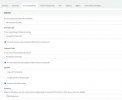
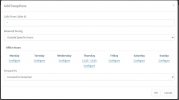
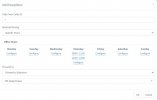
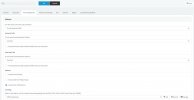
Thank you Chris. I have set Office and Specific hours but call whn specific hours occure do not forward to Voicemail. Here is my setting:

2022-03-24 at 11-28-34.jpg

2022-03-24 at 11-28-42.jpg

2022-03-24 at 11-31-23.jpg

2022-03-24 at 11-32-47.jpg

Thank you!
 
That's because you've set one rule to trigger "Outside specific hours" and the other to trigger during "Specific hours" but the time ranges you set are conflicting.

To help clarify the situation:

1. If you decide to use the Forwarding Rules Exceptions fully, you must completely forget about profile statuses and their forwarding because as previously mentioned, exceptions will override all the extension's forwarding.

2. In exceptions, the "Outside Specific Hours" option means that the routing you configured will apply always except the times you specific. So, if you specify 11:20 - 12:00 it means that the routing to voicemail will happen from 00:00 - 11:20 and from 12:00 to 23:59. It has nothing to do with office hours. I recommend checking my screenshots again, you will see that the times I set are actually the same ranges, the only difference is the option under "Received During".

3. The exception Rules order matters. They are checked from top to bottom so if you have conflicting rules the routing may change depending on the order of the rules.
 
Status
Not open for further replies.

Latest Posts

Forum statistics

Threads
111,964
Messages
590,009
Members
164,870
Latest member
nizammoktar