Use AI during calls, after calls, in your own infrastructure or to manage your PBX.
3CX V20 gives businesses several ways to use AI, depending on what they need to achieve. You can transcribe and summarise completed calls, use AI Agents during live conversations, keep transcription processing inside your own infrastructure or connect an AI tool to manage and query your PBX. Each serves a different purpose.
Read on to learn more and choose the right AI setup for your organisation.
1. After the Call: Transcribe, Summarise and Analyse
3CX AI can process recorded calls after they finish, giving teams useful information without having to listen back to every recording. It can generate:
- Transcripts of recorded calls
- AI summaries of the conversation
- Sentiment analysis to help review call outcomes
This can make call reviews faster for support, sales and call-centre teams, while giving managers clearer information to work with. 3CX V20 supports several transcription options: xAI Grok, OpenAI GPT Models, Google Speech and 3CX AI Server.
Admins can configure the transcription provider from: Admin > Integrations > Transcription. Recording and transcription settings can then be controlled for individual extensions from the Users section of the Admin Console.
2. During the Conversation: Let AI Handle Calls and Chats
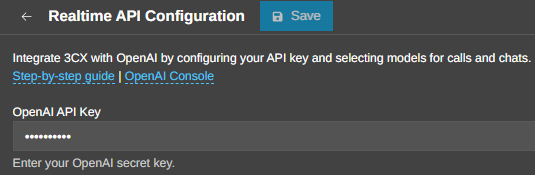
AI Agents work in real time. They can speak with callers or respond to incoming chats, answer questions and route conversations when human assistance is required. Different AI Agent roles are available for different tasks:
- AI Receptionist: Answers first-line questions and routes callers to the right destination
- AI Personal Assistant: Screens incoming calls before forwarding them to busy users
- AI Customer Care Agent: New in V20 Update 10, it can help resolve customer questions and provide first-level troubleshooting
This gives businesses more control over which conversations need a person and which can be handled by AI first. Admins can start configuring AI services from: Admin > Integrations > AI.
Give AI Agents Your Company Knowledge
AI Agents can also use Knowledge Sources to answer company-specific questions. These are approved files containing information the AI Agent can search during a conversation. This could include company policies, FAQs, product information or technical documentation. For example:
- AI Personal Assistant can use a limited knowledge base about the person it represents
- AI Receptionist can answer general company and front-desk questions before transferring the caller
- AI Customer Care Agent can use more detailed support information to answer questions and help troubleshoot issues
This allows each AI Agent to work with information relevant to its role rather than relying only on general AI knowledge.
3. Keep Transcription Processing in Your Infrastructure
For organisations with stricter privacy, regulatory or internal data requirements, the 3CX AI Server provides another option. It can be deployed on-premise or within your own cloud infrastructure and connects directly to the 3CX Phone System. This keeps transcription-related processing under your control.
Update 10 also simplifies deployment. The updated AI Server uses a client-style connection to the PBX, reducing network configuration requirements. It also adds broader hardware support and options for larger transcription deployments.
Refer to the 3CX AI Server Installation and AI Transcription configuration guides for further setup details.
4. Manage Your PBX Using AI
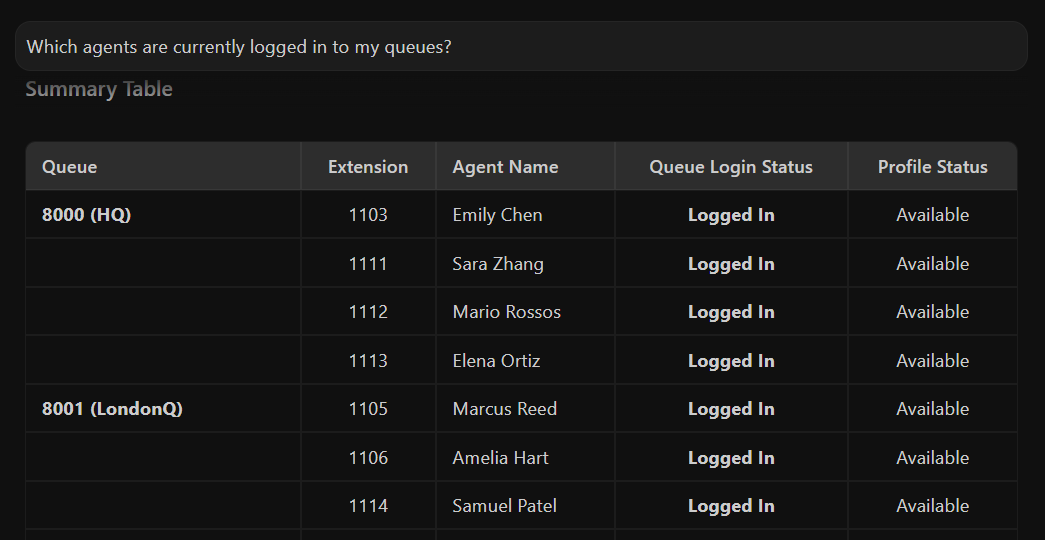
A built-in MCP server was also introduced with V20 Update 10. This allows Admins to connect supported AI tools to the PBX and use natural language to request information or perform permitted actions. Depending on the user role assigned to the connection, the AI tool can:
- Run reports
- Check live call status
- Monitor or manage calls
- Make permitted PBX configuration changes
Access remains linked to the permissions of the associated 3CX user role, giving Admins control over what the connected AI tool can do.
Choose the Right AI Path
The right setup depends on what you want AI to do. Here's a table to help you decide on your next steps:
| I want to... | Use this AI path |
|---|---|
| Get transcripts and summaries from recorded calls | AI Transcription |
| Analyse sentiment or call content after a conversation | AI Transcription |
| Let AI answer live callers | AI Receptionist |
| Let AI respond to incoming chats | AI Agents |
| Screen calls before forwarding them to key staff | AI Personal Assistant |
| Provide first-level customer support from a knowledge base | AI Customer Care Agent |
| Keep transcription processing inside my infrastructure | 3CX AI Server |
| Add transcription redundancy | 3CX AI Server |
| Request custom reports using natural language | MCP Server |
| Monitor live call status using AI | MCP Server |
| Configure PBX | MCP Server |
Join the Discussion
Join the 3CX discussion in our dedicated Partner or Customer Forums. Follow us on X and LinkedIn to stay-up-to date on latest news and feature releases.