Nick Galea

About Nick Galea - Page 65

CEO, 3CX

Nick is the CEO and Founder of 3CX. His love for innovation, visionary leadership, and 35 years in the software development industry have helped drive 3CX towards becoming one of the top communications systems across the globe. Presently, he continues this mission by placing most of his energy towards company operations, product strategy and vision.

Configuring "Play On Phone" for Outlook with 3CX Phone System

Edit 16th September 2015: Please note that 3CX Phone System only works with MS Exchange Server 2013 and 2013 SP1 If you have enabled Exchange integration inside 3CX Phone System, with Outlook 2007/2010/2013 as an Email client you can take advantage of the "Play On Phone" feature. For details about enabling 3CX Phone System and Exchange Server Integration, please refer to the fo [...]

By |December 3rd, 2010|Comments Off on Configuring "Play On Phone" for Outlook with 3CX Phone System

Upgrading the Firmware of IP Phones Network-Wide With 3CX v9 SP4

3CX Phone System Version 9 features the ability to easily upgrade your IP Phone's firmware network wide. This is done using the Phone Provisioning node located in the "Settings" section. Pre-requisites Download the latest firmware available for your phone model. It is recommended to use 3CX Tested firmwares 3CXPhone System Version 9 SP4 and up is required You can upgrade firmwa [...]

By |December 2nd, 2010|Comments Off on Upgrading the Firmware of IP Phones Network-Wide With 3CX v9 SP4

Configuring IP Phone LCD Display language with 3CX Phone System

3CX Phone System features the ability to easily change your IP Phone's LCD display language network wide or on a per phone basis. Pre-requisites: Download & install the available language packs for your phone model - Not all models require Language packs. It is recommended to use 3CX Tested firmwares - not all firmwares support language display changes 3CXPhone System Versi [...]

By |December 2nd, 2010|Comments Off on Configuring IP Phone LCD Display language with 3CX Phone System

Configuring the Time Zone on IP Phones

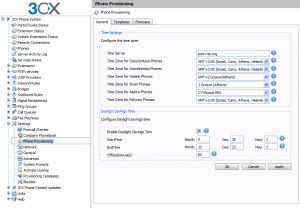
PLEASE NOTE: This blog post is only applicable for 3CX Phone System v12.5 and lower. 3CX Phone System includes functionality to easily set the Time Zone and DST (Daylight Savings Time) parameters on phones via provisioning. By default, 3CX Phone System is configured for US Eastern Time. You can manage Time Zone settings from the 3CX Management Console in the "Settings->Phone [...]

By |November 24th, 2010|Comments Off on Configuring the Time Zone on IP Phones

3CXPhone for iPhone available!

3CXPhone for iPhone is here! We’ve gotten the go-ahead from Apple and it is available immediately via the Apple Appstore. 3CXPhone for iPhone is a VoIP phone for Apple iPhone, iPads and iTouch devices running iOS 4.0 or higher. With it, you can make and receive calls via 3CX Phone System using Wifi or 3G and using your existing extension credentials. Since it’s a SIP client, yo [...]

By |November 23rd, 2010|Comments Off on 3CXPhone for iPhone available!

3CX Assistant V9 for Terminal Services

3CX is pleased to announce service 3CX Assistant client installer for Terminal Services. This installer allows you to install the 3CX Assistant on a Windows Server operating system which has been promoted to a Terminal Server. [...]

[...]
By |November 19th, 2010|Comments Off on 3CX Assistant V9 for Terminal Services

Replacing a User's VoiceMail Greeting

Sometimes a user may wish to have a professionally-created greeting message for his VoiceMailBox, rather than create it from his phone handset or headset. When a user wants to create a greeting message for his VoiceMailBox, all he needs to do is log into his VoiceMailBox, press "9" for options, and then press "8" to change his greeting message. When he saves his greeting messag [...]

By |November 12th, 2010|Comments Off on Replacing a User's VoiceMail Greeting

3CX Version 9 Service Pack 4

3CX is pleased to announce service pack 4 for version 9. This update allows you to perform all IP phone management functions from within the 3CX Management Console.  This service pack is ready for download from the 3CX Winforms Management console / Service pack updates and will upgrade your 3CXPhone System V9 to build 14901. The update takes between 5-10 minutes once downloa [...]

By |November 10th, 2010|Comments Off on 3CX Version 9 Service Pack 4

Third Party Applications for 3CX: MDLsolutions Predictive Dialer

Commercial Automated Dialer - Predictive Dialer - 3CX Based Call Center Solution MDLsolutions Dialer/Predictive Dialer - Call Center Solution is a proven Windows based comprehensive, dynamic and easy to install/configure SIP/VoIP commercial dialer/call center solution that is low cost yet extremely reliable and well supported with a comprehensive feature set, for medium size ca [...]

By |October 18th, 2010|Comments Off on Third Party Applications for 3CX: MDLsolutions Predictive Dialer