





New reports & filters, new CDR and Grafana integration.
Four new built-in reports, 10 new grafana dashboards, ability to export CDR to external database and report across installations, improved accuracy, faster data queries, and better filtering - all underpinned by the rewritten Call Detail Records (CDR) system for more powerful reporting - are just some of the highlights of Update 6 Final. Ready for production following the successful ALPHA, BETA, RC, RC2 and RC3 releases, Update 6 Final introduces the biggest reporting improvements since V20 launched, bringing back what you’ve been waiting for - and so much more. Read on for more details of what’s new, what’s coming and how to get V20 Update 6.
Four New Built-In Reports
Update 6 adds four new reports.
- Inbound Call Report - Lists incoming calls including trunk received on, DID, status (answered/unanswered), duration, ringing and talking time, and call type.
- Outbound Call Report with cost calculations - Same fields as Inbound, with additional cost calculation per call.
- User Activity - Shows answered and unanswered calls per user or group across defined time ranges.
- Call Distribution - Displays total number of inbound and outbound calls across hourly, daily, weekly, monthly, or yearly intervals.
Based on the new CDR structure they apply only to call data collected after the upgrade. Legacy reports remain available for older records.
Improved Granular Filtering and CSV Exports
Filtering got much more granular:
- Select multiple users, queues, or departments
- Filter internal vs external calls
- CSVs now include totals
- Choose any day as the start of the reporting week
- Optimized for Google Sheets and Excel to easily import and open CSV files
Grafana & Remote Database Support
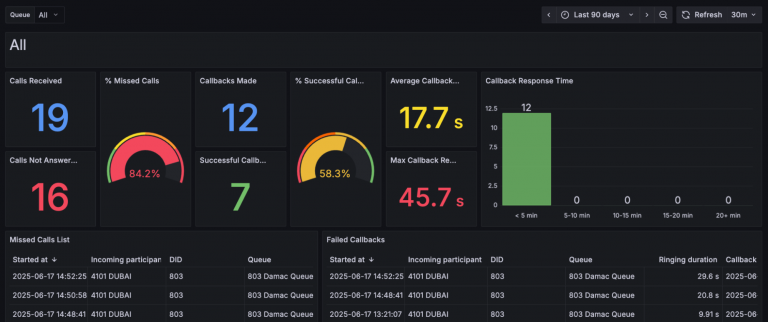
Larger deployments of 16SC+ can now export reporting data to external databases such as Google BigQuery or PostgreSQL. This includes sequential export with resume + error handling and optional purge after sync, making it easy to store call logs off of your 3CX system or use them in external custom reports and dashboards. The following reports are available via Grafana:
- Queue missed calls and callback efficiency - Tracks missed calls, returns, and callback success. Includes response times to highlight delays and follow-up speed
- Extension statistics - Breaks down call counts, talk time, and missed calls per extension
- Inbound calls - Shows inbound volume, answer rates, and call durations
- Outbound calls - Tracks outbound activity, agent talk time, and answer rates
- Inbound vs outbound call traffic analysis - Compares inbound/outbound volume, duration, and cost
- High Value calls, consumers & extensions - Shows longest and most expensive calls by agent and customer
- Missed calls and redialed callbacks - Shows missed calls, redials, response times, and handler
- Call overview - Shows total calls, top dialed numbers, answered/missed extensions, and termination reasons. Gives a quick snapshot of call activity
- Ring groups - Displays ring group stats like average ring time, call outcomes, and user activity
- Queues - Covers queue performance with stats on agent activity, call volumes and time metrics like ringing and talk time
CDR 2.0 - More Powerful Reporting
CDR 2.0 (Call Data Records) brings you better reporting. We’ve introduced a redesigned unified CDR with a simplified table structure. The new CDRs contain more and more accurate information making reporting more reliable and faster. Furthermore the system is able to write them more efficiently allowing for scaling to more sim calls per system. It forms the foundation for external data reports, CSV generation and future analytics. You can read more about how we rebuilt the CDR system and follow our cdrbilling and cdroutput guides to get started.
Other Improvements in Update 6 Final
Administrative and User Management Improvements:
- Multi Company Mode
- 16SC+ 3CX systems can now operate in either single- or multi-tenant mode
- Company-Specific Prompts: In Multi Company Mode, prompts are stored separately, with a "Shared prompts" option. More information is available in our dedicated guide.
- Impersonate Feature: System Owners can temporarily impersonate other users (excluding other System Owners) for troubleshooting. Actions are logged.
- Remote Support Link: System Owners/Admins can generate temporary, revocable remote access links for support, with email notifications and dashboard status. Access is permission-based and excludes API access.
- Request Support from Admin Console: Users with commercial licenses and support tokens can initiate support requests directly from the Admin Console. You can also use it to request support from your partner (charges are set by partner)
- Disable Operator Extension: Administrators can disable voicemail routing to the operator extension, with '*' to repeat the greeting instead.
- Customizable FAX Sender ID: The "3CX Fax Machine" identifier can be overridden with a custom string.
- Recordings Filter: A "Location" filter is added to the Recordings page to view all, archived, or local recordings.
- Expanded User Operation Rights: The "Perform receptionist operations" right now includes the ability to view and change call forwarding rules in the Windows Softphone, controlled by a new "User Operations" right.
- Web Client Edit Before Call: Users can now right-click on numbers in various sections of the Web Client and choose "Edit before call" to modify the number before dialing.
Enhanced Security Measures:
- Weak Cipher Removal: Weak CBC ciphers removed from various HTTPS, SIP TLS, WebRTC and Tunnel configurations, improving security scores.
- Weak SIP Credential Warnings: The Users page now flags extensions with weak SIP Authentication IDs or Passwords, providing recommendations and critical alerts for vulnerable configurations.
- Clearer Remote Connection Blocking: The label for blocking insecure remote connections is now more explicit.
- Faster Security Synchronization: Global Blacklist and Blocked UA list update intervals are reduced for quicker protection.
- PKCE for OAuth CRM Integrations: An extra security layer (PKCE) is implemented for OAuth integrations with supported CRMs to prevent authorization code interception.
Notes for Admins
- Google Transcription Update: New installs and upgrades will automatically use the Gemini-2.0-flash-lite model:
- Starting September 24, 2025, if you’re running Version 20 Update 1,2,3,4,5 and using Google for Transcription it will be discontinued.
- Starting from Update 6, new installs and upgrades will be adjusted to use Gemini-2.0-flash-lite, Admins do not need to do anything - 3CX does it automatically for you - so please update to u6!
- Queue Callbacks: In case of Queues with Call Back enabled, and outbound rules that allow only extensions (not departments), Admins need to add the Queue Number as part of the extension list. This has been added to protect abuse against Queue Call back.
View the complete changelog here.
Get Started With Update 6 Final
To try out these new features, upgrade to V20 Update 6 Final
- Log in to the Admin Console.
- Navigate to System > Updates.
- Select Update 6 Final and click Download.
For a fresh, on-premise installation:
- 3CX Windows Installer.
- 3CX Windows Installation Guide.
- Download the 3CX ISO.
- 3CX Linux Installation Guide.
Start a new cloud deployment here.
Join the V20 discussion in our dedicated Partner or Customer Forums. Follow us on X and LinkedIn to stay-up-to date on latest news and feature releases.









 Copyright © 2026