





3CX launches transcription and analysis engine - 3CX AI.
Acknowledging the potential of AI - and transcribing and analyzing calls for productivity and customer satisfaction - 3CX set up a specialised AI team tasked to bring the benefits of AI to 3CX users in record time, and at an affordable cost. Now, on this memorable day we release the alpha version showcasing this unique capability.
3CX AI - Call Transcription Made Affordable and In Depth
The current call transcription built into 3CX relies upon either OpenAI or Google. Two problems with that:
- Call Transcription is quite expensive. Depending upon installation size you can easily end up paying hundreds of dollars per month for transcription only. The cost is justified to some extent because transcribing calls is CPU intensive and the correct GPUs are in high demand.
- Further analysis on the actual transcribed calls is quite limited and not necessarily optimized for customer/audio calls. Currently only call summary and sentiment analysis are available but it just scores between 1 and 5 for the entire call and both participants.
Leveraging Open source models and fine tuning them for transcription - as well as leveraging our knowledge of building scalable processing power used for hosting and Web Meeting - our team was able to put together a large cluster of GPU powered machines that can transcribe more cost effectively than Google or OpenAI, but more importantly can do much more in depth analysis.
Call Analytics - Looking Ahead at Update 5
Going beyond basic transcription, in future updates 3CX AI will do much more advanced analysis of the actual call. Looking ahead, the analysis that will be available in future updates will include:
- Customer Sentiment: customer satisfaction rating
- Agent Effectiveness: operator empathy rating
- Content Analysis: Q&A, suggested follow up, products and companies mentioned, discussion topics, keywords and resolution analysis
- Call Analysis: type, intent, participants and call urgency rating
- Suggested Follow Up: action, suggestions for the call
All this data will be available for in-depth analysis through our new reporting interface which is in development for update 5.
Licensing - Temporarily Free for ENT Users
Call transcription is CPU intensive and cannot be done onboard on the 3CX machine as it would be too slow. So it needs to be offloaded to GPU machines in the cloud - and the rental of these machines is significant. Therefore, Transcription and Analytics requires additional cost depending upon the amount of files to be analyzed. We’re confident we can beat OpenAI and Google by a wide margin - but we’ve not yet finalized our costings.
Therefore, for a limited time, we’re offering all enterprise users free transcription of calls. This allows customers to trial the power of call transcription without any cost. From our side we can finalize the actual cost based on data. At some point a separate license upgrade will be required to do transcription.
Granular Transcription Settings
It's now possible to turn transcription on or off per department and to override department transcription settings per queue or ring group. This allows you to fine-tune what to transcribe. For example, you could switch on transcription for the sales department but leave it off for the accounting department.
Web Based Call Control API
A new web based call control API is available. This API is separate from the configuration API we released earlier. The Call Control API allows you to control or process an existing call. For example, it can be used to launch a call from within a CRM, or even to take a call and use AI real time to take the caller through certain steps before directing the call. Previously, implementing this solution required an experienced developer to work with the API, which added complexity and additional costs. Now, with our new approach, you can seamlessly integrate the solution. This makes it faster, easier, and more cost-effective to get up and running.
You can see more information on the call API and how to use it here.
Other Features
- Generic templates now have an SMS field - if your provider has developed SMS integration with 3CX as documented here, then you can insert the URL without needing the provider to be supported.
- Ability to record all prompts via the phone. This was not enabled in all parts of the interface, now it is.
- New call scripts - information in separate blog post to follow.
- New phone model added:
- Yealink AX83H WiFi
- New supported/updated VoIP providers
- Orange - FR
- VoiceMeUP - CA
- BT - UK
- SWISSCOM ENT. - CH
How to Set Up Your 3CX AI Transcription
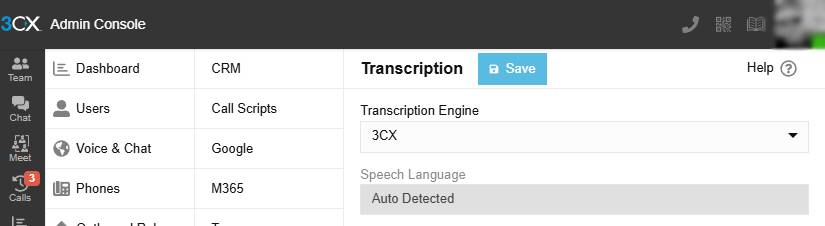
- Go to Admin Console
- Integrations > Transcription
- Select 3CX and Save
- Create a Department and select what to transcribe.
All Users, Ring Groups and Queues in that department will now be transcribing calls.
Note: It needs to be an Enterprise license.
Join the V20 discussion in our dedicated Partner or Customer Forums. Follow us on X and LinkedIn to stay-up-to date on further developments.







