





Siri can search, read & reply to messages from 3CX.
Say hello to Siri and the new iOS BETA 2 which brings even more Apple CarPlay support. We’ve now enabled Siri to find messages from a specific contact or number, read these to you and also reply if you want her to.
Read James’ Messages
This new feature is very simple to use. You simply command Siri to read a message to you, for example: “Hey Siri, find messages from James using 3CX”. Siri will read up to 15 messages including the date/time and type of conversation. You can then choose to reply to an individual message.
See it in action - it really is something!
Customizing your CarPlay Panel Tabs
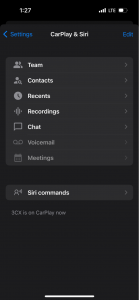
From your 3CX for iOS app, go to the Menu Button (top left) > CarPlay & Siri > Edit. From here, you can move items around to give them priority and have them displayed on the CarPlay panel.
Customizing your CarPlay Panel List
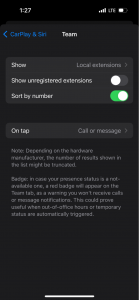
This BETA also enables you to customize and filter out some criteria when listing your CarPlay panel items.
From your 3CX iOS app tab, go to the Menu Button (top left) > CarPlay & Siri > Select a tab. This is an example “Team” tab, showing the custom criteria you can choose to have displayed:
- Show Local extensions, All extensions or Favorites
- Show unregistered extensions
- Choose to sort by number
Fixes
- Added support for iOS17.5 SDK
- Fixed: CarPlay high CPU usage and memory leak
- Fixed: CarPlay flickering when tab badge is shown
Known Issues
We have recently received a few forum posts asking why there are so few list items and tabs. This is not a 3CX limitation, but an iOS one.
- Lists have a limit of 24 items - can be less according to the car manufacturer.
- Navigation tabs have a limit of 5 items - can be less according to the car manufacturer.
To address this issue as much as we can, users are able to customize tabs and list items within the 3CX App - as described above.
Try the iOS Beta
Try out this BETA and any future BETAs by joining our iOS TestFlight program.
Our TestFlight program enables you to provide feedback directly to our development team from within the app.
View the Change Log.









 Copyright © 2026