





Ad-hoc conferences on-the-go & connection monitoring in latest iOS app.
Our last BETA has made it to the final release stage and includes a new “Connection Quality Monitoring tool” accessed directly from your app’s dialpad.
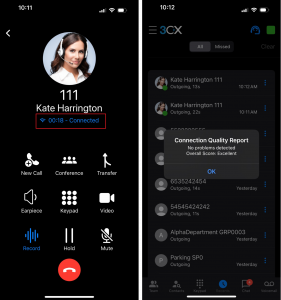
If during a call you experience any issues or glitches all you need to do is:
- Tap on the call duration label within your dialer
- A dialog will appear prompting you to start monitoring. Tap on ‘OK’
- Once the call has ended, go to your ‘Recents’ tab
- Tap on the menu button next to the recent call and tap on ‘Quality Report’ to review
Note: A more extensive report can be found in the Web Client. Login to your Web Client and go to ‘Calls’. Next to your call you will see a button ‘Show call quality report’, click on it.
Start a Conference Using CarPlay
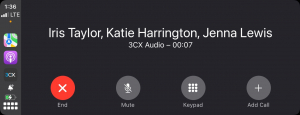
Start an ad-hoc conference, from your car. Simply say “Hey Siri, call Katie and Iris using 3CX'' - make sure you say “and” before each person’s name.
How to start a conference:
- Launch the 3CX app on CarPlay
- Say ‘Hey Siri, call Iris Taylor and Katie Harrington and Jenna Lewis using 3CX’
- You and your participants will receive a conference call
Note: Make sure your iPhone is running iOS 16 and above.
Get the Latest App
Download the new app from the App Store or upgrade your existing app from your device.
View the complete changelog here.
Let us know what you think in the iOS Forum.









 Copyright © 2026