





Shopping cart allows multiple key ordering & renewal. Bigger hosting packages too.
We’ve completely refactored the Shopping cart giving you the long awaited ability to order, renew or upgrade multiple licence keys at once before proceeding to checkout. Overall, it’s much faster too! Read on to find out more.
Easily link to a Partner to buy
Customers who wish to buy a subscription can easily link themselves to a 3CX Partner in their area. Here’s how!
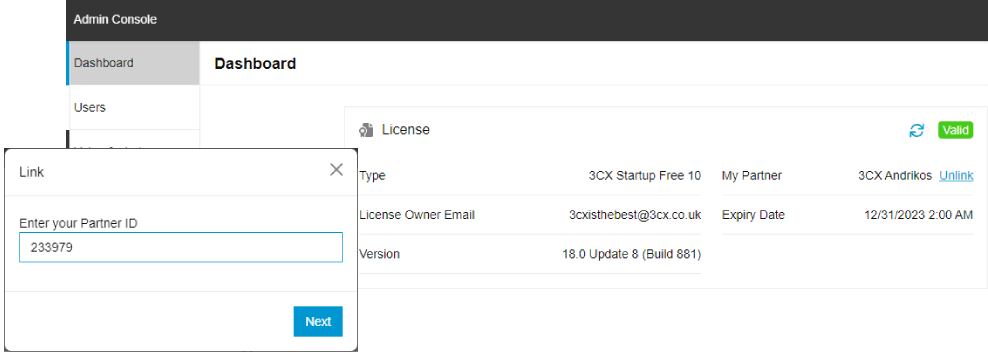
- Find a Partner in your area
- Go into your Admin Dashboard via your 3CX Web Client
- Select “link”
- Enter their Partner ID
Your 3CX Partner can now manage your 3CX account!
Upgrade your install, insert the key
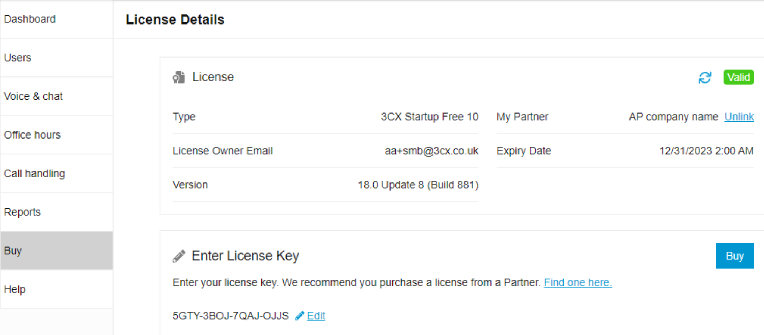
Replacing your license key
- Via your 3CX Web Client, go to the Admin Console
- Click on the “Buy” tab Or Click on License key heading
- This takes to your License key details
- Click “Edit”
- Enter the new License Key then click “Save”
Migration to 3CX Hosted made easier
The migration of your 3CX from On-premise to Hosted will now be much smoother. The FQDN of the On-premise install will automatically be transferred to your newly created Hosted instance.
Customer Portal security checked
In line with our commitments to improved security, laid out in our 7-Step security plan 'EFTA', pentesting of the portal is complete and vulnerabilities fixed. Our focus, moving forward, is to add more functions to the website and product rather than the portal itself.
Self Hosting wizard replaced by Marketplace
We’ve replaced the Self Hosting Wizard with a new deployment method that leverages the marketplaces Amazon, Google, DigitalOcean or Azure. This allows resellers to deploy using the latest available instance sizes and regions, plus it reduces the testing overhead and updates to the wizard for 3CX. Self Hosting is only recommended for organisations that already host their infrastructure in one of the leading data centres and have admins familiar with these hyperscalers.
We’re busy adding 3CX to the marketplace on OVH and Vultr. More news to follow soon. If you’re an Amazon Lightsail user you don’t have access to a marketplace, so you’ll have to follow this guide to upload a 3CX image.
Install, deploy, add trial
And finally, where before we were only taking the email of the deploying Partner who was logged in and trying to deploy a 3CX for their customer, now we’ll be asking for registration details relating to the owner of the license key before providing the key for deployment purposes. This will help eliminate issues arising from the activation process.
Stay informed
Hit the follow button on Twitter and LinkedIn for blog updates. Join us in the 3CX Community Forum to tell us what you think about the latest features!







