





This beta introduces several updates focused on visibility, control and usability.
A new Beta of the 3CX iOS App V5.3 is now available for testing. This version includes general improvements, along with new features available from Version 20 Update 7, such as voicemail transcription previews, number blocking, and SMS restrictions based on country codes. Read on for more.
View Transcription Snippets for Voicemails & Recordings
With voicemail and call recording transcription enabled in Version 20 Update 7, the iOS app now shows:
- A snippet of the transcription for voicemails
- A summary preview of recordings
- Full text available via the transcription icon
This helps quickly identify the content of a message or call without needing to play it back.
Block Numbers from Chat or Recents
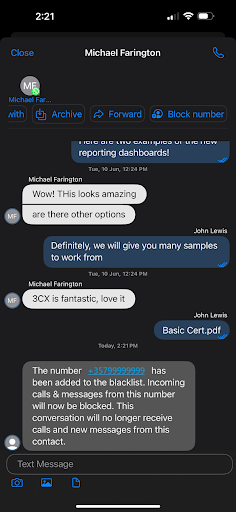
With V20 Update 7, users can now also block external, WhatsApp, and SMS contacts directly from within the app. Blocked numbers are added to the CID Blacklist and cannot contact you.
From Chats:
- Open the chat
- Tap Block number
- The number is blacklisted
From Recents:
- Tap the menu next to the number
- Select Block number > Confirm
Enforce SMS Rules with Allowed Country Codes
Outbound SMS is now restricted based on the configured “Allowed Country Codes” list. If the prefix of the destination number is not included in the list, the message is blocked and the user is shown an error in the app.
This feature is available with Version 20 Update 7.
Get Involved
Join the iOS TestFlight program to test this beta and provide direct feedback to our development team.
For instructions on how to install and provision the 3CX iOS app, see our configuration guide.
View the changelog for a detailed breakdown of updates and fixes in this latest build.
iOS Forum
Head over to the dedicated iOS Forum to let us know what you think.
Follow us on X and LinkedIn to stay-up-to date on latest news and feature releases.









 Copyright © 2026