





To finish our stream of midsummer updates with a bang, Update 3 Alpha has just been released and... it's not to be missed! Included among the numerous fixes, updates and improvements are the new built-in DNS and reconnect connectivity controls, just-released Android and iOS apps, new audio transcription options and drag-and-drop attachments in Web Client's "Chat".
Latest Update Turns the Heat Up
This new Alpha version brings these improvements and upgrades to the table:
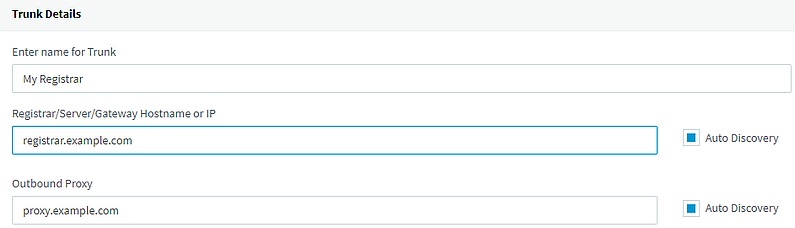
- New DNS Options for SIP Trunks - using the new "Auto Discovery" with transport and IP mode options, ensures better control and provides flexibility over DNS resolutions. As this is a major upgrade for SIP Trunks, test it out and give us your feedback.
- Ad Hoc Reconnect - use with the latest Android Beta app to seamlessly switch between WiFi and 3G/4G networks while moving around.
- Live Chat and Talk Website Code Generator - this new tool in "Settings" > "WordPress/Website Integration" enables you to specify the Live Chat and Talk options and generate the configuration to include in your website.
- Smartphone Provisioning Badges - the updated Web Client UI now includes shortcut badges for the iOS and Android apps when a smartphone has not been provisioned.
- Bridges in SIP Trunks - to further tidy up the Management Console UI, the Bridges functions is now merged into SIP trunks, along with the relevant VoIP gateways and SBCs.
- New Phones Supported - the latest Alpha adds support for the new Intelbras TIP 120 and TIP 125 phones.
You Ain't Seen Nothing Yet
Try the new Update 3 Alpha features with these recent releases for a combined effect:
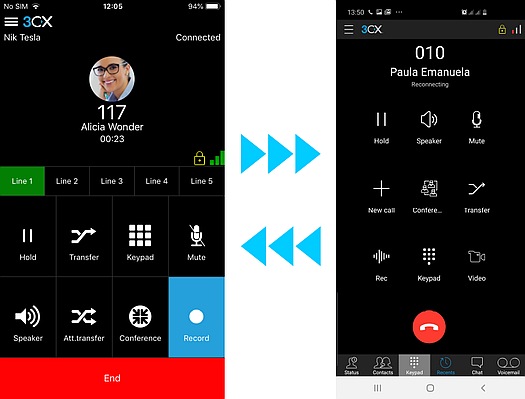
- New Android Beta App - introduces a heavily re-designed and flexible UI, secure calls via encrypted tunnel and a call reconnect feature. Join the 3CX Beta Program to get the new Beta app via the Google Play Store.
- New iOS App - brings improved IPv6 support, out-of-the-box tunnel encryption and chat functionality on par with the Web Client. More features to be added soon for feature parity with the Android app, so watch this space!
Requirements & Known Issues
- V16 Update 3 Alpha, the new Android Beta and iOS apps require a valid, not self-signed, SSL certificate.
How to Upgrade
Click on “Updates” in the Management Console’s Dashboard, select “v16 Update 3 Alpha” and click on “Download Selected” to install this update on your PBX.
Alternatively, you can get the v16 Update 3 Alpha for Windows or Linux below:
- Windows: 3CX v16 Update 3 Alpha.
- Linux: 3CX v16 on Debian 9 ISO – choose “Beta” on the “3CX Update Channel” screen.
- Debian & Raspbian manual install: follow the instructions in the Debian and Raspberry Pi install guides.
View the change log for this version and give us your feedback via the community forum.
⚠ Important: The Alpha version can be installed only for evaluation purposes and is not recommended for production systems. This version is not covered by any support SLA.









 Copyright © 2026