Add your contacts from your choice of CRM, Microsoft and / or 3CX.
Update 8 is another massive update bringing together many of the things we’ve been working on this year and complemented by our enhanced security-focused approach. From easier setup and better integration with your Office 365, to adding your contacts from your choice of CRM, Microsoft and / or 3CX, to wider reporting features direct from the new Web Client Admin Dashboard - it’s a feature-rich, major update. There’s also updates on TAPI and Plantronics Support, as well as IP phone provisioning and Customer Portal ordering. Read on for more details on each of these key updates.
Office 365 - Easier Setup and Better Integration
Update 8 makes Office 365 integration configuration easier with the creation of the O365 Application on Azure now automated. This update to the latest 365 API brings you better reliability and security, improved user and contact sync, improved event logging for troubleshooting, and automatic certificate renewal!
Easily create a contact in MS 365
Create a contact in MS 365 from a new caller ID, and add or search your MS 365 contacts from the Web Client.
SharePoint for Backups and Recordings
In Update 8 you’re able to use SharePoint for backups and recordings.
Important: Reprovision your 365 app
If you already have 365 integration configured, then you’ll need to reprovision the app once you upgrade. For more details review the How to Integrate your PBX with Microsoft 365 Guide.
CRM Server Side Integration to Add and Search Your Contacts
You can now add contacts to your CRM from an inbound call as well as add and search your CRM contacts from within the Web Client too. It’s a huge feature allowing you to login to all your phone books whether in your CRM, Microsoft or 3CX!
Reports in Web Client
Reports get an overhaul in U8 as they move from the Management Console to the Web Client. Reliable data - ranging from calls and chats, to queues and ring groups right down to your individual Agents’ performance - offers business insights in an improved, more user friendly format. Just as a reminder, you need to be a manager or an owner to have access.
By taking reports off the Management Console it can be further locked down to the IP of the Admin only, and in doing so becomes ever more secure - in keeping with the commitments laid out in our Security Charter ‘EFTA’.
IP Phone Provisioning & Management Gets Even Easier
You’ll recall in Update 6 we rewrote our RPS provisioning server to make it the main way to provision phones for cloud and StartUP instances. Update 8 now allows you to use the RPS even for on premise 3CX installs. Read how to provision of IP phones. You can still configure phones manually or via option 66, and in Update 8 you can now provision Legacy phones such as Avaya phones that require auth ID to be an extension number.
Note: RPS requires Split DNS but this is now a requirement for all installs going forward and will be enforced in the next version of 3CX.
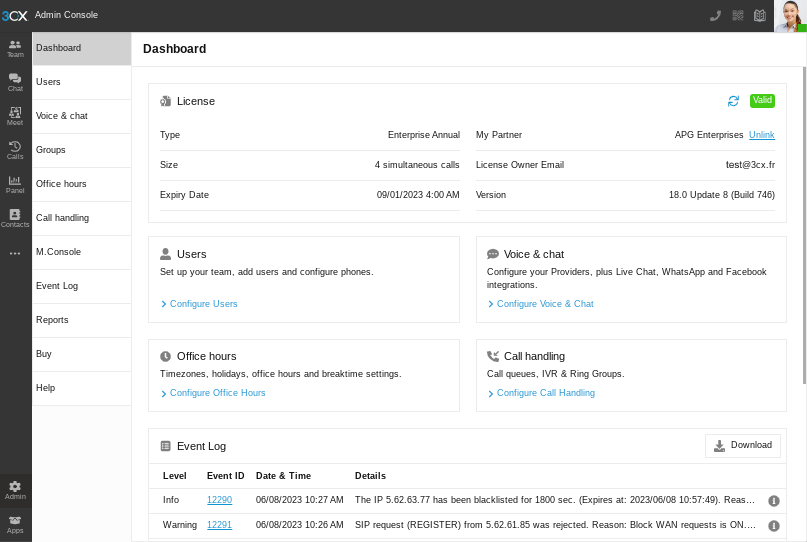
New Dashboard in Web Client Admin Console
The Web Client admin section is now called the Admin Console. We’ve added a Dashboard showing license key status. Also new - the license key info and owner is displayed with the ability to update license key owner details. The event log takes center stage and will become the main troubleshooting tool for admins going forward. To get access to the Admin Console, you need to be a system owner or system admin.
Pop-Up Warning Notifications!
In this release two warning pop-up banners are added to the product.
Product Not Registered Correctly
You’ll recall back in March 2023 we gave you a heads up on the pop-up notifications coming to the Web Client for all users of incorrectly registered 4 SC FREE Subscriptions. This has now been implemented. To register your account correctly follow these steps.
Assign an Extension User System Owner Rights
The other warning advises existing users that need to assign an extension System Administrator / Owner privileges. You can follow the steps to assign system owner rights here.
In Brief…
- 3CX Hosting now up to 256 SC! Limited support on 4 SC self hosted.
- H264 support for intercom in apps shows video both ways
- Live Chat improvements include Group outside of office hours or on break Live chat goes offline.
- Desktop App now supports TAPI which integrates with Datev and others.
- Plantronics Spokes SDK is back! A new MSI release resolved their certificate issue. If you have Plantronics already - it’s provided as is. Any support issues must be taken to the vendor.
- New SIP Trunk Providers to the growing list including but not limited to Gradwell, IP Based Mango, OVH and more. You can see the full updated list of Supported SIP Trunk Providers here.
How to Get V18 Update 8 Alpha
Only recommended for testing! This is an alpha version, not suitable for production systems. Current V18 Update 7 users running on Linux only can try out Update 8 Alpha. Go to updates: "Update 8 Alpha."
Stay Informed
Hit the follow button on Twitter and LinkedIn for blog updates. Join us in the 3CX Community Forum to tell us what you think about the latest features!