





With remote archiving, call transcriptions & multi-edit of users - U3 is gearing up for final release.
V20, Update 3 is one of the most anticipated updates yet and it's nearing its official release date. As showcased in the BETA and ALPHA releases, this update is set to alleviate admins from time-consuming tasks, as well as boost the system’s and team’s performance.
Add Call Processing Scripts from the Store
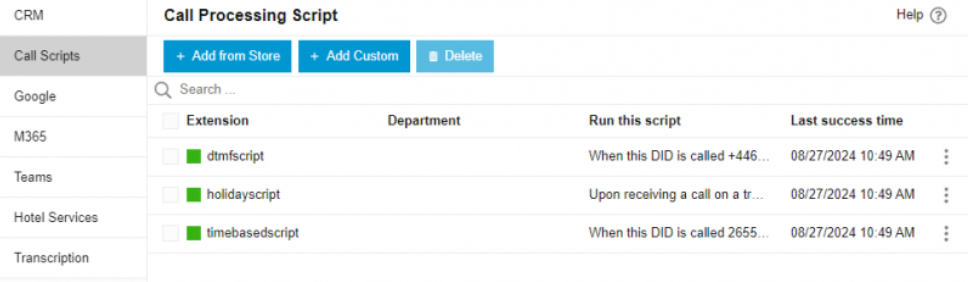
Introduced in the beta is the call processing script store. From here you can quickly add call processing scripts to your pre-scheduled holidays ie. Easter or Christmas. The scripts require no editing at all:
- From the Admin Console, go to “Integrations” > “Call Scripts”.
- Select “+ Add from Store”.
- Select the script you want to use.
- Select which trunk the script should be applied to. i.e. to which incoming calls the script should run.
- Click “Save”.
Remote Storage & Archiving, Call Transcriptions & More
U3 saves on configuration time and streamlines the system’s performance. The below illustrates how this is possible:
- Easier Remote Storage & Archiving. Recordings, chat and voicemails are now easily backed-up off-instance - remotely in Google, Sharepoint, FTP/FTPS/SFTP - and saved in one central remote drive. Read the guide.
- Call transcriptions have been added to CRM Integrations adding the call transcription along with its summary to the customer record.
- Multi-Editing of users and configurations. Copy call forwarding, BLF, voicemail, view and other user configurations from one extension to others.
- Two-Way syncing of 3CX & Teams Status. Users can set their status in 3CX and have it reflected in Teams and vice versa.
- Geolocation added to Emergency E911 calls. Geolocation is a location URL record, transmitted during an emergency call. This feature is available for US users and requires configuration and support from your provider. Read the guide.
- Choose between Away or Custom 2 statuses when using the DND button on your phone.
- Select which status profiles the automatic scheduler will be set to according to opening hours, break times and closed.
For a more detailed description of each feature read the ALPHA release notes.
Removed Restrictions for 3CX Hosted
The following restrictions have been removed:
- Allow Local MCU.
- Allow templates includes Phones, Dects/FXS Templates and Providers.
- Allow adding custom templates and select custom templates.
- In update 4 the CFD restriction will be removed.
Upgrade to V20, Update 3
The RC should be installed for evaluation purposes only. It is not recommended for production systems.
To upgrade: From the admin console click on the latest update: "New 20.0 Update 3 Release - RC".
For a fresh, on-premise installation:
- 3CX Windows Installer
- 3CX Windows Installation Guide
- Download the 3CX ISO
- 3CX Linux Installation Guide
Start a new cloud deployment here.
View the complete change log here.
Important: As of V20, Update 3 all new license keys will be issued for V20 ONLY.









 Copyright © 2026