





New features include multi-user editing, revamped backup/archiving, and improved Teams status sync.
The final release of Update 3 has arrived! It’s packed with new features all designed to enhance both system performance and team productivity in addition to major timesaving functions for both PBX admins and end-users. Read on to learn more.
Simple Remote Storage & Archiving

Recordings, voicemails, and chats can now be stored off-instance in remote drives (Google, SharePoint, FTP, SFTP). Centralized storage reduces local resource demands, improving efficiency. Read the setup guide here.
New Call Processing Script Store
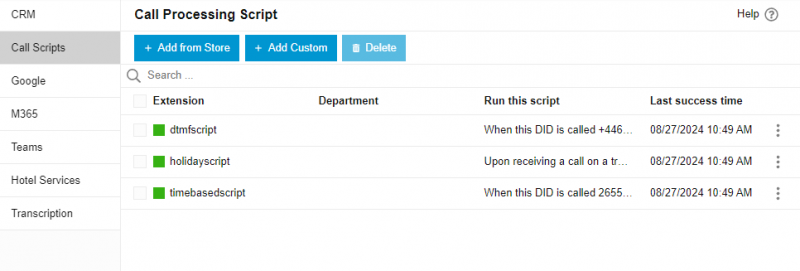
Managing call scripts is now even easier with the introduction of a Call Processing Script Store. Pre-built scripts such as Holiday Routing or Call Interception can be added instantly to your system, simplifying call handling during busy times or holidays. No need to write scripts from scratch - just choose, configure, and deploy.
Sample Scripts:
Two-Way Status Sync for Teams & 3CX
Two-way syncing between 3CX and Microsoft Teams ensures status consistency across platforms. Whether on 3CX or Teams, your status is updated in real time, reducing scheduling conflicts.
Call Transcriptions & CRM Integration
Automatically transcribe calls and add summaries directly to the CRM customer record. This feature works seamlessly with integrated CRMs, improving communication tracking.
Timesavers: Multi-User Editing, Auto-Scheduler & More
Update 3 delivers significant time savings and enhances system performance. Detailed information on each feature is provided below:
- Multi-User Editing: Streamline configuration by copying settings like call forwarding and voicemail across multiple extensions, eliminating repetitive tasks and saving time.
- Auto-Scheduler for Status Profiles: Set automatic status changes based on working hours, breaks, or business closures. Tailor these settings to match your organizational workflow.
- IP Phone DND Options: When using the DND button, choose between "Away" or "Custom 2" statuses, providing more flexibility in managing availability.
Other improvements include:
- Share reports to multiple emails.
- Users can now see their active connections and last activity.
- Hide abandoned queue calls/logs in recents for users, receptionist and department admins.
- Simplified outbound rules.
- Ability to enable/disable 3CX Talk.
- Export BLF configuration.
- Added Hourly Trigger for Scheduled Restore.
- In the IP Phone Firmware option you can now choose 3CX Support Tested Firmwares or Untested-Unsupported firmwares.
- Added Onboard MCU for Enterprise Editions.
Geolocation in Emergency E911 Calls (US Only)
Update 3 also brings Geolocation functionality to Emergency E911 calls (available for US customers only). This feature ensures that location data is automatically transmitted to emergency services during a call, potentially speeding up response times. Configuring this requires support from your provider. Read the guide.
Removal of Restrictions in 3CX Hosted
Several restrictions that were previously applied to hosted systems have been removed:
- Allow Local MCU.
- Allow templates includes Phones, Dects/FXS Templates and Providers.
- Allow adding custom templates and select custom templates.
- In Update 4 the CFD restriction will be removed.
Migration to an Archiving Model
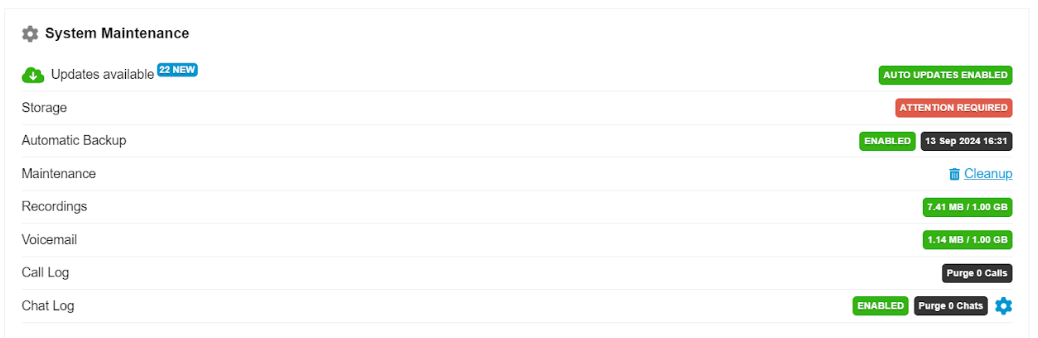
We're transitioning to a simplified archiving model with a single provider and repository. If remote storage for recordings is enabled, the migration will prioritize this. Admins will be notified if the migration fails to link the recording and backup locations. A prompt will appear in the dashboard with the message 'Attention Required', allowing easy reconfiguration.
What’s New in Update 3 Final
We've implemented several changes in Update 3 to enhance usability and streamline processes. Here's a breakdown of what you, as an administrator, need to know:
Interface & Functionality Updates
- Call Scripts Relocation: Call Processing Scripts have been renamed to Call Scripts and are now located under the Integrations section.
- Voicemail Routing: The setting for "Call transferred from voicemail will be routed to" has been moved to the Voicemail Page within System > Voicemail.
- Transcription Integration: Google Speech for Transcription can now be found in Integrations > Transcription.
- Redesigned Options Page: The Options page has been reorganized for clarity with three distinct tabs: General, Apps, and Scheduler.
- Voice & Chat Separation: Add Trunk and Add Gateway functionalities are now separated within the Voice & Chat section.
- SBC Department Support: SBCs can now be created with a specific Department Membership, allowing for more granular control.
- Licensing Changes: Summary & Sentiment features for OpenAI & Google now require an Enterprise License. This is now enforced.
Upgrade to V20, Update 3
Upgrading is simple! From the admin console, select the latest update: "New 20.0 Update 3 Release". For a new installation, use the following links:
For a new on-premise installation:
- 3CX Windows Installer
- 3CX Windows Installation Guide
- Download the 3CX ISO
- 3CX Linux Installation Guide
Start a new cloud deployment here.
View the complete change log here.
Important: As of V20, Update 3 all new license keys will be issued for V20 ONLY.









 Copyright © 2026