





Boss-Secretary support and updates to SDK for Jabra and Yealink.
Hot on the heels of the successful BETA 2 release, we’re rolling out Beta 3 of the 3CX Windows Softphone V5.4. Next stop - final! Read below for more information.
Boss-Secretary Support
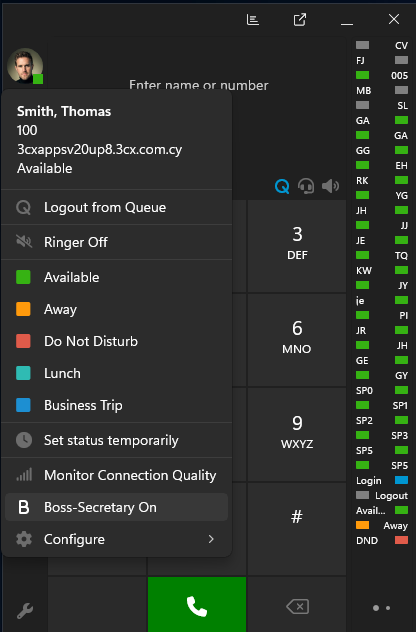
With the release of Version 20 Update 8 Beta, the Windows Softphone now includes support for the new Boss-Secretary feature.
Once a user is configured with the required permissions in the Admin Console, an option in the avatar menu appears. This lets you easily toggle the feature on or off, helping teams manage incoming calls in a more controlled and efficient way.
Note: Boss-Secretary support requires the upcoming Version 20 Update 8 Beta 2.
Updates to Jabra and Yealink SDK
We’ve updated the internal integration libraries for both Jabra and Yealink to the latest SDK versions provided by each vendor. These updates offer improved device support and include several under-the-hood fixes.
If you experience any issues with headset behavior after updating, please report them directly to Jabra or Yealink Support.
View the complete Changelog for a detailed breakdown of updates in this latest build.
Compatibility Notice
This Beta release is no longer compatible with 3CX Version 18. Systems running V18 will not connect with the new Windows Softphone. Please refer to our V18 End of Support announcement for full details.
How To Get 5.4 BETA 3
Go to the Microsoft Store to find and install 3CX BETA 3.
Note: Avoid running the production version alongside the BETA to prevent conflicts.
Windows Softphone Forum
Head over to the dedicated Windows Softphone Forum to let us know what you think.
Follow us on X and LinkedIn to stay up to date on latest news and feature releases.









 Copyright © 2026