





Improving routing and introducing shared voicemail.
Update 8 is all about AI! With the recent ALPHA release we formally launched our AI chapter complementing our existing AI capabilities, including the AI Receptionist. The BETA now builds on that foundation with AI Call Screening across all apps, new Boss-Secretary call handling and further AI Receptionist improvements. Along with this there’s department-based user sync and shared voicemail for queues and ring groups. Read on for an overview of what’s new and improved in this release!
AI Call Screening Across All Apps
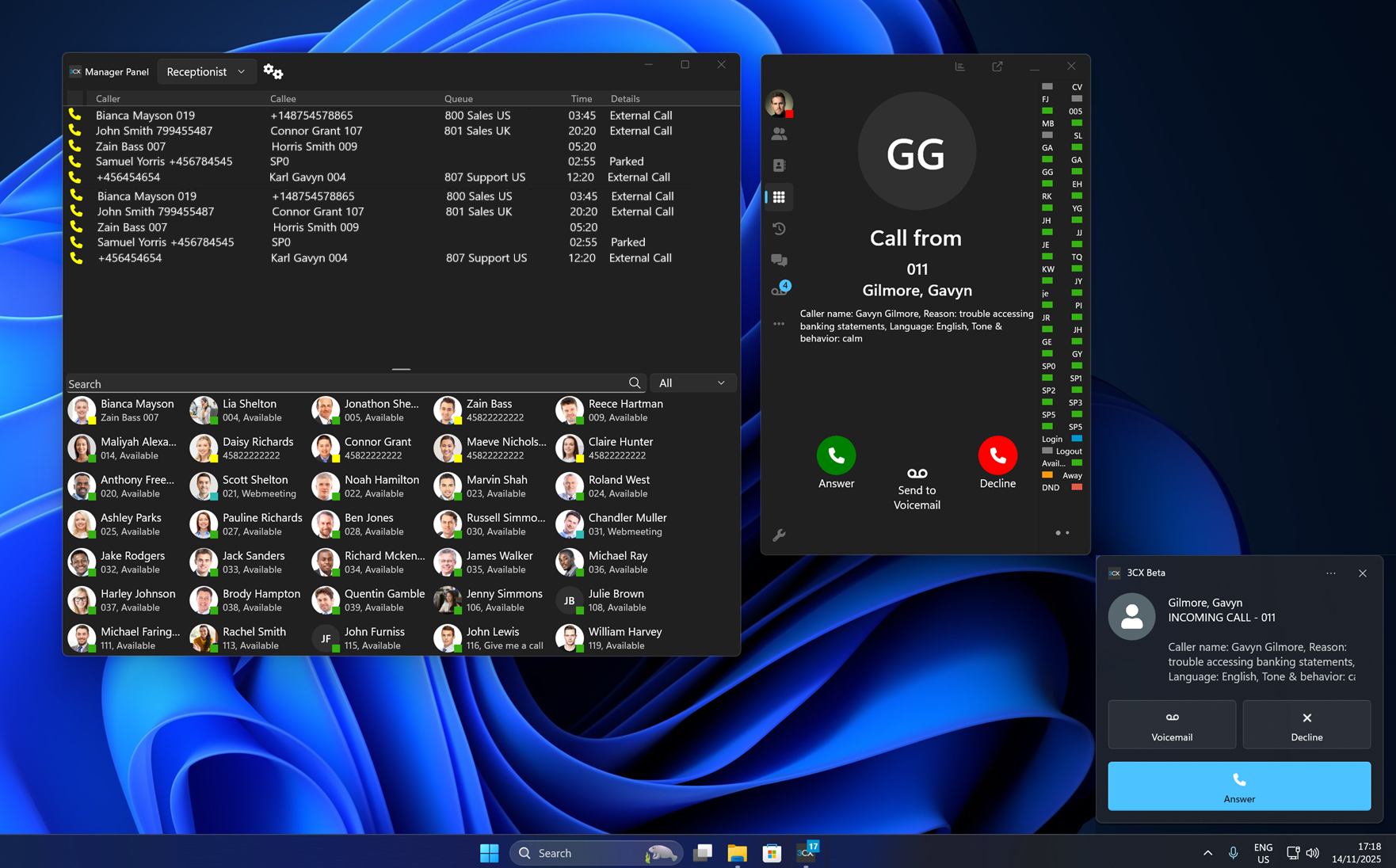
Starting with 3CX V20 Update 8, AI call screening is presented consistently across all 3CX apps - Windows, Android, iOS and the Web Client. This feature standardizes the experience across all platforms and follows the privacy and technical constraints of each operating system. This ensures a unified user experience while keeping each platform compliant with its system rules.
Introducing Boss-Secretary Call Handling
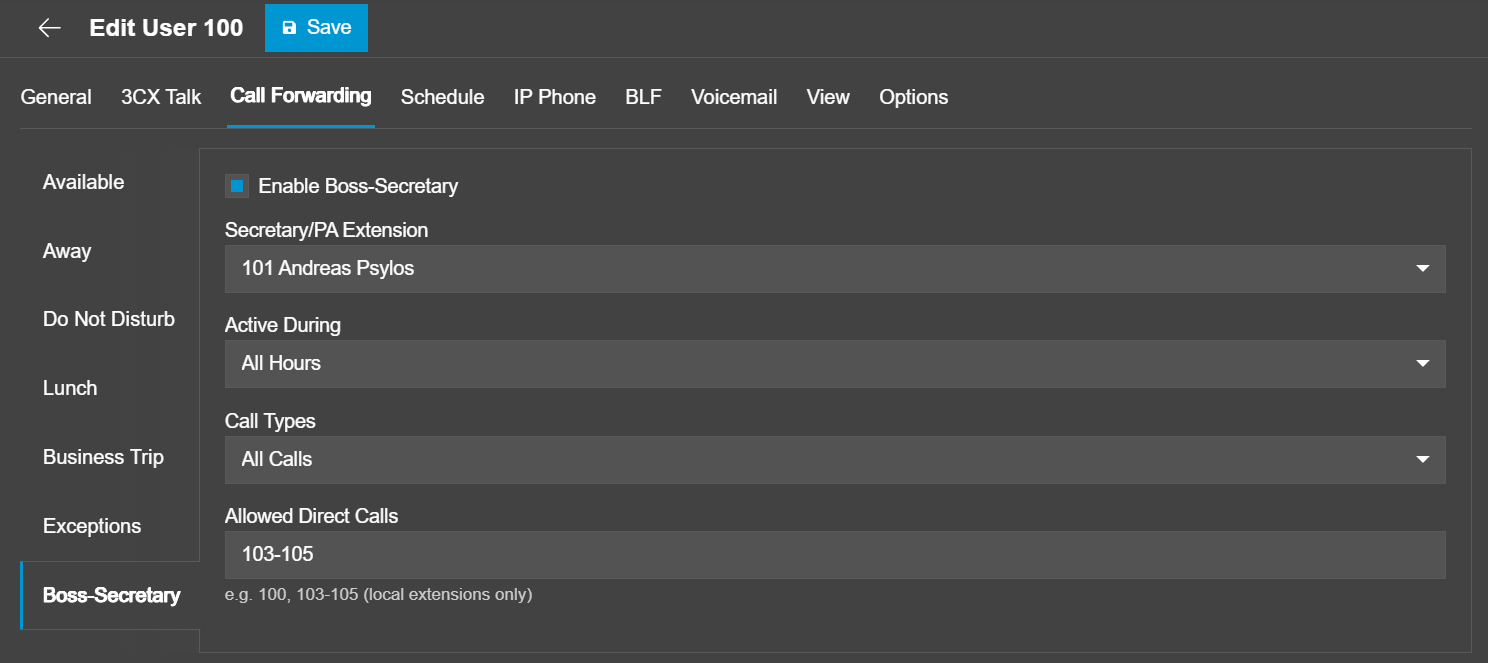
This Beta also introduces the new Boss–Secretary call-handling feature, designed for executives and PAs who need more controlled management of incoming calls. Any user with access to the Users section of the Admin Console can assign a dedicated secretary/PA extension - human or AI Agent, define when the feature should be active and specify which call types it applies to. This can be internal, external or all. Trusted internal extensions can also be added to the Allowed Direct Calls list, enabling them to bypass screening and reach the boss directly.
The Boss–Secretary rules take full priority over standard forwarding exceptions. Once enabled, this routing logic overrides all existing Call Forwarding exception rules, ensuring that delegation and call screening always behave exactly as intended.
Shared Voicemail for Queues and Ring Groups
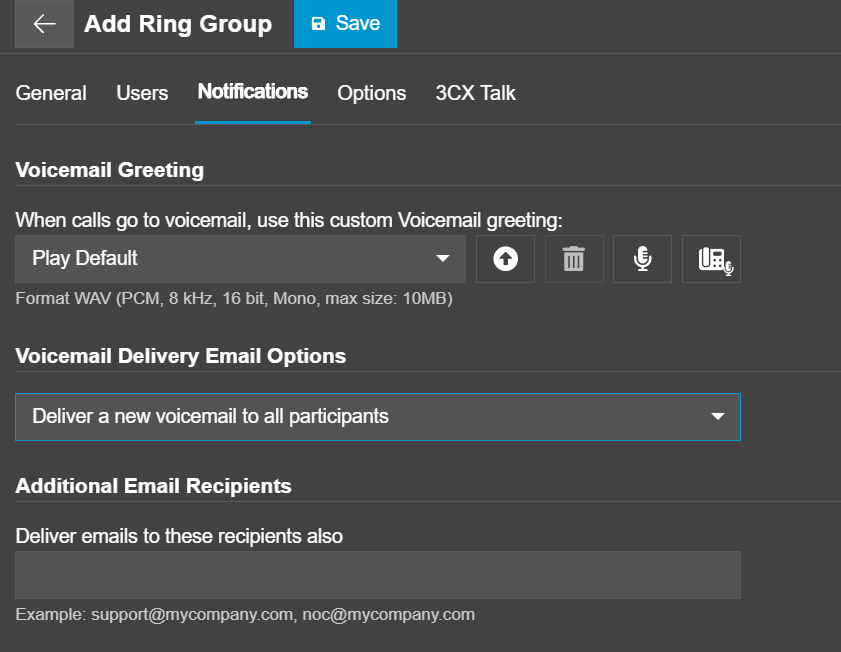
Shared voicemail for Queues and Ring Groups gets a major upgrade in this BETA. Until now voicemail followed a fixed attachment-and-delete flow which emailed the WAV file to all members and immediately removed it from the system. This meant users could not see a shared inbox, manage messages or check who listened to what.
The new Shared Voicemail Box modernizes this by introducing two delivery modes: keep-and-copy or attachment-and-delete. There’s also the option to deliver voicemails to a mailing list, or add any additional recipients you want to receive an email too. Voicemails now appear as standard shared messages.
Department-Based User Sync for Microsoft 365
Currently, the user synchronization process lists all users from M365, requiring manual selection. This makes management inefficient and error-prone.
The new Department-Based User Sync feature allows administrators to selectively synchronize users based on their existing M365 groups. This ensures that only relevant users are imported, automatically mapped into departments that mirror their group memberships. Any membership changes in Microsoft 365 are picked up in subsequent sync jobs which keeps everything aligned without manual cleanup.
AI Receptionist Improvements
The AI Receptionist has several improvements in this BETA making routing smarter and daily use more reliable. Routing destinations now save correctly and the DN import process supports more destination types - including Extensions, Ring Groups, Queues, Shared Parking, IVRs, Call Scripts and External Numbers.
Of note:
- Administrators can configure reply options for Agents as follows: single - one language only, or multi-language - allowing callers to switch languages.
- Caller ID checks are extended into all phonebooks: department and company - together with CRM lookups, Google Workspace and MS365 - to identify trusted callers when call screening is disabled for phonebook contact.
- AI Agents are now Department Aware, so the AI can route calls more accurately for requests like Billing or Finance when the AI Agent belongs to those departments. This is useful if you have multiple users with the same name but in different departments. For example, I want to speak with Sam in Finance!
New assistant tools include:
- Transfer to Voicemail - Enables AI to route the caller directly to voicemail when appropriate.
- Take Message (Chat Forwarding) - AI can take a message from the caller and automatically send it as a chat to the relevant recipient, ensuring follow-up even when agents are unavailable.
Phonebook API and Department Support Improvements
The phonebook system now fully supports Company, Department and Personal directories and is now supported in Multi Company Mode. Administrators get clearer control over contact sources, while users see only the directories relevant to them. Import and bulk-delete actions now respect roles, department membership and multi-company mode for cleaner and safer contact management.
Other Fixes
This BETA includes a range of other quality updates across the system.
- 3CX AI Transcription Improvements: Language detection and summaries have been improved and system alerts now notify administrators if the 3CX Transcription Engine goes down. Update procedures for the engine have also been refined.
- Twilio Automatic Creation Improvements: The handling of number requests through the Twilio API has been improved, allowing larger batches of numbers to be created more reliably.
- Hotel Billing Improvements: Hotel Billing now references CDR output and CDR billing data which provides more accurate call records and cost calculations.
- Telnyx VoIP provider: has been added back as Supported.
Get Started with Update 8 BETA
To try out these new features, upgrade to V20 Update 8 Beta.
- Log in to the Admin Console
- Navigate to System > Updates
- Select Update 8 BETA and click Download
⚠ Important: The Beta version should be installed for evaluation purposes only. It is not recommended for production systems.
Join the Discussion
Join the 3CX discussion in our dedicated Partner or Customer Forums. Follow us on X and LinkedIn to stay-up-to date on latest news and feature releases.









 Copyright © 2026