





Stability improvements for production release.
Following the feature additions introduced in earlier betas, Windows Softphone V5.4 final release focuses on stability fixes and refinements as the app is now available for production use. Read below for more information.
Recap of Features Introduced in Windows Softphone V5.4
Across the first three beta releases, Windows Softphone V5.4 introduced improvements to conferencing, call screening and call handling.
Conferencing & Department Phonebook
Beta 1 introduced Consultative and Direct Conference modes, allowing users to choose whether to immediately merge calls into a conference or speak privately with a second participant before merging.
The release also added a Department Phonebook, enabling contacts to be shared within departments or companies when using Multi Company Mode, with department-specific contacts clearly separated under the Company filter. Version 20 Update 8 or later is required for this feature.
AI Call Screening & Shared Voicemail
With Beta 2, AI-powered call screening was introduced to the Windows softphone. AI Call Screening provides summaries of incoming calls, helping users decide how to handle calls before answering. The same release also introduced shared voicemail support for Queues and Ring Groups, ensuring voicemail activity is visible to all relevant agents and preventing duplicate follow-ups.
Boss-Secretary Support
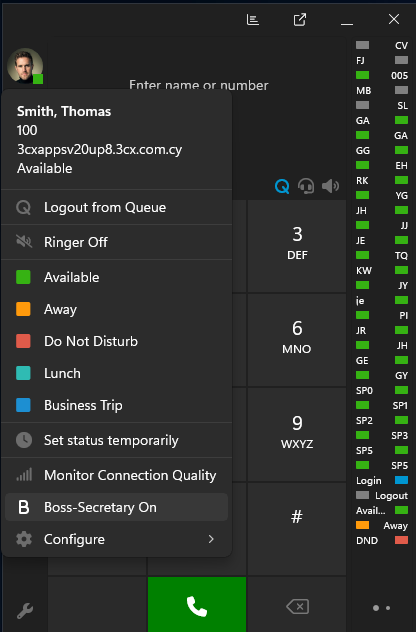
Beta 3 introduced support for the Boss-Secretary feature. Users configured with this role can turn this on or off directly from the app by clicking on their avatar, simplifying the management of incoming calls.
This beta release also included updates to the Jabra and Yealink SDK integrations, improving headset compatibility and addressing underlying issues.
Fixes in Final Release
This release doesn’t introduce new features. Instead, it focuses on fixes and refinements, including:
- The Boss-Secretary option has been moved to the hamburger menu
- When MCM mode is enabled, the Department checkbox is now visible when adding a contact
- Fixed issues related to headset integration
- Updated the dialog shown when connecting to a V18 PBX, which is now discontinued
View the complete Changelog for a detailed breakdown of updates in this latest build.
How To Get 5.4
Search for 3CX in the Microsoft Store to download the final version.
Windows Softphone Forum
Head over to the dedicated Windows Softphone Forum to let us know what you think.
Follow us on X and LinkedIn to stay up to date on latest news and feature releases.









 Copyright © 2026