


This guide is outdated please refer to the latest guide.
Ten tips for a more secure IP PBX System
If you are in charge of a VoIP system or planning to deploy one, then VoIP security is probably one of your main considerations. In this article we present ten simple tips that could help make an IP PBX System more resilient to network attacks.
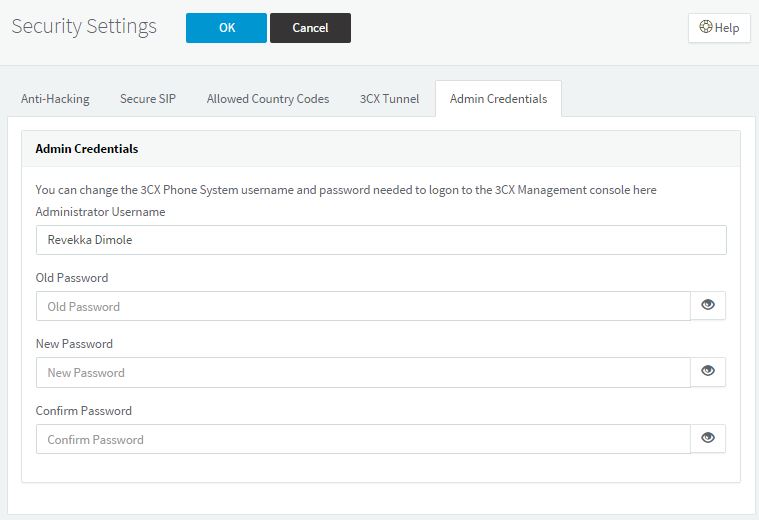
- Protect the administrative interface by using a strong password - Most modern IP PBX servers can be configured through a web interface. Whilst practical, it is very important to choose a strong password. Some IP PBX systems might come with a default password. Leaving such default passwords in operation would be asking for trouble. Therefore it is of critical importance to ensure VoIP security, by setting a strong password during installation. If your PBX server is hosted on non-proprietary hardware, chances are that it is running a Windows or Linux OS. Such systems typically have a remote administrative interface such as RDP or SSH so that system administrators can perform maintenance tasks. Attackers are known to actively and blindly target these services by launching brute-force attacks on common usernames on the system. It is therefore highly important that you choose strong passwords for this highly privileged user accounts.
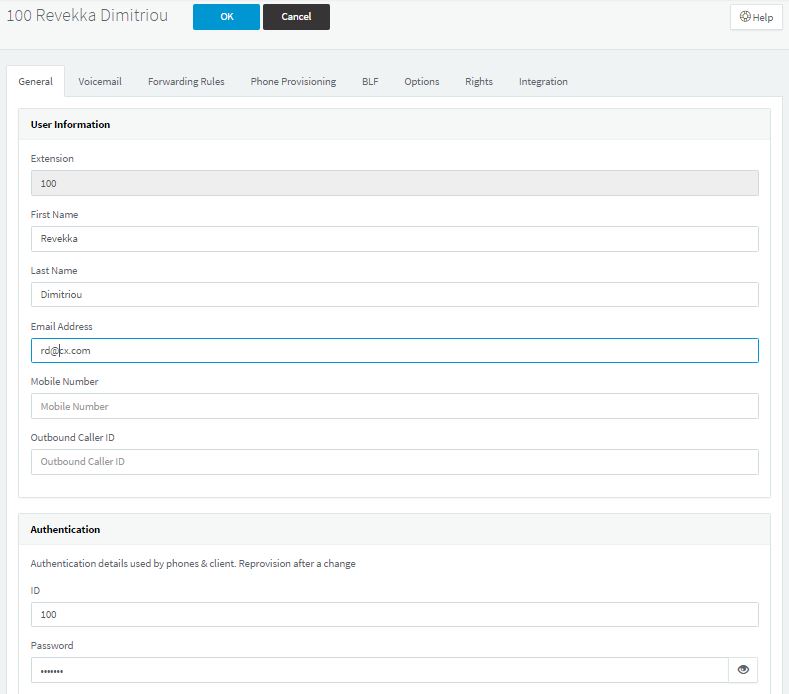
- Choose strong and unique passwords for the IP phones - Another location where passwords are used in an IP PBX Phone System is on the IP Phones. Even though some PBX servers will allow you to have no password or a blank one, avoid this. Give each phone extension present on the IP PBX a unique and strong password. A common and classic mistake that jeopardizes VoIP security on PBX systems is to use the same password as the extension name. For example extension 100 would have "100" as a password and so on. Attackers have long known about this behavior and this will be one of the first targets that they will try to exploit. Therefore, it is imperative that you avoid the use of known or predictable patterns for these passwords.
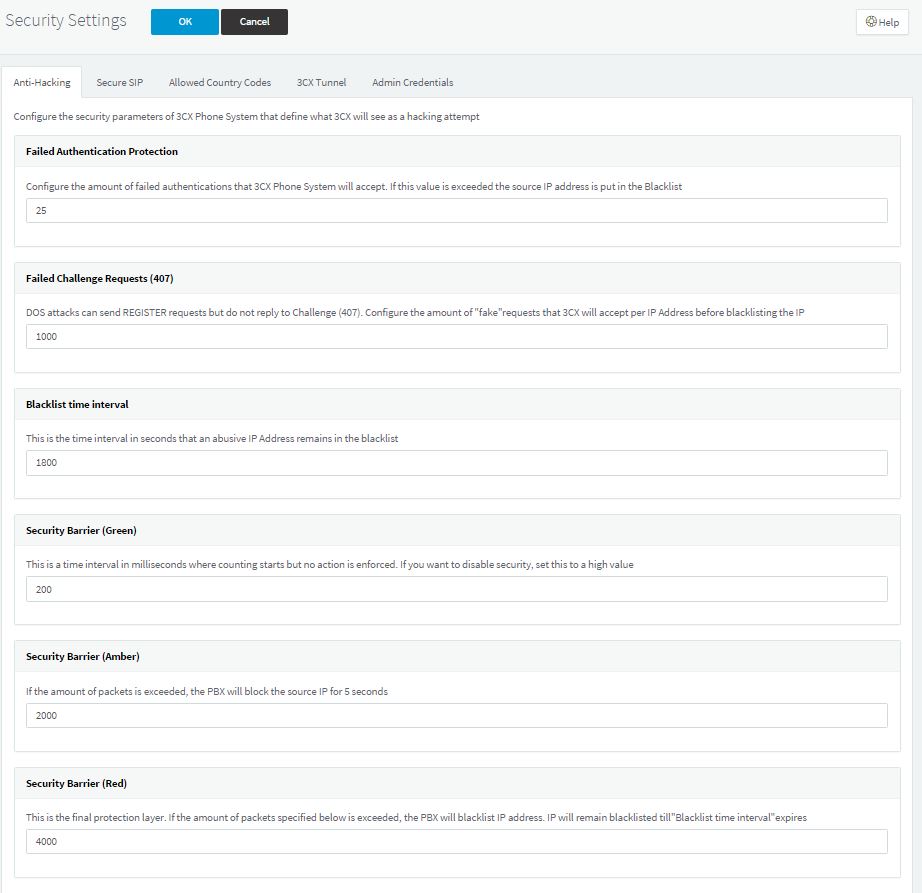
- Start by implementing VoIP security during design stage - You are more likely to get security right if it is considered a priority from the start. A healthy amount of planning will allow you to avoid security nightmares later on. VoIP security is all about reducing the risk to an acceptable level . The best way to do this is by making security a priority from the start. 3CX Phone System also provides additional built-in VoIP Anti Hacking Security settings to help you in this task, such as the use of Secure SIP, multiple configurable Anti hacking settings and IP Blacklisting, making the IP PBX System more resilient to network attacks..
- Segregate where possible - Security people tend to be big fans of the KISS principle - keep it simple stupid. Segregation can often help simplify complex networks. As an additional benefit segregated networks usually have reduced congestion resulting in higher performance, security is improved and any failures remain localized and do not affect other parts of the network. However it is important to note that when it comes to network design, there is no single formula that solves all VoIP security issues. Different requirements usually create different limitations, and therefore require different solutions. For example, a hotel will have different security requirements for its IP PBX system than a corporate system. In the case of a hotel phone system, the IP PBX might never need to access the rest of the system and therefore can be physically separate from the hotel internal network. On the other hand, a business IP PBX system might need to allow the help-desk department to make use of software phones and therefore would need to be placed in a part of the internal network.
- Reduce exposure to non-trusted networks - Most of the times there is no need to put the VoIP phones on the internet. Therefore the VoIP phones should be placed behind a firewall with restrictive access control rules. This can prevent VoIP spam (also known as SPIT) as well as other internet-based attacks which directly target VoIP Phones. Similarly, if the PBX itself does not need internet access then placing it on a protected network can greatly decrease the exposure and therefore the risk of attacks. When the IP PBX needs to have services exposed on the internet, it is a good practice to allow internet access only to the required services.
- Make use of an IDS - In VoIP security, implementing preventive measures is only getting half the job done. The job of the host intrusion detection system is to help system administrators and security analysts to identify possible attacks before it is too late. A host-based intrusion detection system or HIDS, can be useful in identifying attacks on a targeted system by analyzing log files, event logs and file system modifications. A network intrusion detection system or NIDS attempts to identify attacks by monitoring the network instead. One example of NIDS is the freely available Snort, which can be configured to monitor the network for VoIP based attacks and alert the system administrator when such incidents occur.

- Monitor network usage - Another way of detecting network based attacks on an IP PBX system is to monitor network usage. Netflow is Cisco's way to doing this by providing information about network users and applications and peak usage times. MRTG is an open source tool which also allows network operators to monitor the network usage, providing graphs to visually identify unusual network activity. Following such incidents, the operators responsible for detecting network based attacks should investigate to determine whether the traffic is legitimate or not. Certain attacks targeting the VoIP PBX System, such as a password brute-force attacks, are known to create a large amount of network traffic and these can be detected by making use of the described methods.

- Harden the OS - One way to harden any operating system of your IP PBX phone system is to stop any unnecessary services and identify any security vulnerabilities. Most systems run services that are not necessary for the function they perform and any service that is not crucial to the IP PBX functionality should be disabled. Some of these services might be IIS on Windows or Sendmail on Linux. Apart from disabling unnecessary services, there are various operating system specific settings that one can tweak to make the base OS more secure and various tools that can be used to identify vulnerabilities and security risks. For example, on Windows it is recommended to disable LM and NTLM v1 unless there is a need for backwards compatibility.

- Keep the operating system up to date - Modern operating systems are patched periodically for security flaws. Enable automated security updates and make sure to keep your system up to date.

- Keep your Phone Firmware up to date - Hardware SIP Phones also get security updates from time to time in the form of firmware updates. Some firmware security flaws have been known to allow attackers to turn the SIP phone into a listening device. Make sure that you keep your phones updated to the latest firmware version to minimize the chance of these security intrusions happening to you, by using the firmware upgrade feature of 3CX Phone System.


Conclusion
As VoIP Telephony is steadily gaining market share and the benefits are being appreciated and adopted rapidly by companies around the world, taking the implications of VoIP security into consideration is a must.VoIP security can easily be implemented in an IP PBX, securing that VoIP phone systems can be protected from compromising network attacks.


