





Last stability improvements for production release.
Following the feature additions introduced in earlier betas, Android App V5.4 is now available for production use. Read on to learn more!
Recap of Features Introduced in Android App V5.4
Over the course of the first three beta releases, Android App V5.4 introduced several key enhancements to conferencing, call handling and Android Auto support.
Conferencing Modes, Department Phonebook & Android 16 Support
New Consultative and Direct Conference modes, giving users control over how participants are added to conference calls, along with support for Android 16 was introduced in Beta 1.
The release also added a Department Phonebook, allowing contacts to be shared within departments or across companies when using Multi Company Mode. Version 20 Update 8 or later is required for this feature.
Android Auto Support & AI Call Screening
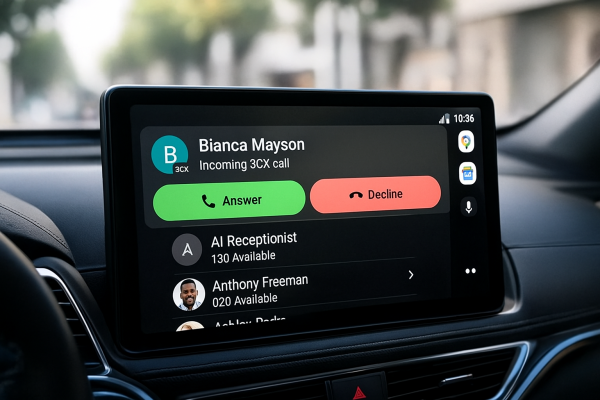
With Beta 2, the Android app expanded support for users working on the move. The release introduced Android Auto support, allowing calls to be placed and managed directly from a vehicle’s display.
It also added AI Call Screening, providing summaries of incoming calls, as well as shared voicemail access for Ring Groups and Queues, improving visibility for teams.
Boss-Secretary Support & Android Auto Enhancements
Beta 3 focused on improving call control and refining the Android Auto experience.
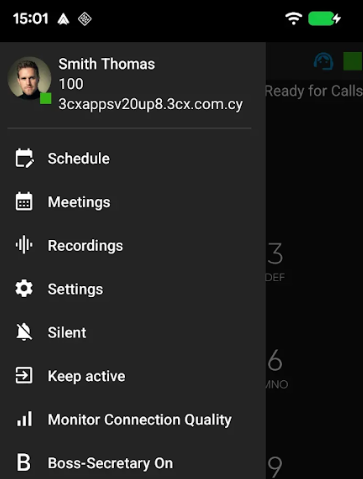
Support for the Boss-Secretary feature was also introduced in this release. When a user is configured with the required settings in the Admin Console, an option in the hamburger menu appears. Tapping this lets you turn the feature on or off, giving you more controlled management of incoming calls.
Additional improvements were also made to Android Auto to enhance stability and usability.
Fixes in Final Release
- Boss-Secretary option has been moved to the hamburger menu
- When MCM mode is enabled, the Department checkbox is now visible when adding a contact
- Fixed an issue where the app could crash in the transfer dialog on overloaded devices
- The call button in chat participants now remains responsive even when “Receive information” for presence is disabled
View the Changelog for a detailed breakdown of updates in this latest build.
Get the Update
Download the latest release from the Google Play Store.
For instructions on how to install and provision the 3CX Android app, see our configuration guide.
Android Forum
Head over to the dedicated Android Forum to let us know what you think.
Follow us on X and LinkedIn to stay-up-to date on latest news and feature releases.









 Copyright © 2026