





Sign in with Google or MS365, choose your outbound number and set how BLF transfers work.
3CX Softphone V5.8 is now ready for production. Following the Beta release, V5.8 brings easier Google and Microsoft 365 sign-in, outbound number selection and a clearer settings layout.
The production release also adds a new option to choose the default transfer method when using BLF keys. Please note all new features described below require you to have V20 Update 10. Read on for a recap of what’s new.
Set a Default BLF Transfer Method
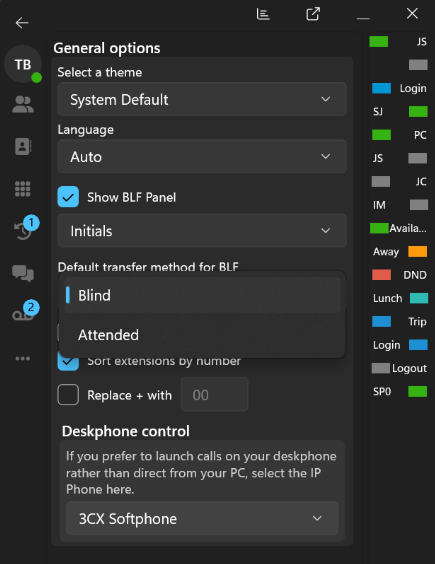
New in the production release is the option to choose how a call is transferred when clicking a BLF key.
Under Settings > General options, users can set Default transfer method for BLF to:
- Blind
- Attended
Once selected, clicking a BLF during an active call uses that transfer method automatically. If the user manually selects Blind or Attended from the keypad first, that choice takes priority for the current transfer.
Sign In Faster and Choose Your Outbound Number
Sign In with Google or Microsoft 365

Provisioning the Softphone is now easier for users with Google or Microsoft 365 accounts. After entering the 3CX server address, users can choose to sign in with Google, Microsoft 365 or email. Google and Microsoft 365 authentication opens in the browser and, once authorised, the account information is returned to the Softphone for provisioning.
Select the Number Used for Outbound Calls
Users with multiple numbers assigned can now choose which one to use before placing an outbound call. When enabled by the Admin, a Call using selector lets the user choose either the default route or one of the available numbers assigned to them. The default route continues to follow the configured outbound rules.
Admins can enable the option under Admin > System > Options > Apps > Permissions & Restrictions by turning on Allow Users to Select Outbound Route & Caller ID. The option is disabled by default.
How to Get 3CX Softphone V5.8
Search for 3CX in the Microsoft Store to download this version. If you have any BETA installed, uninstall it before using the production version.
View the complete changelog for the full list of changes.
Join the Discussion
Let us know what you think in the 3CX Partner Forum or Customer Forum.
Follow 3CX on X and LinkedIn to stay up to date on the latest news and feature releases.









 Copyright © 2026