





A Beta update of 3CX Android App is available for download. Get it now for added image compression support when sending large photos. Read on to prepare for any unsupported Android devices. Automatic image compression Effective with 3CX V18 Update 1, the updated Android App (Beta) also adds support for image compression. Large images sent to MMS, SMS and Facebook are auto [...]

Our latest 3CX App for iOS (Beta) now provides options to handle external numbers appearing in chat messages. It also includes image compression support, making the iOS App even better integrated with SMS, MMS and Facebook messaging providers. Managing phone numbers in chats You can now easily manage phone numbers that are sent in chat messages. These will appear as hyperlinks, [...]

Following the release of our new Deployment Wizard (formerly PBX Express), here are a few updates to our marketplace offerings. 3CX welcomes DigitalOcean The 3CX Deployment Wizard now includes DigitalOcean, in its list of supported cloud-hosted providers. Easily host and manage 3CX in your own DigitalOcean account and manage all your servers from one place. Known for its service reliability and security, 3CX [...]

Our new Google Chrome and Microsoft Edge browser extensions allow Click2Call from any website or CRM system. Available for 3CX users running version 18. Click2Call from your browser or CRM With the 3CX extension, telephone numbers on any webpage or CRM system will be ‘hyperlinked’ allowing a simple click to initiate the call instead of copying and pasting. When setting up the e [...]

With Update 1, 3CX V18 is now ready to be installed on Windows operating systems. Companies running 3CX on Windows can benefit from improved audio quality, reliability and upgraded performance. Update 1 also comes with improvements to MS Teams integration and support for Yealink Headsets. Professional headsets at half the price Use Yealink headsets to attend to your calls. Avai [...]

Following the release of the new Customer Portal, the 3CX Cloud Team brings you a brand new Deployment Wizard! Previously known as the PBXexpress, the system has undergone a complete overhaul, was updated to the latest APIs and includes many new features. Restore in Self-Hosted You can now upload backups up to 1GB, for hosted and self-hosted deployments. Backups are uploaded on [...]

Following this week’s release of Version 18 Update 1 Beta 2, there is a new release of the Windows desktop app. We’ve added customizable hotkey shortcuts to the app to make it even easier and quicker for users. Hotkeys Simplify Call Management Users that work in parallel on a number of business applications need an easy way to interact with the desktop app. Hotkeys enable users [...]

A hotfix is now available for customers who have been affected by an expired root cross-signing certificate by Let’s Encrypt - one of the most popular SSL/TLS certificate issuers globally. Who is affected and how 3CX configured the chain of certificates by following the popular project certbot, which is commonly used on web servers to obtain and configure Let’s Encrypt certific [...]

The first of many REST APIs to come to your 3CX System is now available in V18 Update 1 Beta 2. You can create, manage or delete meetings from 3rd party applications such as ClickUp and MS Teams, allowing you to integrate 3CX Video Conferencing better into your day to day workflow. Try it out and tell us all about your awesome integration. Use it to: Create meetings - Build mee [...]
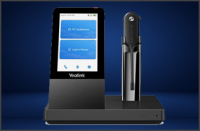
Update 1 Beta 2 has been released, adding support for Yealink headsets as well as optimizing the way images are sent. This Beta has been thoroughly tested on Windows operating systems, ensuring bugs and issues are ironed out, prior to the final stable release on Windows, due shortly. Yealink Headset Integration The Web Client now includes integrated support for Yealink headsets [...]

 Copyright © 2026